C4 DRIVER DOCUMENTATION
Advisor Advanced
Integration Manual
Advisor Advanced | FWK4
PRODUCTION EDITION | REVISION 1.0
Field |
Document details |
|---|---|
Document ID / revision |
C4-IM-ADVISOR-ADVANCED / 1.0 |
Applies to |
Advisor Advanced | FWK4 | Supported firmware: MR_4.7 - MR_4.13 |
Document status |
Production edition |
Document owner / author |
Gamanet / Peter Kováč |
Technical / QA approval |
Not recorded in this manual |
Edition date / language |
2026-10-10 / English |
Configure. Operate. Validate.
This manual applies only to the combinations and capabilities identified in its compatibility and supported-functionality sections.
Document Information
Purpose and scope
This manual describes the integration of Advisor Advanced with C4 through the Advisor Advanced driver using FWK4. It covers supported functionality, communication, configuration, credentials, profiles, operating behavior, restrictions and integration tests.
The manual is intended for system integrators, commissioning engineers, C4 administrators, technical support and integration testers. Device installation, electrical work and manufacturer-specific safety procedures remain governed by the applicable manufacturer documentation and site procedures.
Document control
Field |
Document details |
|---|---|
Integration identity |
Advisor Advanced / ATS Advanced; ATSx500A(IP) main panel and associated DGP, RAS and CDC4 devices |
Document revision / date |
1.0 / 2026-10-10 |
Original technical author / date |
Peter Kováč / 2026-09-18 |
Framework |
FWK4 |
Supported firmware statement |
MR_4.7 - MR_4.13. Earlier MR versions are retained only in explicitly version-specific operating notes. |
Validation record |
This manual defines test procedures and expected results. It does not record an executed test run or certify an installation. |
Revision history
Revision / date |
Changes and impact |
Approval / evidence |
|---|---|---|
1.0 / 2026-10-10 |
Reorganized the Advisor Advanced Integration Manual dated 2026-09-18 into the Integration Manual.Red.v02 structure. Technical tables, diagrams, operating notes and all 35 integration tests are retained. |
Editorial production edition; technical test results and release authorization are separate records. |
Terminology and conventions
C4 labels, device types, property names, commands, statuses and event identifiers are written exactly as shown in the applicable software. A device is the integrated equipment or external system; a driver is the C4 software component that implements the integration. An endpoint or circuit is identified using the terminology of the applicable C4 release.
Integration Overview and Supported Functionality
Device Category
Category |
Selection / scope |
|---|---|
ACS |
Yes - access control |
IAS |
Yes - intrusion alarm |
FPS |
No |
CCTV |
No |
DVR |
No |
Perimetry |
No |
Building |
No |
Other |
No |
Integration boundary and operating modes
C4 connects to the Advisor Advanced panel over Ethernet. Associated expanders, keypads and readers are represented in the C4 device tree. A CDC4 in extended mode communicates both through the internal ATS bus and directly over the LAN; it keeps a separate database of users and door groups.
For the two connection topologies and their original diagrams, see How to Connect Device to C4. For CDC4 in standard mode, use the Expander device type.
Supported Functionality
S = marked as supported. N = not marked as supported in the integration scope. The detailed chapters qualify the supported functions; a support indication is not an executed test result.
ID |
Functionality |
State |
Documentation / integration tests |
|---|---|---|---|
F01 |
Import From File |
N |
Not supported in the documented scope. |
F02 |
Combined Credentials |
S |
Supported Identifiers; T-ID-01A/B; T-UPL-01 |
F03 |
Lift |
S |
Remote Device Control; Status Information Display |
F04 |
Encrypted Communication |
S |
How to Connect Device to C4; Device Configuration; T-SEC-01 |
F05 |
Load Configuration |
S |
Configuration Transfer and Device Discovery; T-CFG-03 |
F06 |
Time Synchronization |
S |
Time Management; T-TIM-01A/B |
F07 |
Time Zone Support |
S |
Supported; see the required Time zone setting in Time Management. |
F08 |
Live Video Streaming |
N |
Not supported in the documented scope. |
F09 |
Recorded Video Streaming |
N |
Not supported in the documented scope. |
F10 |
Video Records Downloading |
N |
Not supported in the documented scope. |
F11 |
Voice Transmitting |
N |
Not supported in the documented scope. |
F12 |
Audio Streaming |
N |
Not supported in the documented scope. |
F13 |
PTZ |
N |
Not supported in the documented scope. |
F14 |
Presets |
N |
Not supported in the documented scope. |
F15 |
Motion Detection |
N |
Not supported in the documented scope. |
F16 |
Live Stream Snapshot |
N |
Not supported in the documented scope. |
F17 |
Record Stream Snapshot |
N |
Not supported in the documented scope. |
F18 |
Multiple Stream Types |
N |
Not supported in the documented scope. |
F19 |
Person Data Read |
N |
Not supported in the documented scope. |
F20 |
Fire Panel Networking Mode |
N |
Not supported in the documented scope. |
F21 |
Card Learning |
N |
Not supported in the documented scope. |
F22 |
Dynamic Upload |
S |
Credentials Synchronization; T-UPL-01 covers the documented upload scenarios. |
F23 |
Access Time Restrictions |
S |
Credentials Synchronization; T-ACL-01 |
F24 |
Holidays Support |
S |
Credentials Synchronization; T-ACL-02 |
F25 |
PIN Management |
S |
Supported Identifiers; T-ID-01A |
F26 |
Card Management |
S |
Supported Identifiers; T-ID-01B |
F27 |
Fingerprint Management |
N |
Not supported in the documented scope. |
F28 |
Reserved Memory Zones |
S |
Credentials Synchronization; ATS Alarm Panel configuration |
F29 |
Antipas back Forgiveness |
N |
Not supported in the documented scope. |
F30 |
Handicapped Flag |
N |
Not supported in the documented scope. |
F31 |
Alarm Suppression |
N |
Not supported in the documented scope. |
F32 |
Fire Alarm Counter |
N |
Not supported in the documented scope. |
F33 |
Device Audit Log Retrieval |
S |
Events and Audit Log; T-EVT-02 |
F34 |
Remote Device Control |
S |
Remote Device Control; T-ACS, T-ALM and T-IO cases |
F35 |
Wiegand Biometric Support |
N |
Not supported in the documented scope. |
F36 |
Discovery |
N |
Not supported in the documented scope. |
F37 |
Sending Configuration |
N |
Not supported in the documented scope. |
Lift functions and the CDC4 Use Timing For Disabled profile are listed in their respective sections. They do not change the separate, unselected Handicapped Flag entry above.
Compatibility, Dependencies and Licensed Devices
Compatibility and dependencies
Supported firmware versions: MR_4.7 … MR_4.13
Component / mode |
Documented applicability |
|---|---|
Integration framework |
FWK4 |
Main control panel |
ATSx500A(IP) Advisor Advanced; ATS3500AIP is shown as an example. |
Associated equipment |
DGP expanders, ATS125x access controllers, ATS1260 Lifts controllers, RAS keypads/readers and CDC4 controllers. |
CDC4 standard mode |
Represented by the Expander device type; communication is through the ATS bus. |
CDC4 extended mode |
Represented by CDC4 Door Controller; internal ATS bus plus direct LAN communication. |
Firmware-specific notes |
X500 MR1, MR2, MR3, MR4 and MR4.1-and-later behavior is identified explicitly in Restrictions and Important Notes. |
C4 / driver release qualification |
Record the exact C4 release, driver build, panel model and firmware in the test-run record before acceptance testing. |
Licensed Device
Alarm Panel
Licensed element / unit |
Counting rule |
Verification |
|---|---|---|
Alarm Panel |
At driver startup, C4 counts device instances marked with the Licensed attribute and requests that number from the installed license. |
T-LIC-01: one licensed device node consumes one driver license. |
The supported firmware statement above is not extended by the historical version-specific notes elsewhere in this manual.
Restrictions and Important Notes
Capacity and functional restrictions
The maximum number of credentials per user is one PIN code and one Card. If a person in C4 has multiple credentials assigned, multiple user entries are created in the device so that all credentials can be added.
Important notes
PIN code is mandatory for every user on X500 panels with MR1 and MR2 firmware
While communicating with the panel from C4, Installer account is locked out (Installer cannot login to keypad or to ATS8500 Standalone Downloader). This is valid also vice versa.
Advisor Advanced X500 (MR1, MR2, MR3, MR4) : All areas, DGPs an DGPs ATS 125x Access Controller couldn’t have any of alarms (e.g. Alarm, Fire alarm or Tamper) during credentials upload. Otherwise, upload will fail.
Advisor Advanced X500 (MR4.1 and higher) : Panel accepts credentials upload in states like: unset, alarm, exit time, set, set alarm, entry time, entry alarm, tamper zone, tamper RAS, tamper DGP, partset1, partset2.
During user upload, users can be denied their rightful access.
Maximum / minimum number of allowed users and user groups may be set in Alarm Panel’s general setting tab. It’s extremely important to remember about not exceeding the available number, keeping in mind that 2 first users are already saved for Installer and Supervisor (done automatically).
The maximum acceptable user number on the old panels (MR1, MR2) varies (50, 200, 1000) and depends on panel model and protocol version. The current panels (MR4) support 2000 users itself, which increase to the max (65532) only when a door controller is added. Without door controller these additional users will not be usable.
Operational warnings
Full Upload clears managed device memory positions before uploading credentials. Coordinate access, protection and monitoring impacts before uploads, resets or integration tests. Use an authorized test installation or controlled work window.
Security and safety boundaries
The retained factory-reset procedure specifies Non EN50131 mode, Duress mode and Forced Set. Confirm these settings against approved site requirements before changing an operational installation. Encryption settings are listed under Device Configuration.
How to Connect Device to C4
Topology and communication flows
The ATS Advanced system is connected through an Ethernet interface.
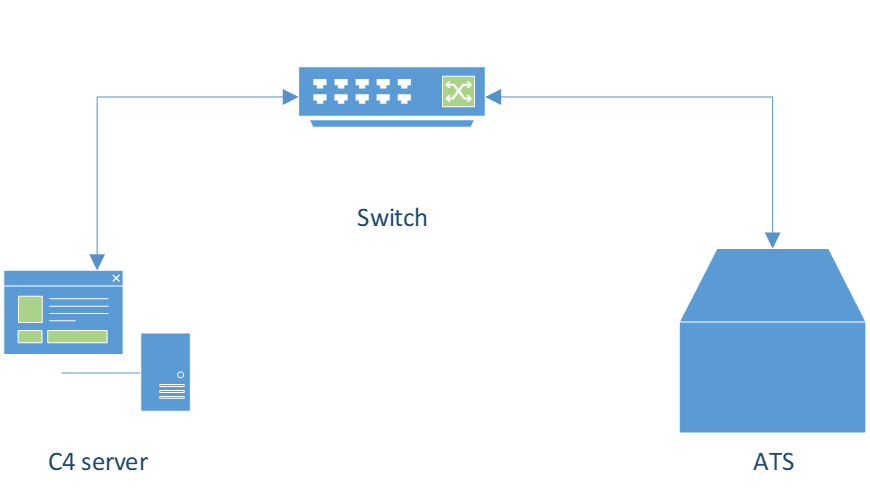
Figure 1. Ethernet connection between the C4 server and the ATS Advisor Advanced panel.
ATS in the diagram means ATSx500A(IP) Advisor Advanced device - Main Control Panel (e.g. ATS3500AIP) and some other DGP expanders (DGP – Data Gathering Panel, e.g. four door expander ATS1250), Keypads (RAS-es) and Readers.
To connect C4 to Advisor Advanced device, configure network connection between your machine and the panel:
Put the machine and the panel in the same network,
Configure static IP for the panel,
Make sure the machine and the panel are in the same subnet (subnet mask)
Connection and initial commissioning procedure
After the physical network is configured, in C4, under device manager, add Advisor Advanced Bus Controller device, under which ATS Alarm Panel. Fields that must be configured:
Bus Controller:
IP Address,
Destination port (default 32000),
Timeout (default 30 seconds)
Type Encryption Key in Encryption Key field
Type Encryption Key 2 in Encryption Key 2 field
ATS Alarm Panel options:
Password (Installer’s PIN code).
Connection and communication with CDC4 door controllers in extended mode
The CDC4 is an eight-door controller (In Standard mode only the four-door) and can operate in extended mode, which means that it is connected directly to the LAN in addition to the internal ATS bus. In the C4, the “CDC4 Door Controller” device is used for this type of connection. Each door slot can be configured as a Lift (Door type: CDC4 Lift).
The CDC4 door controllers in extended mode communicates with the C4 system via the Advanced panel (via the internal ATS bus) and also directly via the LAN. Access events are sent directly via IP to C4, while intrusion alarms are sent to the Advisor Advanced panel. The CDC4 retains its own database of users, door groups etc. separate from the Advisor Advanced panel.
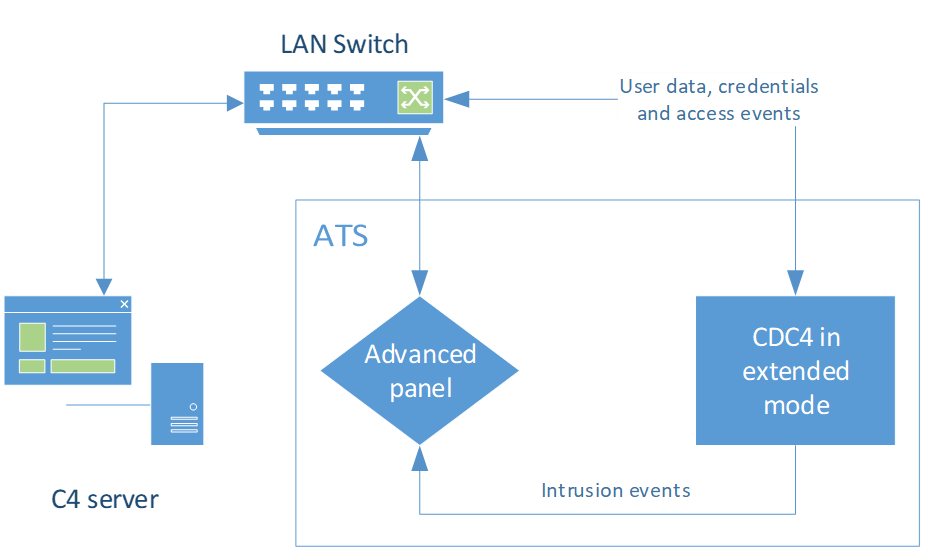
Figure 2. CDC4 extended mode: direct LAN user/access traffic and ATS-bus intrusion traffic.
Device preparation and secure access
Set the panel network address and subnet before starting the circuit. The panel Password is the Installer PIN. Provision Encryption Key and Encryption Key 2 to match the panel. The factory-reset and initial-menu sequence is retained under Operation, Recovery and Maintenance.
After Load Configuration, complete the CDC4 IP Address, Port, Password and encryption properties manually. The C4 and local Installer sessions cannot be used concurrently, as described under Restrictions and Important Notes.
Device Configuration
Device tree and addressing
Add the ATS Alarm Panel below the Advisor Advanced Bus Controller. Each record below defines the represented object, allowed parent, properties and address range.
Validation: T-CFG-01 (duplicates), T-CFG-02 (missing item), T-CFG-07 (properties) and T-CFG-08 (additional nodes).
Advisor Advanced Bus Controller
This is the root device in the device tree.
Property |
Definition |
Default Value |
Range |
|---|---|---|---|
Enabled |
Defines whether circuit usage is enabled |
Yes |
Yes/No |
Default Agent |
Define which Agent will run this circuit |
Server Runner Manager |
|
Time zone |
Defines the Time zone of the ATS Advanced |
System Time |
|
IP Address |
The IP Address of the panel TCP/IP network |
||
Port |
The TCP port of the communication module |
32000 |
1 - 65535 |
Timeout |
Response timeout for the communication (TCP packets) |
00:00:30 |
00:00:30 - 01:00:00 |
Encryption Key |
Password used for encryption, configured in the panel. |
000...{12} |
|
Encryption Key 2 |
Password used for encryption, configured in the panel. |
000...{12} |
|
Technical Events Enabled |
Defines whether the propagation of technical events from the device to C4 is enabled |
Yes |
Yes/No |
NOTE:
The time zone property must match the time zone (UTC offset) in the panel settings, otherwise time of events or time synchronization may not work properly!
If panel’s time zone differs from the C4 time zone, the event “Invalid format of property value 'TimeZone' on device 'DEVICE'.” is stored when the driver is started.
ATS Alarm Panel
Represents the main panel (Central unit)
This device can be added under the Bus Controller
Property |
Definition |
Default Value |
Range |
|---|---|---|---|
Minimum Allowed User Number |
Minimum user’s number allowed to be added (numbers 1 and 2 reserved for technician groups) |
3 |
3 - 65532 |
Maximum Allowed User Number |
Maximum user’s number allowed to be added |
50 |
3 - 65532 |
Minimum Allowed Alarm Group Number |
Minimum group’s number allowed to be added (numbers 1 and 2 reserved for technician groups) |
3 |
3 - 128 |
Maximum Allowed Alarm Group Number |
Maximum group’s number allowed to be added |
16 |
3 - 128 |
Minimum Allowed Door Group Number |
Minimum door group's number allowed to be added (number 1 reserved) |
2 |
2 - 128 |
Maximum Allowed Door Group Number |
Maximum door group's number allowed to be added |
128 |
2 - 128 |
Minimum Allowed Filter Number |
Minimum filter number allowed to be added (numbers 1 - 64 reserved) |
65 |
65 - 128 |
Maximum Allowed Filter Number |
Maximum filter number allowed to be added |
128 |
65 - 128 |
Minimum Allowed Floor Group Number |
Minimum floor group's number allowed to be added |
1 |
1 – 128 |
Maximum Allowed Floor Group Number |
Maximum floor group's number allowed to be added |
128 |
1 – 128 |
Minimum Allowed Schedule Number |
Minimum schedule’s (calendar) number allowed to be added (number 1 reserved for default schedule - Always) |
2 |
2 - 24 |
Maximum Allowed Schedule Number |
Maximum schedule’s number allowed to be added |
24 |
2 - 24 |
Holiday Set |
Defines the holidays set |
None |
|
Night Full Upload |
Automatic Full Upload |
Night Upload |
|
Night Incremental Upload |
Automatic Incremental Upload |
None |
|
Supported Credential Types |
Defines the Credential Types for the device |
||
Time Synchronization Interval |
Periodic time synchronization interval |
01:00:00 |
|
Password |
Installer PIN (User 1 in ATS device) used for the communication with the panel |
||
Query Interval |
Periodic status / event query interval. |
00:00:10 |
NOTES:
The Filters have been implemented (as time restrictions for User Groups) in driver version 2020.0.0.138
Area
Represents Area (Partition) on the ATS device
This device can be added under the Alarm Panel
Property |
Definition |
Default Value |
Range |
|---|---|---|---|
Address |
Logical address (ID) of the area |
1 - 64 |
|
Rearm delay |
Delay before automatic Arm sub-command in the Reset alarm command |
00:00:10 |
Detector
Represents a Zone on the ATS device
This device can be added under the Alarm Panel.
Link to Detector can be added under the Area
Property |
Definition |
Default Value |
Range |
|---|---|---|---|
Address |
Logical address of the zone |
1 - 976 |
Virtual Door
Used as a parent device for RAS devices (Keypad, Card Reader or Keypad And Card Reader) not associated with a physical CU Door.
This device can be added under the Alarm Panel
Property |
Definition |
Default Value |
Range |
|---|---|---|---|
Address |
Address of the RAS |
1 |
1 - 32 |
CU Door
Represents a Door on the ATS Panel (Door type: Standard)
This device can be added under the Alarm Panel
Property |
Definition |
Default Value |
Range |
|---|---|---|---|
Address |
Logical (global) address of the door |
1 - 16 |
|
Time open |
Opening time for Door Unlock Timed command |
00:00:10 |
Keypad
Represents an LCD Keypad on the RAS bus (RAS - Remote Arming Station)
This device can be added under the: CU Door; Virtual Door.
Property |
Definition |
Default Value |
Range |
|---|---|---|---|
Address |
Device address (Id of RAS) |
1 – 32 |
|
Supported Credential Types |
Defines the Credential Types for the device |
Keypad And Card Reader
Represents a Card reader device with numeric keypad (on the RAS bus)
This device can be added under the: CU Door; Virtual Door.
Property |
Definition |
Default Value |
Range |
|---|---|---|---|
Address |
Device address (Id of RAS) |
1 – 32 |
|
Supported Credential Types |
Defines the Credential Types for the device |
Card Reader
Represents a Card reader device (on the RAS bus)
This device can be added under the: CU Door; Virtual Door.
Property |
Definition |
Default Value |
Range |
|---|---|---|---|
Address |
Device address (Id of RAS) |
1 – 32 |
|
Supported Credential Types |
Defines the Credential Types for the device |
Input
Represents a Zone on the ATS device (typically expander)
This device can be added under the: Alarm Panel; Expander; DGP Door; CDC4 Door Controller.
Property |
Definition |
Default Value |
Range |
|---|---|---|---|
Address |
Logical address of the zone |
1 - 976 |
Relay (Output)
Represents the Relay / Output on the device
This device can be added under the: ATS Alarm panel; Card Reader; Keypad; Keypad And Card Reader; DGP Keypad And Card Reader; Expander; CU Door; DGP Door; CDC4 Door Controller.
Property |
Definition |
Default Value |
Range |
|---|---|---|---|
Address |
Logical address |
1 – 1256 |
|
Trigger |
Trigger ID used for control |
1 – 255 |
Expander
Represents the DGP (Data Gathering Panel) device
This device can be added under the Alarm Panel.
Property |
Definition |
Default Value |
Range |
|---|---|---|---|
Address |
Device address (Id of DGP) |
1 – 30 |
NOTE: Maximum address for the devices ATS125x Access Controller and CDC4 (4-door controller in standard mode) is 12
DGP Door
Represents a Door on the Expander (DGP device – e.g. ATS1250 controller)
This device can be added under the Expander
Property |
Definition |
Default Value |
Range |
|---|---|---|---|
Address |
Logical (global) address of the door |
1 - 128 |
|
Time open |
Opening time for the “Door Unlock Timed” command in seconds |
10 |
1-255 |
DGP Lift Unit
Represents a Lift (Lift car) on the Expander (CDC4 controller in Standard mode)
This device can be added under the Expander
Property |
Definition |
Default Value |
Range |
|---|---|---|---|
Address |
Logical (global) address of the door |
1 - 128 |
DGP Lift Door
Represents a Floor
This device can be added under the DGP Lift Unit
Property |
Definition |
Default Value |
Range |
|---|---|---|---|
Address |
Logical (global) address of the door |
1 - 128 |
DGP Keypad
Represents an LCD Keypad
This device can be added under the DGP Door or DGP Lift Unit
Property |
Definition |
Default Value |
Range |
|---|---|---|---|
Address |
Device address (Id of RAS) |
1 – 384 |
|
Supported Credential Types |
Defines the Credential Types for the device |
DGP Keypad And Card Reader
Represents a Card reader device with numeric keypad
This device can be added under the DGP Door or DGP Lift Unit
Property |
Definition |
Default Value |
Range |
|---|---|---|---|
Address |
Device address (Id of RAS) |
1 – 384 |
|
Supported Credential Types |
Defines the Credential Types for the device |
DGP Card Reader
Represents a Card reader device (on the RAS bus)
This device can be added under the DGP Door or DGP Lift Unit
Property |
Definition |
Default Value |
Range |
|---|---|---|---|
Address |
Device address (Id of RAS) |
1 – 384 |
|
Supported Credential Types |
Defines the Credential Types for the device |
CDC4 Door Controller
The CDC4 door / lift controller in extended mode
This device can be added under the ATS Alarm Panel
Property |
Definition |
Default Value |
Range |
|---|---|---|---|
Account Code |
Management software computer number |
1 - 1024 |
|
Address |
Address of DGP on the internal BUS (DGP ID) |
1 - 12 |
|
IP Address |
The IP Address of the panel TCP/IP network |
||
Port |
TCP Port |
3001 |
0 - 65535 |
Timeout |
Timeout for response from device |
00:00:30 |
|
Password |
Communication password |
||
Cipher Type |
Encryption cipher type |
None |
None, AES, Twofish |
Encryption Key |
Use when cipher type is different than None |
||
Query Interval |
Interval for sending regular queries to the central unit |
00:00:05 |
|
Calendar Record Min Number |
Minimum allowed memory position for Calendar Records |
25 |
25 - 2000 |
Calendar Record Max Number |
Maximum allowed memory position for Calendar Records |
100 |
25 - 2000 |
Door Group Record Min Number |
Minimum allowed memory position for Door Groups Records |
1 |
1 - 10000 |
Door Group Record Max Number |
Maximum allowed memory position for Door Groups Records |
128 |
1 - 10000 |
NOTES:
for CDC4 in standard mode use Expander device type instead of CDC4 Door Controller
The minimum and maximum allowed memory position for user records is the same as for the ATS alarm panel. Also, the memory positions for the same person are the same on the panel and CDC4
Time synchronization is performed via the internal ATS BUS from the Advanced panel
CDC4 Door
Represents a Door on the CDC4 door controller in extended mode
This device can be added under the CDC4 door controller
Property |
Definition |
Default Value |
Range |
|---|---|---|---|
Address |
Logical (local) address of the door |
1 - 8 |
CDC4 Lift Unit
Represents a Lift (Lift car) on the CDC4 controller in extended mode (door slot configured as Lift)
This device can be added under the CDC4 door controller
Property |
Definition |
Default Value |
Range |
|---|---|---|---|
Address |
Logical (local) address of the Lift |
1 - 8 |
CDC4 Lift Door
Represents a Floor on the CDC4 Lift Unit
This device can be added under the CDC4 Lift Unit
Property |
Definition |
Default Value |
Range |
|---|---|---|---|
Address |
Address of the Floor |
1 - 128 |
CDC4 Keypad
Represents a credential device on the CDC4 door controller in extended mode
This device can be added under: CDC4 Door; CDC4 Lift Unit.
Property |
Definition |
Default Value |
Range |
|---|---|---|---|
Address |
Logical (local) address |
1 - 6 |
|
Supported Credential Types |
Defines the Credential Types for the device |
CDC4 Card Reader and CDC4 Keypad with Card Reader
Represents a credential devices on the CDC4 door controller in extended mode
This device can be added under: CDC4 Door; CDC4 Lift Unit.
Property |
Definition |
Default Value |
Range |
|---|---|---|---|
Address |
Logical (local) address |
1 - 6 |
|
Supported Credential Types |
Defines the Credential Types for the device |
Configuration Transfer and Device Discovery
Load Configuration
During the Load Configuration process, CDC4 door controllers in extended mode are automatically imported into the device tree, but some properties (IP address, Port, Password, encryption settings) must be configured manually for successful communication.
Field |
Behavior |
|---|---|
Direction and invocation |
Device to C4. Stop the endpoint and execute the Load Configuration wizard. |
Imported scope |
Device nodes and properties are retrieved according to the current device configuration. |
Names on first retrieval |
Node names present on the device are used where possible. |
Existing device-tree names |
Applying changes to an existing tree must not change names of existing nodes. |
Manual post-import properties |
CDC4 Door Controller IP Address, Port, Password and encryption settings. |
Acceptance |
T-CFG-03 verifies successful import and the incomplete-tree variant. |
Configuration-transfer acceptance checks
Check the resulting tree and properties, complete the manual CDC4 settings and validate the addresses before starting the endpoint. Expected audit messages are retained in T-CFG-03.
Supported Identifiers
User authentication is based on PIN codes and cards.
Supported PIN Lengths
4 - 10
PIN
Each user can be authenticated with a PIN. PIN can be an n digit number string within a range defined by the central unit. Central unit must have the PIN mode property set to Custom.
Important: PIN is compulsory for X500 MR1, MR2. A person without a PIN couldn’t be send to the panel.
Card
Apart from the PIN, each user can have a card, as well. Card is not required to send credentials (this option is non-obligatory). Supported card type is for example ATS IUM.
Card + PIN (Merged)
If a person has multiple cards or PINs, the merged credentials ensures that they are stored in the same memory position on the device.
Person and identifier mapping
The device supports one PIN and one Card per user entry. Multiple credentials assigned to one person in C4 can require multiple device user entries. Review the merged-credential statement above together with this per-entry limit, and validate reassignment using T-UPL-01.
Default credentials and commissioning accounts
Memory position |
Name in C4 |
Name in ATS |
Default PIN |
|---|---|---|---|
1 |
Engineer |
Installer |
1278 |
2 |
Administrator |
Supervisor |
1122 |
These are factory-default credentials used by the reset procedure, not deployment-specific secrets. The C4 communication Password uses the Installer account PIN. See Operation, Recovery and Maintenance for the default-login and Installer-PIN-reset sequence.
Credentials Synchronization
Ownership and object mapping
C4 object / setting |
Device object / record |
Mapping |
|---|---|---|
Person / credential |
User record |
PIN and card authentication; multiple C4 credentials can create multiple device user entries. |
ATS Alarm Panel profile |
Panel user |
Panel profiles map to users in device memory. |
Area profile / access level |
User group |
Area profiles map to user groups. Different settings can allocate additional groups. |
CDC4 profile |
CDC4 user |
CDC4 profiles map to users in the controller memory. |
CDC4 user-number range |
Shared user positions |
Minimum and maximum user-record positions are the same as the ATS Alarm Panel; the same person uses the same position on both. |
Upload modes and triggers
Mode |
Trigger / scope |
Data impact / evidence |
|---|---|---|
Full Upload |
Alarm Panel command; Night Full Upload can schedule an automatic full upload. |
Clears managed memory positions before uploading person credentials. |
Incremental Upload |
Alarm Panel command; Night Incremental Upload can schedule an automatic incremental upload. |
Differential upload; verify changed access and credential ownership using T-UPL-01. |
Dynamic Upload |
Person command |
Differential upload; only on selected persons, but on all devices |
Lifecycle, access rights and exceptional conditions
T-UPL-01 preserves the access-right and credential-reassignment scenarios, including persons placed under the root, companies and departments, and access assigned to doors absent from the physical device. Check permissions on the device and verify the correct person in the C4 access event after each upload.
The panel Holiday Set and schedule/filter ranges are listed in Device Configuration. T-ACL-01 verifies access-time restrictions and T-ACL-02 verifies holiday behavior. Filters for user-group time restrictions were introduced in driver version 2020.0.0.138.
Reserved memory positions
Memory position |
Name |
|---|---|
Users |
|
1 |
Engineer (Installer in ATS) |
2 |
Administrator (Supervisor in ATS) |
Alarm groups (User groups in ATS) |
|
1 |
Installer group |
2 |
Supervisor group |
Door groups |
|
1 |
Door group 1 (all doors, always) |
Calendars (Schedules) |
|
1 |
Always |
Verification and recovery
Observe the Uploading Credentials status and the completion or failure audit messages. A reported communication failure during upload can also mean that the central unit refused a user or user group. Validate actual permissions and person attribution rather than relying only on transport completion.
T-UPL-02 covers interruption during credential transfer. After the namespace-changing upgrade to driver version 2020.0.0.581 or later, perform Full Upload before any other upload type; see Upgrade and Migration.
Profiles (Extended Properties)
It is possible to set special settings for device or device type:
ATS Alarm panel
Area
CDC4 door controller
Profiles on ATS Alarm Panel
These profiles are mapped to users in device’s memory
Panel profile properties mapping and description:
Property in C4 |
Downloader |
Values |
Meaning |
|---|---|---|---|
Language |
Language |
English | Slovak | Czech | ... |
User language |
Privileged |
Privileged |
On / Off |
Privileged user |
Select Group Option |
Area | Area group | All |
User has right to view and control access schedules (only for models ATS4500A or ATS4500AIP) |
|
Trace |
Trace |
On / Off |
|
User Access Type |
Access user type |
Normal | Two Cards | Guard | Visitor | High Security User |
|
Phone number |
Mobile |
Mobile phone number |
Area profiles
Area profiles are mapped to user groups in device’s memory.
It is possible to set special user settings for each user group (access level).
Be careful while setting different settings for many Profiles. Modifications in Profiles for separate users may cause creation of new user group at the panel and in result cause overrun of maximum allowed alarm group number.
Area profile properties mapping and description:
Property in C4 |
Downloader |
Values |
Meaning |
|---|---|---|---|
Arming |
Full set |
On / Off |
Rights to arm areas in full set mode |
Card And Pin Mode |
Card and PIN Mode |
Card | Card or PIN | PIN |
User can use card or PIN for authentication |
Change PIN |
Change PIN |
On / Off |
User is allowed to change his own PIN code |
Cleaner |
Cleaner |
On / Off |
Disarm of the area does not automatically inhibit detectors in the area |
CS Configuration |
CS Configuration |
On / Off |
Flag indicating whether the user has privilege to edit CS phone or account |
Disarming |
Unset |
On / Off |
User is allowed to disarm areas |
Door Control |
Door Control |
On / Off |
User is allowed to door control |
Engineer Reset |
Engineer Reset |
On / Off |
User is allowed to enter to the Engineer reset menu |
Fob Learning |
Fob Learning |
On / Off |
Flag indicating whether the user group has privilege to program a fob. |
Forced Set |
Forced set |
On / Off |
User is allowed to arm the areas with active detectors |
Installer Access |
Inst. Access |
On / Off |
Grant the installer an access to system configuration. |
Isolate |
Isolate |
On / Off |
Users are allowed to to exclude zones in areas for multiple arm / disarm cycles |
Logs Access |
Logs access |
On / Off |
Enable access to log entries |
Menu Access |
Menu Access |
On / Off |
Menu access allowed |
No OP/CL Reports |
No OP/CL Reports |
On / Off |
Open/Close events will not be reported |
Notification Control |
Notification Control |
On / Off |
Flag indicating whether the user group has privilege to change own notification settings |
Notification Reporting |
Notification Reporting |
On / Off |
Flag indicating whether the user group has privilege to receive notifications |
Part Set 1 |
Part set 1 |
On / Off |
User is allowed to arm the areas in partial arm 1 mode |
Part Set 2 |
Part set 2 |
On / Off |
User is allowed to arm the areas in partial arm 2 mode |
Pic Deletion |
Pic Deletion |
On / Off |
User is allowed to execute picture deletion |
Region Control |
Region Control |
On / Off |
Enable to region control |
Remote Connection |
Remote Connection |
On / Off |
User is allowed to connect to the panel via PSTN, GSM, ISDN or IP communication paths |
Remote Pics |
Remote Pics |
On / Off |
User is allowed to enable/disable remote picture triggering |
Reset |
Reset only |
On / Off |
Flag indicating whether the user group has privilege to acknowledge alarm/faults when system is set. |
Sheduled Access |
Sheduled Access |
None | View | View And Control |
User has rights to view access schedules |
Shunt |
Shunt |
On / Off |
User is allowed to use extended door shunt time option |
Sms Control |
SMS control |
On / Off |
SMS control availability |
Sms Reporting |
SMS reporting |
On / Off |
SMS reporting availability |
Stop Reporting |
Stop report |
On / Off |
User is allowed to cancel reporting on voice protocol |
Tests |
Reporting tests |
On / Off |
User is allowed to perform manual test calls |
Time And Date |
Time and date |
On / Off |
User is allowed to change the system date/time |
Use Of Duress Code |
Duress code |
On / Off |
User has the right to use a duress PIN |
User group area list |
User group area list |
On / Off |
Flag indicating whether the user group has privilege display the list of areas |
User Type |
User group type |
Normal | Supervisor | Installer | Guard | ATM | Bank Reset | Log |
Determines the sequence of login |
Users Adding |
User adding |
None | All | Restricted |
Flag indicating whether the user group has privilege to create new users |
Walk Test |
Walk test |
On / Off |
User is allowed to activate the Walk test procedure |
Zones Bypassing |
Inhibit |
On / Off |
User is allowed to inhibit/uninhibit devices |
Default values and restrictions depending on User (group) type
The profile settings must respect these restrictions or the upload process will fail.
User-group defaults: Normal user, Supervisor, Installer and Guard
Property name |
Normal user |
Supervisor |
Installer |
Guard |
|---|---|---|---|---|
Arming |
1 |
1 |
1 |
1 |
Card And Pin Mode |
Card or PIN |
Card or PIN |
Card or PIN |
Card or PIN |
Change PIN |
1 |
1 |
1 |
1 |
Cleaner |
0 |
0 |
0 |
0 |
CS Configuration |
0 |
1 |
1 |
0 |
Disarming |
1 |
1 |
1 |
1 |
Door Control |
0 |
1 |
1 |
0 |
Engineer Reset |
0 |
1 |
1 |
1 |
Fob Learning |
0 |
1 |
1 |
0 |
Forced Set |
0 |
1 |
1 |
0 |
Installer Access |
0 |
1 |
0 |
0 |
Isolate |
0 |
0/1 |
1 |
0 |
Logs Access |
0 |
1 |
1 |
1 |
Menu Access |
1 |
1 |
1 |
1 |
No OP/CL Reports |
0 |
0 |
0 |
0 |
Notification Control |
1 |
1 |
1 |
0 |
Notification Reporting |
1 |
1 |
1 |
0 |
Part Set 1 |
0 |
1 |
1 |
1 |
Part Set 2 |
0 |
1 |
1 |
1 |
Picture Deletion |
0 |
1 |
1 |
0 |
Region Control |
0 |
1 |
1 |
0 |
Remote Connection |
0 |
1 |
1 |
0 |
Remote Pictures |
0 |
1 |
1 |
0 |
Reset |
1 |
1 |
1 |
1 |
Scheduled Access |
View |
View & Ctrl |
View & Ctrl |
View & Ctrl |
Shunt |
0 |
0 |
1 |
0 |
SMS Control |
0 |
0/1 |
1 |
0 |
SMS Reporting |
0 |
0/1 |
1 |
0 |
Stop Reporting |
0 |
0 |
0 |
0 |
Tests |
0 |
1 |
1 |
0 |
Time And Date |
0 |
1 |
1 |
1 |
Use Of Duress Code |
0 |
1 |
1 |
1 |
User group area list |
0 |
1 |
1 |
1 |
Users Adding |
None |
All |
All |
None |
Walk Test |
0 |
1 |
1 |
1 |
Zones Bypassing |
1 |
1 |
1 |
1 |
User-group defaults: ATM, Bank Reset and Log
Property name |
ATM |
Bank Reset |
Log |
|---|---|---|---|
Arming |
1 |
0 |
0 |
Card And Pin Mode |
Card or PIN |
Card or PIN |
Card or PIN |
Change PIN |
1 |
0 |
0 |
Cleaner |
0 |
0 |
0 |
CS Configuration |
0 |
0 |
0 |
Disarming |
1 |
0 |
0 |
Door Control |
0 |
0 |
0 |
Engineer Reset |
0 |
0 |
0 |
Fob Learning |
0 |
0 |
0 |
Forced Set |
0 |
0 |
0 |
Installer Access |
1 |
0 |
0 |
Isolate |
0 |
0 |
0 |
Logs Access |
1 |
1 |
1 |
Menu Access |
1 |
1 |
1 |
No OP/CL Reports |
0 |
0 |
0 |
Notification Control |
0 |
0 |
0 |
Notification Reporting |
0 |
0 |
0 |
Part Set 1 |
0 |
0 |
0 |
Part Set 2 |
0 |
0 |
0 |
Picture Deletion |
0 |
0 |
0 |
Region Control |
0 |
0 |
0 |
Remote Connection |
0 |
0 |
0 |
Remote Pictures |
0 |
0 |
0 |
Reset |
1 |
1 |
0 |
Scheduled Access |
None |
None |
None |
Shunt |
0 |
0 |
0 |
SMS Control |
0 |
0 |
0 |
SMS Reporting |
0 |
0 |
0 |
Stop Reporting |
0 |
0 |
0 |
Tests |
0 |
0 |
0 |
Time And Date |
0 |
0 |
0 |
Use Of Duress Code |
0 |
0 |
0 |
User group area list |
0 |
0 |
0 |
Users Adding |
None |
None |
None |
Walk Test |
0 |
0 |
0 |
Zones Bypassing |
0 |
1 |
0 |
Legend
0 = Unchecked (OFF). 1 = Checked (ON).
Cell appearance |
Meaning |
|---|---|
White |
Property can be changed. |
Gray |
Property can NOT be changed for this type of user group. Default value must be used. |
CDC4 profiles
CDC4 profiles are mapped to users in device’s memory (on the CDC4 door controller).
CDC4 profile properties:
Property in C4 |
Values |
Meaning |
|---|---|---|
Card Only |
On / Off |
|
Dual Custody |
On / Off |
|
Guard |
On / Off |
|
HSU |
On / Off |
High Security User |
Privileged |
On / Off |
|
Trace |
On / Off |
|
Visitor |
On / Off |
|
Use Timing For Disabled |
On / Off |
Time Management
Time source and synchronization
Field |
Documented behavior |
|---|---|
Startup |
C4 sets the device time after communication is established; T-TIM-01A. |
Periodic synchronization |
ATS Alarm Panel Time Synchronization Interval defaults to 01:00:00; T-TIM-01B uses a temporary five-minute interval. |
CDC4 time |
CDC4 time synchronization is performed by the Advanced panel over the internal ATS bus. |
Time-change audit |
The test notes require a time-set event only when the time difference is greater than five minutes. The test offset is 60 minutes, with expected measured offset 59-61 minutes. |
Historical events |
Retrieved offline events retain their original device event time, not the time of retrieval; T-EVT-02. |
Time zone and event-time interpretation
The Bus Controller Time zone property must match the panel time zone (UTC offset). Otherwise event timestamps or time synchronization may be incorrect.
If the settings differ, the startup audit message is: Invalid format of property value 'TimeZone' on device 'DEVICE'.
Verification
Execute the startup and periodic tests only under their documented conditions. The periodic test is restricted to devices that do not notify time changes. The startup test retains the special applicability note for devices whose time is controlled by their own NTP server or equivalent facility.
Technology-Specific Functionality
ACS - doors, access and lifts
CU Door represents a standard panel door. DGP Door represents a door on an expander; CDC4 Door represents a local door on an extended-mode CDC4. Their command and status mappings are defined in the following two chapters.
DGP Lift Unit and CDC4 Lift Unit represent lift cars; their Lift Door children represent floors. Lift-unit Arm secures all floors and Disarm provides access to all floors. Lift Door Lock and Unlock secure or allow access to the individual floor. DGP Lift Unit additionally exposes Bypass On and Bypass Off.
Door tests cover manual override, permanent unlock, forced opening, held-open alarms, remote unlock, exit-button use and access decisions. Open/closed/locked events depend on the door type and settings; the held-open event depends on Report DOTL.
IAS - alarm, bypass and walk test
Area commands include Arm, Disarm, Reset alarm, Forced arm, Rearm, Test and Finish Test. Rearm issues Disarm, waits for Rearm delay and then issues Forced Arm. All commands are disabled during area testing except Finish Test.
Alarm and bypass behavior, including the extended-mode expander Rearm restriction and device-side bypass events identifying the actor as Unknown, is preserved in T-ALM-01, T-ALM-02A and T-ALM-02B.
Inputs, outputs and equipment health
Output has to be configured in ATS downloader through Filter where you select trigger and event. Then on output you select filter you created.
Input and Relay (Output) addressing and trigger properties are listed in Device Configuration. Output activation/deactivation, tamper, mains failure and backup-power failure are covered by T-IO-01, T-ALM-03 and T-HLT-01/02.
Remote Device Control
Supported commands
The C4 system makes it possible to perform the following operations above individual elements:
Element |
Operation |
Meaning |
|---|---|---|
Bus Controller |
Start |
Starts a stopped circuit |
Stop |
Stops a started circuit |
|
Restart |
Restarts a circuit |
|
Load Configuration |
Load configuration from device and modify device tree in C4 |
|
Alarm Panel |
Incremental Upload |
Starts Incremental (differential) upload of persons credentials into device |
Full Upload |
Starts Full upload of persons credentials into device (clear managed memory positions on the device before uploading) |
|
Test |
Starts a Walk test in all Areas |
|
Finish Test |
Stops a Walk test in all Areas |
|
Area |
Arm |
Starts protecting the specific area |
Disarm |
Finishes the protection of the specific area |
|
Reset alarm |
Restores the previous state of the system which was present before the alarm |
|
Forced arm |
Starts protecting the specific area with bypass / isolate active and alarmed zones |
|
Rearm |
Invokes the Disarm command, waits the time specified in the "Rearm delay" property, and then invokes the Forced Arm command |
|
Test |
Starts a Walk test in this Area |
|
Finish Test |
Stops a Walk test in this Area |
|
Expander, CDC4 Keypad, |
Bypass On |
Temporarily disables the particular detector from operation |
Bypass Off |
Returns the previously bypassed detector to regular operation |
|
Relay (Output) |
On |
Activate output |
Off |
Deactivate output |
Door, input and lift commands
Element |
Operation |
Meaning |
|---|---|---|
CU Door |
Lock |
Doors are locked |
Unlock |
Doors are unlocked |
|
Unlock Timed |
Doors are unlocked for specific time |
|
Manual Override |
Doors are disabled (unknown state of door) |
|
Manual Override Off |
Doors are enabled. |
|
DGP Door |
Lock |
Doors are locked |
Unlock |
Doors are unlocked |
|
Unlock Timed |
Doors are unlocked for specific time |
|
Unlock permanently |
Doors are unlocked permanently |
|
Manual Override |
Doors are disabled (unknown state of door) |
|
Manual Override Off |
Doors are enabled. |
|
Input |
Bypass On |
Temporarily disables the particular detector from operation (events and alarm) |
Bypass Off |
Returns the previously bypassed detector to regular operation |
|
DGP Lift Unit |
Arm |
Starts protecting the specific Lift (secure all floors) |
Disarm |
Finishes the protection of the specific Lift (access all floors) |
|
Bypass On |
Temporarily disables the particular Lift from operation |
|
Bypass Off |
Returns the previously bypassed Lift to regular operation |
|
DGP Lift Door |
Lock |
Floors are locked (secured) |
Unlock |
Floors are unlocked (accessed) |
|
CDC4 Lift Unit |
Arm |
Starts protecting the specific Lift (secure all floors) |
Disarm |
Finishes the protection of the specific Lift (access all floors) |
|
CDC4 Lift Door |
Lock |
Floors are locked (secured) |
Unlock |
Floors are unlocked (accessed) |
NOTES:
All commands are disabled while the area(s) are being tested, except the Finish Test command
Status Information Display
The device status information is displayed on the following components:
Bus Controller
Status |
Description |
|---|---|
Idle |
Normal functioning state of a device |
Disconnected |
Device Is disconnected |
Configuration Failure |
Driver configuration is broken |
Connecting in Progress |
Connection to the device is in progress |
Alarm Panel
Status |
Description |
|---|---|
Unknown |
Device status is unknown |
Idle |
Normal functioning state of a device |
Uploading Credentials |
Access permissions are currently being uploaded to the device. |
Downloading History |
Upon reconnecting to a device or external system, the C4 system downloads history that has occurred during the disconnection. |
Tamper |
Device status is tampered |
Disconnected |
Device Is disconnected |
Configuration Failure |
Driver configuration is broken |
Loading Device Configuration |
This state means that the C4 System is reading the device's configuration |
Failure |
General technical failure on a device (panel fault or system fault status reported from the device) |
NOTES:
The device reports a Fault status under certain circumstances even when everything is functional.
Area
Status |
Description |
|---|---|
Unknown |
Device status is unknown |
Not Ready to Arm |
The system can not be fully secured/armed, as one or more zones are activated. |
Ready to Arm |
The system is not secured, meaning that intrusion or motion within this zone will not trigger an alarm. |
Configuration Failure |
Device configuration is broken |
Alarm |
Indicating an intrusion situation |
Armed |
The system is in a fully secured mode (intrusion will trigger an alarm) |
Bypass |
Temporarily out of service |
Tamper |
Device status is tampered |
Armed Partially |
The system is not fully secured, as one or more zones (detector / input) are not secured. |
Rearm |
This state occurs during processing of the Rearm command |
Testing |
This is a state in which the device health and features are being tested. |
Detector
Status |
Description |
|---|---|
Unknown |
Device status is unknown |
Idle |
Device is in deactivated mode |
Failure |
General technical failure on a device |
Tamper |
Device status is tampered |
Bypass |
Temporarily out of service |
Alarm |
Indicating an intrusion situation |
Activated |
The device is currently in an active state, fulfilling it's primary function |
Testing |
This is a state in which the device health and features are being tested. |
Alarm In Test |
The device is currently being tested for functionality of the alarm. This means that there is not a real alarm, but a simulation of an alarm, in order to audit the device's health. |
CU Door
Status |
Description |
|---|---|
Unknown |
Device status is unknown |
Door Normal |
The door is physically closed. The lock is locked. Entry is only possible for authorized persons. |
Door Forcibly Opened |
The door has been forcefully physically opened by an unauthorized access |
Door Opened |
The door is physically opened. |
Door Opened Too Long |
The door is physically opened. The door is opened longer than the maximum defined time it should be opened by the device |
Door Unlocked Permanently |
The door is physically closed, but can be opened at any point without any required access authorization, until it is locked again. |
Door Unlocked |
The door is physically closed, but can now be opened. This occurs after valid access authorization or sending a command to unlock the door. This occurs for a certain preconfigured time. This time is defined per device. |
Door Unlocked Timed |
The door is physically closed, but can now be opened. This occurs after sending a command to unlock the door for a user-defined time period. The user can set a shorter or longer time than is defaultly defined per device. |
Failure |
General technical failure on a device |
Alarm |
The device is currently in a general alarm state (indicating an intrusion situation) |
Door Manual Override |
The door is physically closed, locked and cannot be opened. |
Virtual Door
Status |
Description |
|---|---|
Unknown |
Device status is unknown |
Door Normal |
The door is physically closed. The lock is locked. Entry is only possible for authorized persons. |
Keypad, Keypad And Card Reader, Card Reader
Status |
Description |
|---|---|
Unknown |
Device status is unknown |
Idle |
Input is in deactivated mode |
Tamper |
Device status is tampered |
Bypass |
Temporarily out of service |
DGP Door
Status |
Description |
|---|---|
Unknown |
Device status is unknown |
Door Normal |
The door is physically closed. The lock is locked. Entry is only possible for authorized persons. |
Door Forcibly Opened |
The door has been forcefully physically opened by an unauthorized access |
Door Opened |
The door is physically opened. |
Door Opened Too Long |
The door is physically opened. The door is opened longer than the maximum defined time it should be opened by the device |
Door Unlocked Permanently |
The door is physically closed, but can be opened at any point without any required access authorization, until it is locked again. |
Door Unlocked |
The door is physically closed, but can now be opened. This occurs after valid access authorization or sending a command to unlock the door. This occurs for a certain preconfigured time. This time is defined per device. |
Door Unlocked Timed |
The door is physically closed, but can now be opened. This occurs after sending a command to unlock the door for a user-defined time period. The user can set a shorter or longer time than is defaultly defined per device. |
Failure |
General technical failure on a device |
Alarm |
The device is currently in a general alarm state (indicating an intrusion situation) |
Door Manual Override |
The door is physically closed, locked and cannot be opened. |
Configuration Failure |
The device has issues due to mistakes or wrong data in configuration paramaters and/or settings |
DGP Keypad, DGP Keypad And Card Reader, DGP Card Reader
Status |
Description |
|---|---|
Unknown |
Device status is unknown |
Idle |
Input is in deactivated mode |
Tamper |
Device status is tampered |
Bypass |
Temporarily out of service |
DGP Lift Unit
Status |
Description |
|---|---|
Unknown |
Device status is unknown |
Idle |
Input is in deactivated mode |
Tamper |
Device status is tampered |
Failure |
General technical failure on a device |
Configuration Failure |
The device has issues due to mistakes or wrong data in configuration paramaters and/or settings |
DGP Lift Door
Status |
Description |
|---|---|
Unknown |
Device status is unknown |
Door Normal |
The Floor is secured |
Door Unlocked |
The floor is accessed |
Configuration Failure |
The device has issues due to mistakes or wrong data in configuration paramaters and/or settings |
Expander
Status |
Description |
|---|---|
Unknown |
Device status is unknown |
Idle |
Input is in deactivated mode |
Tamper |
Device status is tampered |
Failure |
General technical failure on a device |
Configuration Failure |
The device has issues due to mistakes or wrong data in configuration paramaters and/or settings |
Input
Status |
Description |
|---|---|
Unknown |
Device status is unknown |
Idle |
Device is in deactivated mode |
Failure |
General technical failure on a device |
Tamper |
Device status is tampered |
Bypass |
Temporarily out of service |
Alarm |
Indicating an intrusion situation |
Activated |
The device is currently in an active state, fulfilling it's primary function |
Output
Status |
Description |
|---|---|
Unknown |
Device status is unknown |
Activated |
Input is in activated mode |
Idle |
Input is in deactivated mode |
Bypass |
Temporarily out of service |
CDC4 Door controller
Status |
Description |
|---|---|
Unknown |
Device status is unknown |
Idle |
Device is in deactivated mode |
Failure |
General technical failure on a device |
Tamper |
Device status is tampered |
Downloading History |
Upon reconnecting to a device or external system, the C4 system downloads history that has occurred during the disconnection. |
Tamper |
Device status is tampered |
Disconnected |
Device Is disconnected |
Configuration Failure |
Driver configuration is broken |
CDC4 Door
Status |
Description |
|---|---|
Unknown |
Device status is unknown |
Door Normal |
The door is physically closed. The lock is locked. Entry is only possible for authorized persons. |
Door Forcibly Opened |
The door has been forcefully physically opened by an unauthorized access |
Door Opened |
The door is physically opened. |
Door Opened Too Long |
The door is physically opened. The door is opened longer than the maximum defined time it should be opened by the device |
Door Unlocked Permanently |
The door is physically closed, but can be opened at any point without any required access authorization, until it is locked again. |
Door Unlocked |
The door is physically closed, but can now be opened. This occurs after valid access authorization or sending a command to unlock the door. This occurs for a certain preconfigured time. This time is defined per device. |
Door Unlocked Timed |
The door is physically closed, but can now be opened. This occurs after sending a command to unlock the door for a user-defined time period. The user can set a shorter or longer time than is defaultly defined per device. |
Failure |
General technical failure on a device |
Alarm |
The device is currently in a general alarm state (indicating an intrusion situation) |
Door Manual Override |
The door is physically closed, locked and cannot be opened. |
CDC4 Lift Unit
Status |
Description |
|---|---|
Unknown |
Device status is unknown |
Idle |
Input is in deactivated mode |
Tamper |
Device status is tampered |
Failure |
General technical failure on a device |
Configuration Failure |
The device has issues due to mistakes or wrong data in configuration paramaters and/or settings |
CDC4 Lift Door
Status |
Description |
|---|---|
Unknown |
Device status is unknown |
Door Normal |
The Floor is secured |
Door Unlocked |
The floor is accessed |
Configuration Failure |
The device has issues due to mistakes or wrong data in configuration paramaters and/or settings |
CDC4 Keypad,
CDC4 Card Reader,
CDC4 Keypad with Card Reader
Status |
Description |
|---|---|
Unknown |
Device status is unknown |
Idle |
Input is in deactivated mode |
Tamper |
Device status is tampered |
Bypass |
Temporarily out of service |
Initialization, connection and restoration
On a successful connection, the endpoint children are set to their real states. The Network Connection Lost test expects all nodes below the endpoint to become Disconnected during the interruption and to return to their real states after reconnection. Missing, duplicate or additional nodes are addressed by T-CFG-01, T-CFG-02 and T-CFG-08.
The Alarm Panel may report Fault even when all equipment appears functional. State labels used by some test cases differ from the reference tables; retain those differences during review as described under Technical confirmation notes.
Events and Audit Log
Event mapping
The integration tests retain the exact expected audit-message text for each operation. Use the related case below for complete messages, placeholder definitions and conditional logging notes.
Event family |
Object / context |
Related tests |
|---|---|---|
Driver startup and connection |
Endpoint or driver name; connection establishment, loss, recovery and authentication. |
T-CON-01/02; T-SEC-01 |
Configuration |
Device retrieval, duplicated addresses and missing device context. |
T-CFG-01/02/03 |
Time synchronization |
Device and absolute difference from real time in minutes. |
T-TIM-01A/B |
Commands and physical changes |
Command issuer, command name and target device; delivered command versus physical change. |
T-IO-01; T-ALM-02A; T-ACS-01/02/05 |
Alarm and bypass |
Nearest identifiable alarm-source device; actor supplied by C4 or the panel. |
T-ALM-01/02A/02B/03 |
Access decisions |
Person, credential type/name, reader and access-point context; unknown-card raw value where supplied. |
T-EVT-01A/B/C; T-ACL-01 |
Credential upload |
Upload type, target, duration and completion/failure. |
T-ID-01B; T-UPL-02 |
Equipment power |
Device at which mains or backup-power failure was detected. |
T-HLT-01/02 |
Event context and interpretation
Audit messages use the device, person, credential and reader identifiers defined in each test. Missing-device events are attributed to the nearest parent or driver; alarms use the nearest identifiable source. Device-side PIN bypass may identify the actor as Unknown.
Device Audit Log Retrieval
After communication is established again, C4 retrieves events recorded while the device was disconnected. T-EVT-02 requires those events to be stored with their original device timestamps, not the time at which C4 read them. Alarm Panel and CDC4 Door Controller expose Downloading History status.
Diagnostics and evidence
The namespace-change issue described under Upgrade and Migration is recorded in the Exceptions trace log. Retain the actual event and trace evidence with the test report; protect deployment secrets and personal identifiers when distributing diagnostic material.
Operation, Recovery and Maintenance
Normal operation and connection ownership
Use the Bus Controller Start, Stop and Restart commands for circuit operation. The normal Bus Controller state is Idle. Panel status/event polling defaults to 00:00:10; CDC4 regular queries default to 00:00:05.
While C4 communicates with the panel, the Installer cannot log in through the keypad or ATS8500 Standalone Downloader. The restriction also applies in the reverse direction.
Failure and recovery behavior
Condition |
Observable impact |
Verification / recovery |
|---|---|---|
Network loss |
Nodes below the endpoint become Disconnected. The connection-loss test identifies a reconnect attempt after approximately 125 seconds. |
Restore the connection, check real device states and verify recovered history; T-CON-02 and T-EVT-02. |
Credentials transfer interrupted |
Communication is interrupted and the upload failure is reported. |
Use the failure evidence in T-UPL-02; check actual permissions before returning to service. |
Mains or backup-power fault |
Fault is expected during the affected power condition. |
Restore the power source and verify the real device state; T-HLT-01/02. |
Driver namespace upgrade |
Access events cannot resolve person names until full synchronization. |
Perform Full Upload first; see Upgrade and Migration. |
Factory reset
Warning: use this sequence only for authorized reset/initial commissioning. A reset affects panel configuration; confirm the approved backup, safe state and restoration plan before proceeding. The listed Non EN50131, duress and arming settings require site-specific authorization.
1.Press MENU - Installer PIN - # - # - 1 - 6 - UP ARROW - #
2. How to log in using default credentials?
Press MENU - PIN - #
To reset changed Installer PIN code to default, short jumper T1 (see image) and power on the panel and wait for System failure message on the LCD keypad. Then remove jumper.
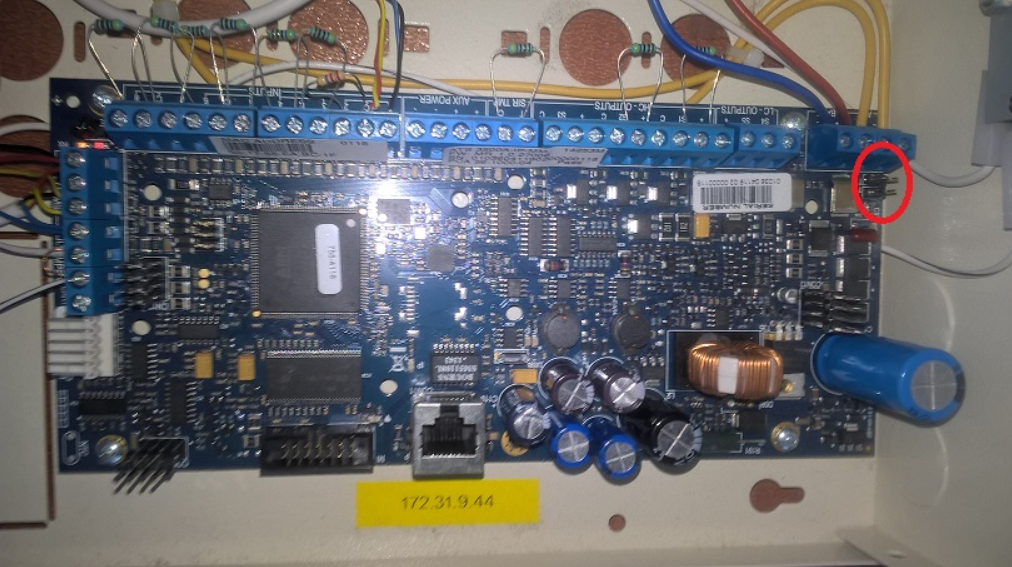
3. Configuration steps to ensure basic operation of the device
Configuration is automatically started after the panel is defaulted, this is only a list of important changes in regards to C4:
option 2 - select Non EN50131 mode
option 3 - Duress mode set to Inc Last Digit
option 6 - select Install - OK - # - # - # / Installation starts.
When installation ends and panel loads, it will ask for Auto Config - confirm Yes with # key
In Installers Menu, navigate to 8 - 4 - 3 and set Forced Set option to On.
In Installers Menu, navigate to 8 - 7 - 5 and set PIN chg mode to Custom
In Installers Menu, navigate to 9 - 3 - 4 - 4 - 1 - change IP config from Dynamic to Static
In Installers Menu, navigate to 9 - 3 - 4 - 4 - 2 - set IP address and confirm with #
In Installers Menu, navigate to 9 - 3 - 4 - 4 - 3 - set subnet mask, if non default
In Installers Menu, navigate to 9 - 3 - 4 - 4 - 4 - set IP of the gateway
Exit the menu with Clear key, until message Goodbye ? appears, then choose Yes and # key.
Upgrade and Migration
Person names are not resolved after upgrade to version 2020.0.0.581 due to a JSON serialization exception
When updating the driver to version 2020.0.0.581 or later, the driver does not determine the names of persons in access events until a full upload has been performed. After this update, a full upload must be performed before any other type of upload. This happens because from this version driver change namespaces in Device Model.
The following error is stored in the Exceptions trace log file:
Newtonsoft.Json.JsonSerializationException: Error resolving type specified in JSON 'Gamanet.C4.Driver.CarrierFSPAdvisorAdvanced.Upload.Model.Entities.UserEntity, Gamanet.C4.Driver.CarrierFSPAdvisorAdvanced'. Path '$type', line 1, position 132.
Troubleshooting, Support and References
Troubleshooting
Symptom / condition |
Documented cause or condition |
Action / reference |
|---|---|---|
Missing person names after upgrade |
Driver model namespaces changed in version 2020.0.0.581. |
Perform Full Upload before any other upload type; Upgrade and Migration. |
Installer cannot log in |
C4 is communicating with the panel, or another Installer session owns communication. |
Observe the mutual session exclusion; How to Connect Device to C4. |
Upload fails on a legacy X500 |
MR1-MR4 alarm conditions can prevent credential upload. A communication-failure result may also be a rejected user or group. |
Check firmware-specific notes, panel condition and configured ranges; Restrictions and Important Notes. |
CDC4 imported but not communicating |
IP Address, Port, Password and encryption settings are not retrieved automatically. |
Complete these properties manually; Configuration Transfer and Device Discovery. |
Invalid TimeZone property event |
Bus Controller and panel UTC offsets differ. |
Match the time-zone settings; Time Management. |
Upload fails after profile changes |
Additional area-profile variants may exhaust user-group capacity, or fixed defaults may be violated. |
Check the profile restriction matrix and allowed alarm-group range. |
Support and reference material
Reference / identifier |
Revision / use |
|---|---|
Advisor Advanced - Integration Manual - FWK4 |
Original technical author: Peter Kováč; cover date: 2026-09-18. |
Integration Manual.Red.v02 |
Gamanet production manual structure and visual template used for this edition. |
ATS8500 Standalone Downloader / ATS8500 GUI |
Manufacturer tool named in connection notes, output preparation and profile mappings. |
Driver version 2020.0.0.138 |
Introduction of filters for user-group time restrictions. |
Driver version 2020.0.0.581 and later |
Namespace-change knowledge-base item and required Full Upload. |
Integration Tests
Test scope, environment and safety
The test set validates the documented integration scope. Record the exact environment and approved expected results before execution. Use an authorized test installation or controlled commissioning window, synthetic identities and safe stimuli. Alarm, access, output, reset, power and time-change tests require an approved method, affected-party notification and a recovery plan.
The following 35 cases are test procedures, not recorded execution results. Retain the firmware-specific conditions and notes within each case. Use an authorized installation and restore temporary settings, credentials, door states and power/alarm conditions after the run.
Test-run field |
Required record |
|---|---|
Test run / purpose |
Run identifier, qualification/regression/commissioning purpose, tester and execution date. |
Version combination |
Actual C4 release, Advisor Advanced driver build, FWK4, panel model and firmware, controller mode and applicable dependencies. |
Equipment and topology |
Device types and counts, C4 communication host, ATS/CDC4 topology and network path. |
Baseline and data |
Configuration backup, managed and reserved ranges, synthetic persons/credentials and initial device states. |
Authorizations / safety |
Approved alarm, access, output, reset, power and time stimuli; notifications, work window and restore owner. |
Evidence |
Actual result for each expectation, event/trace captures, physical observation or read-back, defect reference and cleanup confirmation. |
Measurable acceptance limits
Parameter / condition |
Value defined by the procedures |
|---|---|
Time synchronization stimulus |
Move the device time 60 minutes back; expected measured offset is 59-61 minutes. |
Periodic synchronization test |
Temporarily set Time Synchronization Interval to 5 minutes and wait 5 minutes. |
Time-set audit threshold |
Event required only for a difference greater than 5 minutes, subject to the notes in the time tests. |
Connection-loss retry observation |
The connection-loss procedure identifies a reconnect attempt after approximately 125 seconds. |
Device history stimulus |
Wait 1 minute before and 1 minute after the offline operation. |
Other time / capacity acceptance limits |
Approve values and conditions in the execution record before relying on them. No additional performance limit is claimed by this manual. |
Coverage and selection rules
Run each applicable procedure for the relevant device types and supported modes. Repeat the stated address, property, tamper and power variants. A capability without a dedicated procedure here, such as Card Learning, is not automatically considered validated. Record any additional qualification coverage separately.
Test result and execution record
Each case uses a description, prerequisites, paired Test Steps and Expected Results, expected audit evidence and cleanup. Complete the execution record with actual results and evidence. PASS means every applicable expected result met its limit; FAIL means at least one did not; BLOCKED means a prerequisite or dependency prevented execution; NOT RUN means no execution; NA means an approved, documented non-applicability decision. A waiver or known defect does not turn a failed test into a pass.
Record test ID and variant, requirement, purpose, risk authorization, tester/date, actual results, result, evidence, defect/deviation reference and cleanup confirmation in a separate versioned test report. A dash in a test table means no separate intermediate result is stated for that step; use the later expected result and audit evidence.
Test catalog
Test ID |
Procedure |
|---|---|
License attribute |
|
Driver Copyright |
|
Download Configuration |
|
DNS Name Resolving |
|
Duplicated Addresses |
|
Missing HW Item |
|
Unified Time Management - Time Synchronization on Driver Startup |
|
Unified Time Management - Periodical Synchronization |
|
Network Connection Lost |
|
Property Value Validation |
|
Output Activation and Deactivation |
|
Intrusion Alarm |
|
Detector Bypass On and Bypass Off Remotely from C4 |
|
Detector Bypass On and Bypass Off from Device |
|
Personal Management - PIN Management |
|
Personal Management - Card Management |
|
Upload Scenarios |
|
Door Manual Override On/Off |
|
Door Unlocked Permanently |
|
Door Forced Open |
|
Door Open Too Long |
|
Door Remote Unlock |
|
Request to Exit Button |
|
Personal Management - Handling Access Granted Event |
|
Personal Management - Handling Access Denied Event - No access |
|
Personal Management - Handling Access Denied Event – Unknown Credential |
|
Disconnection During Sending Credentials To Device |
|
Personal Management - Access Time Restriction |
|
Personal Management - Holiday Support |
|
Tamper |
|
Device Tree Configuration Validation |
|
Connection Authentication Failure |
|
Device Audit Log Retrieval |
|
Mains Failure |
|
Battery Failure |
T-LIC-01 | License attribute
This test verifies correct implementation of licensed attribute in driver.
Step |
Test Steps |
Expected Results |
|---|---|---|
1 |
Create device tree with one licensed device node. |
— |
2 |
Check License bus controller. |
When one licensed device node is present, one license is consumed for this driver. |
Notes
When driver is started, system calculates number of instances marked with Licensed attribute and requests that amount from the currently installed license.
Cleanup: Return the device tree to the approved licensed configuration.
T-GEN-01 | Driver Copyright
This test verifies if driver copyright information is defined correctly
Step |
Test Steps |
Expected Results |
|---|---|---|
1 |
Check driver copyright information |
COMPANY |
Where
COMPANY represents the name of company who developed the driver
T-CFG-03 | Download Configuration
This test verifies correct implementation of retrieving configuration from device. Standard behavior is that the plugin retrieves all device nodes and properties with respect of the current device configuration.
Step |
Test Steps |
Expected Results |
|---|---|---|
1 |
Stop the endpoint |
— |
2 |
Execute ‘Load Configuration’ wizard. |
— |
3 |
Wait until configuration from device is downloaded. |
Device tree and properties will be successfully imported |
Expected audit / evidence
'PERSON' sent command 'Load Configuration' to 'DEVICE'.
Configuration retrieval from 'DEVICE' started.
Configuration successfully retrieved from 'DEVICE'.
Where
DEVICE represents the name of the device
PERSON represents the name of person who executed the commands on device
Notes
Variation of this test is to execute the command "Load Configuration" on incomplete device tree configuration. When this functionality is supported, the test is considered as passed only when both ways work correctly.
When creating new device tree from device, plugin will apply node names present in the device if possible. When applying changes to already existing device tree, node names of existing devices should not change.
Some properties of CDC4 Door controller (IP Address, Port, Password, encryption setting) cannot be automatically obtained from the device – these properties must be entered manually for communication to be successful.
Cleanup: Complete manual CDC4 connection properties and validate the resulting tree before starting the endpoint.
T-CON-01 | DNS Name Resolving
This test verifies behavior of the driver in a case IP address is set as DNS name.
Step |
Test Steps |
Expected Results |
|---|---|---|
1 |
Set DNS name of device in IP address field. |
— |
2 |
Start the endpoint. |
Endpoint will successfully connect to device. All device nodes under the endpoint are set to their real state. |
Expected audit / evidence
'DEVICE' started.
'DEVICE' successfully connected to the device.
Where
DEVICE represents driver name.
Cleanup: Restore the approved endpoint address setting.
T-CFG-01 | Duplicated Addresses
This test checks the presence and behavior of the duplicated address check for particular device types. Purpose of the test is to ensure, there’s no duplicated items in device configuration tree, representing the same object (e.g. the same detector created twice in configuration).
Step |
Test Steps |
Expected Results |
|---|---|---|
1 |
Stop the endpoint |
— |
2 |
Create two devices of the same type that are identified by the address, in the device configuration tree. |
— |
3 |
Set the same address value for both devices. |
— |
4 |
Start the endpoint. |
Both items with the same address value have their status set to “ConfigurationFailure”. Endpoint will not finish initialization and stops. |
Expected audit / evidence
Duplicated address 'NUMBER' between 'DEVICE1' and 'DEVICE2'.
Where
DEVICE1 and DEVICE2 represents the names of devices that shares the address value.
NUMBER represents address value.
Notes
Test must be repeatable on each addressable node that can be created in a device tree.
When 'Address' of the device is consisted of multiple parts, change these parts accordingly to achieve the duplication of addresses in between devices
Cleanup: Remove duplicate test nodes and restore valid addresses before restarting.
T-CFG-02 | Missing HW Item
This test verifies behavior of the driver in case the device configuration tree is incomplete. In that situation the driver must, whenever it receives an event from device, log the missing Device event on the nearest parent node of the device configuration or the driver node itself.
Step |
Test Steps |
Expected Results |
|---|---|---|
1 |
Stop the endpoint |
— |
2 |
Create an incomplete configuration tree with missing device. |
— |
3 |
Start the endpoint. |
— |
4 |
Generate some activity on the missing device. |
Endpoint continues to work. |
Expected audit / evidence
Configuration failure 'PARENTDEVICE': Missing device of category 'DEVICETYPE' with address: 'ADDRESS'. Detail: 'EVENT_DESCRIPTION'
Where
PARENTDEVICE represents the expected nearest parent device or the highest driver node.
DEVICETYPE represents the probable type of missing device.
ADDRESS represents the address/identifier of the missing device.
EVENT_DESCRIPTION represents untranslated text from the driver that should describe the event that appear in the audit log in case of correct device tree configuration - for example "AC - AreaAccessedEvent".
Notes
Test must be repeatable on each node type that can be created in a tree and that can be removed from device tree configuration without harming the core functionality (e.g. it doesn’t make sense to remove the driver node itself or panel node when only one panel is allowed in configuration, but it’s perfectly valid for detectors, contacts, etc.).
Cleanup: Restore the complete device tree and verify normal event attribution.
T-TIM-01A | Unified Time Management - Time Synchronization on Driver Startup
This test verifies correct implementation of the unified time management in driver. Driver is required to set up the time on the device after the communication is established.
Step |
Test Steps |
Expected Results |
|---|---|---|
1 |
Stop the endpoint |
— |
2 |
Set the device time 60 min back. |
— |
3 |
Start the endpoint |
— |
4 |
Wait until driver is fully started |
— |
5 |
Check the time on device |
Device time is synchronized with C4 server current time. |
Expected audit / evidence
Time set to 'DEVICE'. Offset with real time was '60' minutes
Where
DEVICE represents the name of the device
OFFSET is an absolute value of the time difference in minutes. Here it is expected to have value 59-61, depending on the exact timing and measurement precision
Notes
Event is stored only when the time difference is greater than 5 minutes
When the device has its own NTP server (or similar facility) and the driver itself does not set the time on the device, this test is considered not supported. Option of using NTP server to synchronize time should be stated in the integration manual
Test is considered as passed also in case the event is not logged due to impossibility to retrieve device time
Cleanup: Restore the approved time and confirm normal synchronization.
T-TIM-01B | Unified Time Management - Periodical Synchronization
This test verifies correct implementation of the unified time management in driver. Driver is required to keep the device time synchronous with C4 server time.
This test can be executed only on the devices that do not support the time change notification, as this feature collides with test execution.
Step |
Test Steps |
Expected Results |
|---|---|---|
1 |
Stop the endpoint |
— |
2 |
Set the value of property Time Synchronization Interval to 5 minutes. |
— |
3 |
Start the endpoint |
— |
4 |
Set the device time 60 min back |
— |
5 |
Wait 5 minutes |
— |
6 |
Check the time on device |
Device time is synchronized with C4 server current time |
Expected audit / evidence
Time set to 'DEVICE'. Offset with real time was 'OFFSET' minutes
Where
DEVICE represents the name of the device
OFFSET is an absolute value of the time difference in minutes. Here it is expected to have value 59-61, depending on the exact timing and measurement precision
Notes
Event is stored only when the time difference is greater than 5 minutes
Test is considered as passed also in case the event is not logged due to impossibility to retrieve device time
Cleanup: Restore the approved Time Synchronization Interval and device time.
T-CON-02 | Network Connection Lost
This test verifies behavior of the driver in a case of connection drop between C4 server and the device. Device is the nearest IP point where C4 communicates to.
Step |
Test Steps |
Expected Results |
|---|---|---|
1 |
Start the endpoint |
— |
2 |
Wait for connection establishment. |
— |
3 |
Drop the connection on the switch or router, in such a way that the Windows system still detects the Ethernet connection. |
— |
4 |
Wait until the disconnection is signaled. |
During a disconnection, all device nodes under the endpoint are set to "Disconnected" state. |
5 |
After circa 125 seconds, the driver attempts to reconnect. Wait until the attempt is finished. |
— |
6 |
Recover the connection. |
— |
7 |
Wait for connection reestablishment. |
After the connection is recovered, all device nodes under the endpoint are set to their real state. |
Expected audit / evidence
'DEVICE' network connection interrupted.
'DEVICE' network connection restored. Number of retries: RETRYCOUNT.
Where
DEVICE represents driver name.
RETRYCOUNT represents a number of retries until the connection was reestablished.
Cleanup: Restore the network path and verify real device states and recovered history.
T-CFG-07 | Property Value Validation
This test verifies behavior of the driver in case the configuration value is out of the defined range. It also verifies that driver detects such an error during its starting sequence. Particularly, it is important to check the validity on device addresses and communication timing settings.
Step |
Test Steps |
Expected Results |
|---|---|---|
1 |
Stop the endpoint |
— |
2 |
Change the property value outside allowed limit or set it to invalid format. |
— |
3 |
Start the endpoint. |
Property with invalid value has red frame around it, in case driver implements Regex validation for property. |
Notes
Test must be repeatable for every property of each device type that can be created in a device tree except the properties like account, password where the validation process is not take in to the account.
Test must be repeatable with values outside of limit or otherwise invalid.
For newly created devices, try not to set the value at all.
Cleanup: Restore valid property values before restarting.
T-IO-01 | Output Activation and Deactivation
This test verifies behavior of the driver implementation for output contact monitoring and controlling support.
Output has to be configured in ATS downloader through Filter where you select trigger and event. Then on output you select filter you created.
Before acceptance, confirm the state-label or command-description difference listed under Technical confirmation notes.
Step |
Test Steps |
Expected Results |
|---|---|---|
1 |
Execute command “On” on output. |
When output is activated, its status is Activated. |
2 |
After the output is opened, execute command “Off” on it. |
When output is deactivated, its status is Idle. |
Expected audit / evidence
'PERSON' sent command 'On' to 'DEVICE'.
Command 'On' from 'PERSON' was delivered to 'DEVICE'.
'DEVICE' turned on.
PERSON' sent command 'Off' to 'DEVICE'.
Command 'Off' from 'PERSON' was delivered to 'DEVICE'.
'DEVICE' turned off.
Where
PERSON represents the name of person who executed the commands
DEVICE represents the output name
Cleanup: Restore the approved output state.
T-ALM-01 | Intrusion Alarm
This test verifies behavior of the driver when handling the alarm events and taking respective actions related to the current state of the alarm handling. This test applies for Alarm systems or systems with similar functionality.
Step |
Test Steps |
Expected Results |
|---|---|---|
1 |
Set the detector to the armed mode (e.g. arming the corresponding area) |
— |
2 |
Issue an alarm on detector |
The detector state is set to the Alarm. The corresponding areas states are set to the Alarm. |
3 |
Restore the alarm on detector |
— |
4 |
Confirm the alarm from C4 UI |
After the alarm confirmation the Alarm state is finished. |
Expected audit / evidence
Alarm on 'DEVICE'.
Alarm restored on 'DEVICE'.
Where
DEVICE represents a name of detector where the alarm was generated.
Notes
User shall use Reset command on the detector in alarm. On some devices this is not possible and it is necessary to issue another sequence of commands to confirm the alarm (for instance disarming the area on Alarm systems). If the sequence can be issued from the C4 UI and resembles the sequence of operations done on the device keypad, this test is considered as passed.
In C4 alarm events are stored always for device that is “nearest” to the real alarm source. This is usually detector. In case the device or its protocol doesn’t provide the information with that precision, for example provides only information about the alarmed area, the test can be considered as passed with remark in test notes
In extended mode with expander, only way to reset alarm is with Rearm command
Cleanup: Restore the approved alarm/protection state using the documented device-specific sequence.
T-ALM-02A | Detector Bypass On and Bypass Off Remotely from C4
This test verifies behavior of the driver implementation for detector bypass support. This test is applied to Alarm systems and Fire alarm systems or systems with similar functionality. In Fire alarm systems it is usually known as detector disable.
Step |
Test Steps |
Expected Results |
|---|---|---|
1 |
Execute command “Bypass On” on detector. |
State of the detector is bypass after Bypass On command is issued. |
2 |
Execute command “Bypass Off” on detector |
State of the detector is idle after Bypass Off command is issued. |
Expected audit / evidence
'PERSON' sent command 'Bypass On' to 'DEVICE'.
Command 'Bypass On' from 'PERSON' was delivered to 'DEVICE'.
'DEVICE' was bypassed by user 'PERSON'.
'PERSON' sent command 'Bypass Off' to 'DEVICE'.
Command 'Bypass Off' from 'PERSON' was delivered to 'DEVICE'.
'DEVICE' bypass was canceled by user 'PERSON'.
Where
DEVICE represents the detector name
PERSON represents the name of person who executed the command from C4
Notes
For Fire alarm systems it is considered as acceptable when the zone/area is automatically inhibited when all detectors in the zone/area are inhibited.
Cleanup: Cancel temporary bypasses and restore the approved protection state.
T-ALM-02B | Detector Bypass On and Bypass Off from Device
This test verifies behavior of the driver implementation for detector bypass support. This test is applied to Alarm systems and Fire alarm systems or systems with similar functionality. In Fire alarm systems it is usually considered as detector disable.
Before acceptance, confirm the state-label or command-description difference listed under Technical confirmation notes.
Step |
Test Steps |
Expected Results |
|---|---|---|
1 |
Bypass the detector using keypad or device panel. |
State of the detector is Idle when not inhibited and Inhibit when detector is inhibited |
2 |
Cancel bypass of detector using keypad or device panel |
— |
Expected audit / evidence
'DEVICE' was bypassed by user 'PERSON'.
'DEVICE' bypass was canceled by user 'PERSON'.
Where
DEVICE represents the detector name
PERSON represents the name of person who executed the command from device
Notes
For Fire alarm systems it is considered as acceptable when the zone/area is automatically inhibited when all detectors in the zone/area are inhibited.
When bypassed from device, by user with pin, event says bypassed by Unknown in audit log
Cleanup: Cancel temporary bypasses and restore the approved protection state.
T-ID-01A | Personal Management - PIN Management
This test verifies behavior of the driver implementation for transferring the PIN credentials into the device memory, allowing to define access permissions based on them.
Step |
Test Steps |
Expected Results |
|---|---|---|
1 |
Create new person. |
— |
2 |
Grant the person access to the access point |
— |
3 |
Assign valid PIN to this person |
— |
4 |
Send credentials to the device |
— |
5 |
Check, whether the definitions were transferred correctly – either by reading the device memory directly or by proving operation on the device |
Person has correctly defined permissions in a device. |
Notes
Some devices might have some limitations in PIN length or some rules to define valid PIN.
Cleanup: Remove synthetic credentials/access after testing and verify the approved access baseline.
T-ID-01B | Personal Management - Card Management
This test verifies behavior of the driver implementation for transferring the card credentials into the device memory, allowing to define access permissions based on them.
Step |
Test Steps |
Expected Results |
|---|---|---|
1 |
Create new person |
— |
2 |
Grant the person access to the access point |
— |
3 |
Assign valid Card to this person |
— |
4 |
Send credentials to the device |
— |
5 |
Use the credential to access the access point |
Person has correctly defined permissions in a device |
Expected audit / evidence
'UPLOAD_TYPE' upload to 'DEVICE' successfully completed (duration'TIME').
Access granted to 'PERSON1' at 'DEVICE1'.
Where
UPLOAD_TYPE type of issued upload
DEVICE represents the device where the credentials are sent into
PERSON1 represents a name of person who used credentials on access point
DEVICE1 represents a name of access point
Cleanup: Remove synthetic credentials/access after testing and verify the approved access baseline.
T-UPL-01 | Upload Scenarios
This test verifies upload behavior. It provides example scenarios to be performed when testing upload.
Tables on the left show first upload and tables on the right show second incremental upload
After each test, access permissions should be verified on the device and access event checked in C4. Access event has to contain correct person.
During testing add also access for some fake doors (door not present on the device). It should not cause any issues for driver upload.
During testing create some persons under root, company, departments, etc..
Test Steps
Follow the Test Scenarios section.
Example case 1
Step |
Test Steps |
Expected Results |
|---|---|---|
1 |
Create 2 persons. Add valid credentials to both persons. |
— |
2 |
Add access to both persons on both doors. |
— |
3 |
Perform credential upload. |
— |
4 |
Change access so Person A has access only to Door 1 and Person B only to door 2. |
— |
5 |
Perform incremental credential upload. |
— |
6 |
Verify that persons only have access to expected access point. |
Persons have correct access to expected access points with expected credentials. |
7 |
Verify that access events contain correct person name. |
Access events contain correct person which accessed the access point. |
Example case 6
Step |
Test Steps |
Expected Results |
|---|---|---|
1 |
Create 2 persons. |
— |
2 |
Add Card 1 to person A. Add card 2 to person B. |
— |
3 |
Add access to access points. |
— |
4 |
Perform credential upload. |
— |
5 |
Change credentials, so Person A has Card 2 and Person B has Card 1. |
— |
6 |
Perform incremental credential upload. |
— |
7 |
Verify that persons only have access to expected access points, with correct card. |
Persons have correct access to expected access points with expected credentials. |
8 |
Verify that access events contain correct person name. |
Access events contain correct person which accessed the access point. |
Expected Results
All upload scenarios finish successfully. Upload does not fail in any case.
Persons have correct access to expected access points with expected credentials.
Access events contain correct person which accessed the access point.
Test Scenarios
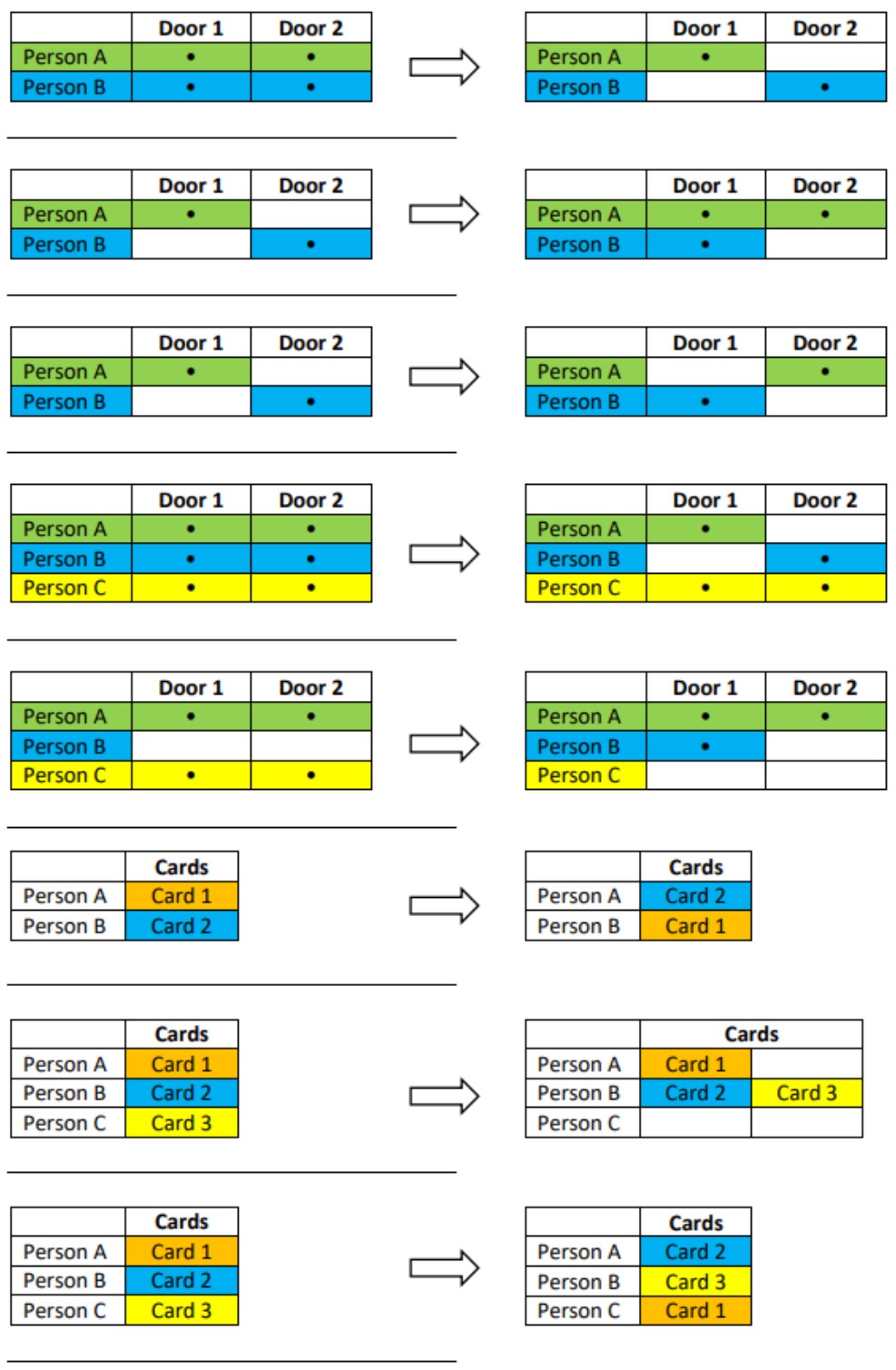
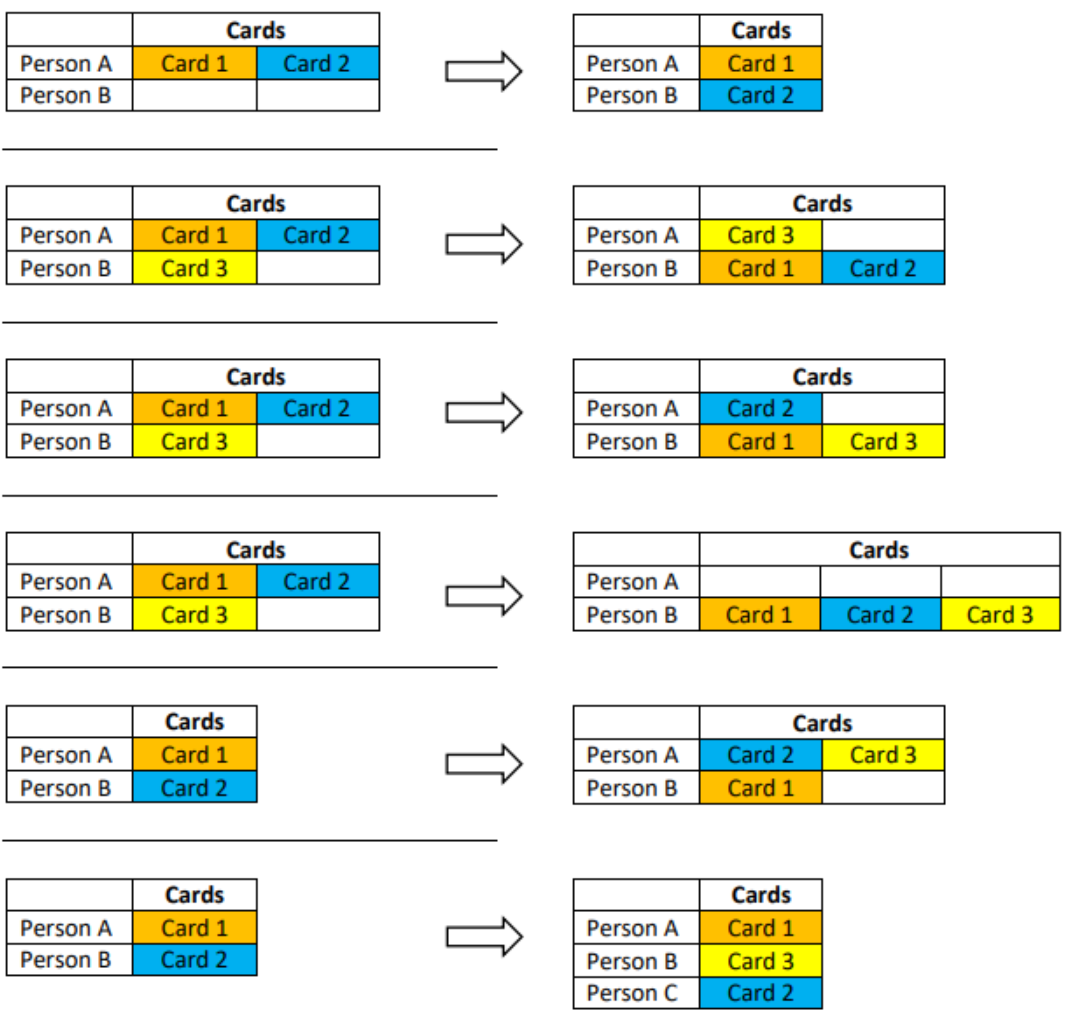
Cleanup: Restore the approved person, credential and access-right baseline after all scenarios.
T-ACS-01 | Door Manual Override On/Off
This test verifies behavior of the driver implementation for controlling of manually overridden doors.
Manually overridden doors doesn't allow to enter the person, even when it has valid credential with proper access rights.
Step |
Test Steps |
Expected Results |
|---|---|---|
1 |
Execute command “Door manual override” on door |
Status of the door is DoorManualOverrideOn when overridden. |
2 |
Try to open the door using valid credential |
During door lockout door ignores any attempt to open it with valid credentials |
3 |
Execute command “Door manual override off” on door |
— |
Expected audit / evidence
'PERSON' sent command 'Door Manual Override Off' to 'DEVICE'.
Command 'Door Manual Override Off' from 'PERSON' was delivered to 'DEVICE'.
'DEVICE' manual override finished.
'PERSON' sent command 'Door Manual Override' to 'DEVICE'.
Command 'Door Manual Override' from 'Support' was delivered to 'Door 1'.
‘DEVICE' manual override started.
Where
DEVICE represents the door name
PERSON represents the name of person who executed the command
Cleanup: Turn off temporary manual override and restore the approved door state.
T-ACS-02 | Door Unlocked Permanently
This test verifies behavior of the driver implementation for remote controlling of doors.
This test focuses on handling events and states when door is unlocked permanently.
Step |
Test Steps |
Expected Results |
|---|---|---|
1 |
Execute command “Door unlock permanently” on door |
After issuing the command "Door unlock permanently ", the door status is set to Unlocked Permanently. |
2 |
When door contact is present, simulate real door opening |
During real door opening, the door contact is activated and the door status is set to Opened. |
3 |
Execute command “Door lock” on door |
After issuing the command " Door lock ", but door contact is still opened, door status remains Opened. |
4 |
When door contact is present, simulate real door closing |
After real door closing, the door contact is deactivated or the door relay timer expires, the door status returns to Locked (normal) state. |
Expected audit / evidence
'PERSON' sent command 'Door Unlock Permanently' to 'DEVICE'.
Command 'Door Unlock Permanently' from 'PERSON' was delivered to 'DEVICE'.
'DEVICE' unlocked permanently.
'PERSON' sent command 'Door Lock' to 'DEVICE'.
Command 'Door Lock' from 'PERSON' was delivered to 'DEVICE'.
'DEVICE' locked.
Where
DEVICE represents the door name
PERSON represents the name of person who executed the command.
Notes
Based on the door controller type, the event 'DEVICE' unlocked instead of 'DEVICE' permanently unlocked may be stored in the audit log.
Cleanup: Restore the approved door-locking state.
T-ACS-03 | Door Forced Open
This test verifies behavior of the driver implementation for remote controlling of doors.
This test focuses on handling events and statuses during the unauthorized opening of the door in a protected system.
Step |
Test Steps |
Expected Results |
|---|---|---|
1 |
Activate door contact when door is locked |
Door status is set to Forcibly open |
Expected audit / evidence
Door 'DEVICE' forced open.
Where
DEVICE represents the door name
Cleanup: Close the door and restore the approved protection state.
T-ACS-04 | Door Open Too Long
This test verifies behavior of the driver implementation for remote controlling of doors.
This test focuses on handling events and states during the held open alarm on the door.
Step |
Test Steps |
Expected Results |
|---|---|---|
1 |
Use the credential to access the access point |
After successful credential authorization, the door status is set to Unlocked. |
2 |
Activate door contact |
Door status is set to Open when the door contact is activated. |
3 |
Keep the contact activated longer than the predefined time |
After predefined open time expiration, the door status is set to Open Too Long. |
Expected audit / evidence
Door 'DEVICE' open too long.
Where
DEVICE represents the door name
Notes
The event "Door 'DEVICE' open too long." depending on the "Report DOTL" setting in Device
Cleanup: Close the door and restore the approved access baseline.
T-ACS-05 | Door Remote Unlock
This test verifies behavior of the driver implementation for remote controlling of doors.
Step |
Test Steps |
Expected Results |
|---|---|---|
1 |
Execute command “Unlock” on door |
After issuing the command "Unlock", the door status is set to Unlocked. |
2 |
When door contact is present, simulate real door opening |
During real door opening, the door contact is activated and the door status is set to Opened. |
3 |
When door contact is present, simulate real door closing |
After real door closing, the door contact is deactivated and the door status is set to Unlocked. If the door relay timer also expires, the door status returns to Locked (normal) state. |
Expected audit / evidence
'PERSON' sent command 'Unlock' to 'DEVICE'.
Command 'Unlock' from 'PERSON' was delivered to 'DEVICE'
'DEVICE' unlocked.
'DEVICE' opened.
'DEVICE' closed.
'DEVICE' locked.
Where
DEVICE represents the door name
PERSON represents the name of person who executed the command
Notes
Opened, closed and locked events may not be stored in the audit log, depending on door type and door settings in the Device
Cleanup: Restore the approved door state.
T-EVT-01A | Personal Management - Handling Access Granted Event
This test verifies behavior of the driver when receiving the access granted event from the device.
Step |
Test Steps |
Expected Results |
|---|---|---|
1 |
Create new person |
— |
2 |
Assign the person a valid credential |
— |
3 |
Grant the person access to the access point |
— |
4 |
Send credentials to the device |
— |
5 |
Use the credential to access the access point |
Person got access to specific access point Access point status is set to Unlocked |
Expected audit / evidence
Access granted to 'PERSON' at 'DEVICE' using ' CREDENTIAL_TYPE' 'CREDENTIAL_NAME' at reader 'READER'.
Where
DEVICE represents the door name
PERSON represents the name of person who used authorized credential
CREDENTIAL_TYPE represents credential type used to get access
CREDENTIAL_NAME name of credential used to get access
READER represents reader where credentials where read
Cleanup: Remove synthetic persons and access rights; restore the approved baseline.
T-EVT-01B | Personal Management - Handling Access Denied Event - No access
This test verifies behavior of the driver when receiving the access denied event from the device.
Step |
Test Steps |
Expected Results |
|---|---|---|
1 |
Create new person |
— |
2 |
Assign the person a valid credential |
— |
3 |
Grant the person access to the access point |
— |
4 |
Deny the person access to another access point |
— |
5 |
Send credentials to the device |
— |
6 |
Use the credential to access another access point |
Person did not get access to specific access point |
Expected audit / evidence
Access denied to 'PERSON' at 'DEVICE' using credential 'CREDENTIAL_NAME' on reader 'READER'. Reason: Door not allowed
Where
PERSON represents the name of person who did not get access to device
DEVICE represents the device name.
CREDENTIAL_NAME name of credentials used to get access
READER name of reader where was credential read
Cleanup: Remove synthetic persons and access rights; restore the approved baseline.
T-EVT-01C | Personal Management - Handling Access Denied Event – Unknown Credential
This test verifies behavior of the driver when receiving the access denied event from the device.
Step |
Test Steps |
Expected Results |
|---|---|---|
1 |
Revoke all access rights for Persons |
— |
2 |
Issue Full Upload command |
— |
3 |
Slide a card on correct reader |
Card will be recognized as unknown |
Expected audit / evidence
Access denied for unknown credential "CARD_NUMBER (CREDENTIAL_NAME)" at 'DEVICE'.
Where
CARD_NUMBER is unknown card number in raw format.
CREDENTIAL_NAME name of credentials type
DEVICE represents the device name.
Cleanup: Restore the approved credentials and access-right baseline.
T-UPL-02 | Disconnection During Sending Credentials To Device
This test verifies behavior of the driver’s handling of communication disconnection during sending credentials to device.
Step |
Test Steps |
Expected Results |
|---|---|---|
1 |
Send credentials to the device |
— |
2 |
During credentials sending, interrupt the connection. |
Communication is interrupted and credentials are not sent to device. |
Expected audit / evidence
'Support' sent command ' UPLOAD_TYPE' to 'DEVICE'.
Command 'UPLOAD_TYPE' from 'PERSON' was delivered to 'DEVICE'.
'UPLOAD_TYPE ' upload to 'DEVICE' started.
'UPLOAD_TYPE ' upload to 'DEVICE' failed due to communication failure (duration'UPLOAD_DURATION').
Where
UPLOAD_TYPE type of upload which was issued
DEVICE represents a name of device where the credentials are sent into.
PERSON represents a name of person who is executing the command.
UPLOAD_DURATION time period from the point when upload started to its interruption
Cleanup: Restore communication and verify actual device permissions before returning to service.
T-ACL-01 | Personal Management - Access Time Restriction
This test verifies behavior of the driver implementation for time limited access scenarios, allowing to update the device configuration in that a way, that the access can be limited to some specific hours and/or days of the week.
Step |
Test Steps |
Expected Results |
|---|---|---|
1 |
Create new person |
— |
2 |
Assign the person a valid credential |
— |
3 |
Grant the person access to the access point |
— |
4 |
Restrict the access permission with time restriction |
— |
5 |
Send credentials to the device |
— |
6 |
Check whether the restriction is applied correctly |
The assigned time restriction is correctly applied When person has no limitation in access it gets access granted event. When person has limited access by time restriction it gets access denied event. |
Expected audit / evidence
Access granted to 'PERSON' at 'DEVICE' using 'CREDENTIAL_TYPE' 'CREDENTIAL_NAME' at reader 'READER'.
Access denied to 'PERSON' at ''DEVICE' using credential 'CREDENTIAL_TYPE' on reader 'READER'. Reason: Door not allowed
Where
PERSON represents a name of person who used credentials on access point
DEVICE represents a access device where person requested access out of time restriction
CREDENTIAL_TYPE represents credential type used to get access
CREDENTIAL_NAME name of credential used to get access
READER name of reader where was credential read
Notes
Some devices might impose limits on the complexity and/or amount of available time restrictions. These limits must be enumerated in test notes and validated during this test.
Cleanup: Restore the approved access-time restrictions and test identities.
T-ACL-02 | Personal Management - Holiday Support
This test verifies behavior of the driver implementation for manipulation with a list of holidays in the device, allowing to define the different rules for holidays than for normal working days or weekends.
Step |
Test Steps |
Expected Results |
|---|---|---|
1 |
Create new person |
— |
2 |
Assign the person a valid credential |
— |
3 |
Create holiday set, containing the todays date |
— |
4 |
Send credentials to the device |
— |
5 |
Check whether the restriction is applied correctly |
The assigned time restriction is correctly applied |
6 |
Modify holiday set that it doesn't contain todays date |
— |
7 |
Send credentials to the device |
— |
8 |
Check whether the restriction is applied correctly |
The assigned time restriction is correctly applied |
Notes
Some devices might impose limits on the complexity and/or amount of available time restrictions. These limits must be enumerated in test notes and validated during this test.
Cleanup: Restore the approved holiday set and test identities.
T-ALM-03 | Tamper
This test verifies behavior of the driver when processing the events about the device tampers on Access systems, Alarm systems or devices with similar functionality.
Step |
Test Steps |
Expected Results |
|---|---|---|
1 |
Issue a tamper on detector, while detector is in disarmed state |
Until the alarm confirmation, the detector has tamper status. |
2 |
Restore the tamper |
— |
3 |
Confirm the alarm from C4 UI. |
— |
Expected audit / evidence
Tamper on 'DEVICE'.
Tamper completed on 'DEVICE'.
Where
DEVICE where tamper was issued
Notes
Variation of this test is to confirm the tamper alarm from device keypad
Test must be reproducible on all devices that are capable of generating the tamper alarm
In case the device ends the tamper state automatically, there is no need to confirm the tamper from C4 UI and the test is also considered as passed.
Cleanup: Restore the tamper circuit and approved alarm state.
T-CFG-08 | Device Tree Configuration Validation
This test verifies behavior of the driver in case the device configuration tree is complete and contains additional nodes that are not present on device.
Step |
Test Steps |
Expected Results |
|---|---|---|
1 |
Stop the endpoint |
— |
2 |
Create an complete configuration device tree with additional nodes of each type that are not presented on device. |
— |
3 |
Set address of additional nodes to fictive value. |
— |
4 |
Start the endpoint. |
Driver starts. |
5 |
Check the status of all nodes in device tree. |
Nodes that are presented on device have equal status to real status of device. Nodes that are not presented on device have unknown status (black). |
Cleanup: Remove fictitious test nodes and restore the approved tree.
T-SEC-01 | Connection Authentication Failure
This test verifies behavior of the driver during communication establishment process, when an invalid connection password, user name or encryption key is defined in device tree configuration.
Step |
Test Steps |
Expected Results |
|---|---|---|
1 |
Stop the endpoint |
— |
2 |
Set the wrong password, username or encryption key or other properties related to the connection establishing. |
— |
3 |
Start the endpoint. |
Endpoint did not connect to device. |
Expected audit / evidence
Authentication to 'DEVICE' failed.
'DEVICE' failed to start.
Where
DEVICE represents the name of the device.
Cleanup: Restore the approved communication credentials and keys before restarting.
T-EVT-02 | Device Audit Log Retrieval
This test verifies behavior of the driver when transferring events from the device audit log after establishing communication. Standard behavior is that the driver reads all events from the device audit log, even events that happened during periods of disconnection.
Step |
Test Steps |
Expected Results |
|---|---|---|
1 |
Stop the endpoint |
— |
2 |
Wait for 1 minute |
— |
3 |
Execute operation on device that leads to the entry in the device audit log |
— |
4 |
Wait for 1 minute |
— |
5 |
Start the endpoint. |
All events from the device that happened during disconnection are stored in audit log with original time of the events on device, not with the time when they were read out from the device. |
Expected audit / evidence
'DEVICE' started.
Where
DEVICE is a name of driver that was started
Cleanup: Restore the approved circuit state and retain the recovered-event evidence.
T-HLT-01 | Mains Failure
This test verifies behavior of the driver in case of mains failure of the device that is backed up by battery or other additional power source.
Step |
Test Steps |
Expected Results |
|---|---|---|
1 |
Disconnect the mains power |
— |
2 |
Wait until the disconnection is signaled |
When mains power is disconnected device status is set to Fault state |
3 |
Reconnect mains power |
— |
4 |
Wait until the reconnection is signaled. |
After mains power is reconnected device status is set to real status of device. |
Expected audit / evidence
'DEVICE' mains failed.
Restore 'DEVICE' after a mains failure.
Where
DEVICE represents the device where the power failure was detected.
Notes
Test must be replicable on all types of devices that have independent powering and are backed up by battery or another power source
Cleanup: Restore mains power and verify the approved device state.
T-HLT-02 | Battery Failure
This test verifies behavior of the driver event handling in case of battery or other backup power fault.
Step |
Test Steps |
Expected Results |
|---|---|---|
1 |
Disconnect the backup power |
— |
2 |
Wait until the disconnection is signaled |
When backup power is disconnected device status is set to Fault state |
3 |
Reconnect the backup power |
— |
4 |
Wait until the reconnection is signaled |
After backup power is reconnected device status is set to real status of device. |
Expected audit / evidence
'DEVICE' – low battery.
'DEVICE' – low battery missing
'DEVICE' – low battery restored.
Where
DEVICE represents the device where the power failure was detected.
Notes
Test must be replicable on all types of devices that have independent power and are backed up by battery or another power source.
Cleanup: Restore backup power and verify the approved device state.