C4 License Policy
and Activation Process
Policy, lifecycle and operational procedure for activation and management of licenses for C4 installations
This document defines the license policy, activation sequence, online and offline activation procedures, device assignment rules, security controls, records, exceptions and operational handover requirements for C4 installations.
Controlled production document. Review after material changes to the C4 licensing model or activation workflow.
© Gamanet. All rights reserved.
The Contents lists first-level sections. The cover is included in the page count but does not display a page number.
Document status: Production | Version 1.1 | Effective date: 11 October 2026
1. Purpose, Scope and Document Priority
This document establishes the production policy and operational process for requesting, activating, extending, assigning, monitoring and recording licenses for C4 System installations. It is intended to prevent activation on an incorrect target, business-code conflicts, unlicensed device operation, avoidable expiry, insecure handling of activation material and incomplete operational handover.
1.1 Purpose
Define the C4 license model and the relationship between an Edition, Plugin licenses, additional extensions and external applications.
Set mandatory activation principles, including activation order, business-code compatibility and permanent installation binding.
Describe the online and offline activation procedures and the post-activation verification criteria.
Define responsibilities for the license owner, business partner, administrator, supplier, support team and Plugin developer.
Provide controls for device assignment, mixed validity periods, hardware changes, testing, security, records, exceptions and troubleshooting.
1.2 Scope
The policy covers C4 server licenses (Editions), Plugin licenses, activation keys, Portal Services, C4 Client, commercial and time-limited entitlements, online and offline activation, device assignment and approved installation changes. The device-addressability sections apply to C4 Transformers. Earlier C4 generations may use a package-based model and shall be managed according to their applicable product documentation and contractual terms.
The policy applies to production, demonstration, testing, training and development environments, including single-server, multi-server, virtualized, clustered and failover deployments where the Edition defines the number of licensed servers.
1.3 Out of scope
Commercial pricing, reseller margin, taxes and payment terms.
The complete contractual license grant, warranty, liability and legal remedies, which are governed by the applicable agreement and order.
Plugin-specific license metrics not defined in the relevant Plugin documentation or by the Plugin developer.
Technical methods intended to bypass or modify license enforcement.
1.4 Document priority and interpretation
This document is an operational policy and procedure. If it conflicts with a signed agreement, accepted order, issued activation key, Portal Services record or product-specific license terms, the more specific contractual or issued entitlement prevails. Interface labels may vary slightly by C4 version, but the control objectives and sequence remain applicable.
The terms shall and must identify mandatory controls. The term "should" identifies recommended implementation guidance. Any exception to a mandatory control requires approval through the authorized C4 commercial or support channel and must be recorded.
Important: Activation permanently consumes the activation key for the selected installation. Verify the target installation, Edition, business code, server identity, version, quantities and validity before confirming activation.
2. Policy Principles
Authorization within scope. A C4 license authorizes use only within the functions, period, server count, Plugin types and quantities contained in the entitlement.
Edition first. The server license - Edition - shall be activated before any Plugin or additional extension key.
Permanent installation binding. An activated key is bound to the selected C4 installation and to the licensed server MAC address or addresses. It shall not be treated as transferable or reusable.
Business-code consistency. Additional keys shall use the same business code as the active Edition unless an approved Edition replacement process is performed.
Correct target and least entitlement. Keys shall be activated only on the intended customer, environment and final server topology. Purchased or time-limited capacity shall be assigned only where required.
Separation of commercial and non-commercial use. EDU, demo and SDK licenses shall not be used as substitutes for purchased production licenses.
Addressable assignment. In C4 Transformers, each addressable Plugin license shall be assigned to a specific licensed device, manually or through the automatic resolution function.
Independent expiry. Each C4 Transformers license may have its own validity period. Expiry of a time-limited license shall not invalidate unrelated lifetime licenses.
Version control. An Edition applies to a defined C4 version. Rights to a newer version require the applicable Upgrade entitlement.
Traceability and security. Activation keys, offline license packages, assignments, changes and exceptions shall be protected and recorded.
No circumvention. Cloning, copying, altering or otherwise attempting to bypass the licensed scope is prohibited.
Note: C4 may be installed and configured without a license. A valid license is required to connect to, communicate with and control external systems and to activate third-party Plugins.
3. License Model and Components
3.1 Dimensions of the license scope
The licensed scope is determined by the following dimensions:
Available functionality on C4 Server and C4 Client.
Usage period, including time-unlimited commercial use or a defined time-limited evaluation or test period.
Number of servers on which the C4 System may run for the installation.
C4 version to which the Edition applies.
Number and type of Plugins, devices, extensions and add-ons.
Any product-specific condition stated in the activation key, order or license terms.
3.2 License components
Component |
Defines |
Operational rule |
|---|---|---|
Server license (Edition) |
C4 functionality, supported version and number of licensed servers. |
Mandatory foundation of the installation. Activate before all other keys. |
Plugin license |
Licensed device type and quantity for a Driver or other licensed Plugin metric. |
Activate after the Edition, then assign addressable licenses to devices. |
Additional extension or add-on |
Optional capability such as a Connector, Panel, Smart Routine, Report Base or other module. |
May be contained in the Edition key or in a separate compatible key. |
External application license |
Rights for an independent application that uses C4 for monitoring or control. |
Licensed separately according to the application-specific model. |
3.3 C4 extension areas
Extension area |
Purpose |
Typical licensed object |
|---|---|---|
Driver |
Connection to and control of external devices. |
As defined by the Driver developer, commonly a control unit, DVR/NVR, camera or another device type. |
IS Connector |
Synchronization or integration with customer information systems. |
Connector instance, interface or another defined metric. |
Panel |
Extension of C4 Client with a dedicated user interface. |
Panel or module entitlement. |
Smart Routine |
Automated process or customer-specific logic. |
Routine or module entitlement. |
Report Base |
Reusable reporting capability. |
Report module or package entitlement. |
External application |
Independent application using C4 for monitoring or control. |
Defined separately for the application. |
3.4 Server binding and topology
The Edition specifies the number of licensed servers. The license is bound to the MAC address of the server or, for a licensed multi-server topology, to the MAC addresses of the applicable servers. Once activated, the key is permanently associated with that installation.
Use the final production server identity. Do not activate on temporary hardware, a staging clone or an installation that will be discarded.
For virtual machines, use stable and reserved virtual network adapter MAC addresses. Infrastructure changes that may regenerate a MAC address shall be planned as a licensing change.
For clustered or active/standby deployments, confirm that the ordered Edition covers the complete server count and that all required server identities are available before activation.
A backup, image or clone of an activated server does not create an additional licensed installation.
3.5 Duration, version and Upgrade
Commercial licenses are provided for an unlimited duration, while test, demo, training and SDK licenses are time-limited. Unlimited duration does not automatically grant rights to future C4 versions. The Edition identifies the licensed version; the C4 licensing model provides a one-year warranty for that version, and use of a newer version requires the applicable Upgrade.
3.6 License addressability in C4 Transformers
C4 Transformers manages each addressable license as an independent unit. A license can be assigned to a specific device, and each license can have its own expiration date. This removes the package-wide expiry dependency used by earlier generations and enables a temporary test license to coexist with lifetime production licenses without invalidating them.
4. License Sources, Business Codes and
Permitted Use
4.1 License sources
License source / type |
How obtained |
Typical validity |
Permitted use |
|---|---|---|---|
Education license (EDU) |
Issued through the C4 Education portal after completion of an applicable course. |
Time-limited, typically aligned with training validity. |
Training, demonstration and testing by the entitled person. No commercial use. |
Commercial license (SLS) |
Ordered through an authorized C4 business partner or supplier and generated for the customer installation. |
Unlimited duration for the licensed version and scope. |
Customer production use within the accepted order and license terms. |
End-customer test license |
Requested through the authorized business partner or Gamanet sales for a defined customer, scope and period. |
Time-limited. |
Controlled evaluation or test at the named customer installation. |
Demo license |
Issued for evaluation where the recipient does not hold the relevant partner entitlement. |
Time-limited, commonly several weeks. |
Demonstration and evaluation only. No commercial production use. |
Developer SDK license |
Issued after the applicable Developer course. |
Time-limited and bound to the developer computer. |
Plugin development and testing only. No commercial production use. |
4.2 Business code
The first three characters of an activation key identify its business code, for example EDU-XXXX-XXXX-XXXX or SLS-XXXX-XXXX-XXXX. The business code determines the source and compatibility of the entitlement.
An installation can be extended only with keys that use the same business code as the Edition.
An EDU Edition can be extended with compatible EDU keys but not with an SLS key as an add-on.
An SLS Edition can be extended with compatible SLS keys but not with EDU keys.
An SLS Edition may replace the Edition on an installation activated under another business code, but this is an Edition replacement, not an extension. The replacement shall be planned and approved before activation.
The full key shall not be placed in general documentation, screenshots or unprotected messages. Use a masked identifier when recording or discussing a key.
4.3 Activation-key composition and order
A single activation key may contain the Edition together with Plugin licenses or other extensions. Alternatively, the Edition and extensions may be delivered in separate keys. Where multiple keys are used, the activation order is mandatory:
Activate the Edition key or the key that contains the Edition.
Verify the active Edition, C4 version, server count and business code.
Activate additional Plugin and extension keys with the same business code.
Assign addressable Plugin licenses to devices and complete verification.
Warning: Do not attempt to activate an extension key before the Edition or to mix business codes. Stop and resolve the entitlement if the key content or business code is not the expected one.
5. Roles and Responsibilities
Role |
Primary responsibilities |
|---|---|
License owner / end customer |
Approve the required scope; use C4 only within the licensed entitlement; provide accurate installation and ownership information; protect credentials and activation material; fund and authorize required commercial changes. |
Authorized business partner |
Translate customer requirements into the correct Edition, server count, Plugins and quantities; validate the order; deliver activation keys securely; coordinate installation, activation, handover and first-line support. |
C4 administrator / engineer |
Install and register C4; confirm server identity; activate keys in the correct order; assign device licenses; verify status; preserve evidence; monitor expiry and raise exceptions before operational impact. |
Authorized C4 supplier / Gamanet |
Generate entitlements based on the accepted order or training program; operate Portal Services; provide commercial or technical exception handling; issue approved test or replacement entitlements where applicable. |
Plugin developer |
Define the licensed device or other Plugin metric; document the metric and compatible versions; ensure development and testing use the appropriate SDK or test entitlement. |
Infrastructure owner |
Maintain stable server and virtual network identities; notify the C4 administrator before hardware, NIC, virtualization, cluster or disaster-recovery changes that may affect license binding. |
Trained engineer or developer |
Use EDU or SDK entitlements only on the entitled computer and only for training, demonstration, development or testing; prevent commercial use or sharing. |
Separation of duties should be used where practical: the person who validates the commercial scope should not be the only person who confirms the final activation target. At minimum, the customer or project owner shall approve the installation identity and the key content before activation.
6. Activation Preconditions and Planning
6.1 Required inputs
Accepted commercial order, training entitlement or approved test request.
Customer name, installation name, environment and responsible owner.
Target C4 version and Edition.
Server topology, licensed server count and stable MAC address or addresses.
Required Plugin types, license metrics and quantities.
Activation key or keys, with verified business code, contents and validity.
Registered Portal Services account with access to the target installation.
Decision whether activation will be performed online or offline.
Approved change window, administrator access and operational backup or recovery point.
Location for storing the activation record and handover evidence.
6.2 Technical and administrative prerequisites
The C4 System is successfully installed on the final target environment.
C4 registration is complete. Registration is the final step in concluding the License Agreement and is required for subsequent license management.
The correct installation is visible in Portal Services and the administrator is authorized to manage it.
The server identities and topology match the ordered Edition. No planned infrastructure change will alter the licensed MAC address immediately after activation.
The current Edition business code, if any, is known and compatible with all additional keys.
A backup or documented recovery point exists before a material activation, Edition replacement or Upgrade.
The full activation key is available only to authorized personnel and has not been exposed in public tickets or shared storage.
6.3 Pre-activation validation
Validation item |
Required confirmation |
|---|---|
Target installation |
Customer, installation name/ID, environment and ownership are correct. |
Edition and version |
The Edition and C4 version match the order and implementation plan. |
Server topology |
The licensed number of servers and their MAC addresses are final and correct. |
Business code |
The key business code matches the active Edition or an approved Edition replacement is planned. |
Key contents |
Edition, Plugins, quantities, validity and any expiration dates match the intended scope. |
Activation sequence |
The Edition will be activated before separate Plugin and extension keys. |
Activation mode |
Online or offline procedure and responsible administrator are confirmed. |
Operational readiness |
Change window, backup, customer approval and evidence repository are ready. |
Important: If any validation item is uncertain, do not activate the key. Once the activation is confirmed, it is irreversible and the key cannot be used on another installation.
6.4 Activation completion criteria
Activation is complete only when all of the following are true:
The expected Edition and all approved extensions are visible in C4 Client.
Portal Services and C4 Client show consistent installation and license data, subject to normal synchronization time.
All required addressable Plugin licenses are assigned to the intended devices.
No production device that requires a license remains unintentionally unlicensed.
Expiration dates and warnings are reviewed, and each time-limited license has an owner and exit plan.
The activation and assignment evidence is recorded and handed over to the license owner or project owner.
7. End-to-End License Activation Flow
The lifecycle below defines the mandatory sequence from entitlement planning through activation, device assignment, verification, operational handover and ongoing license maintenance.
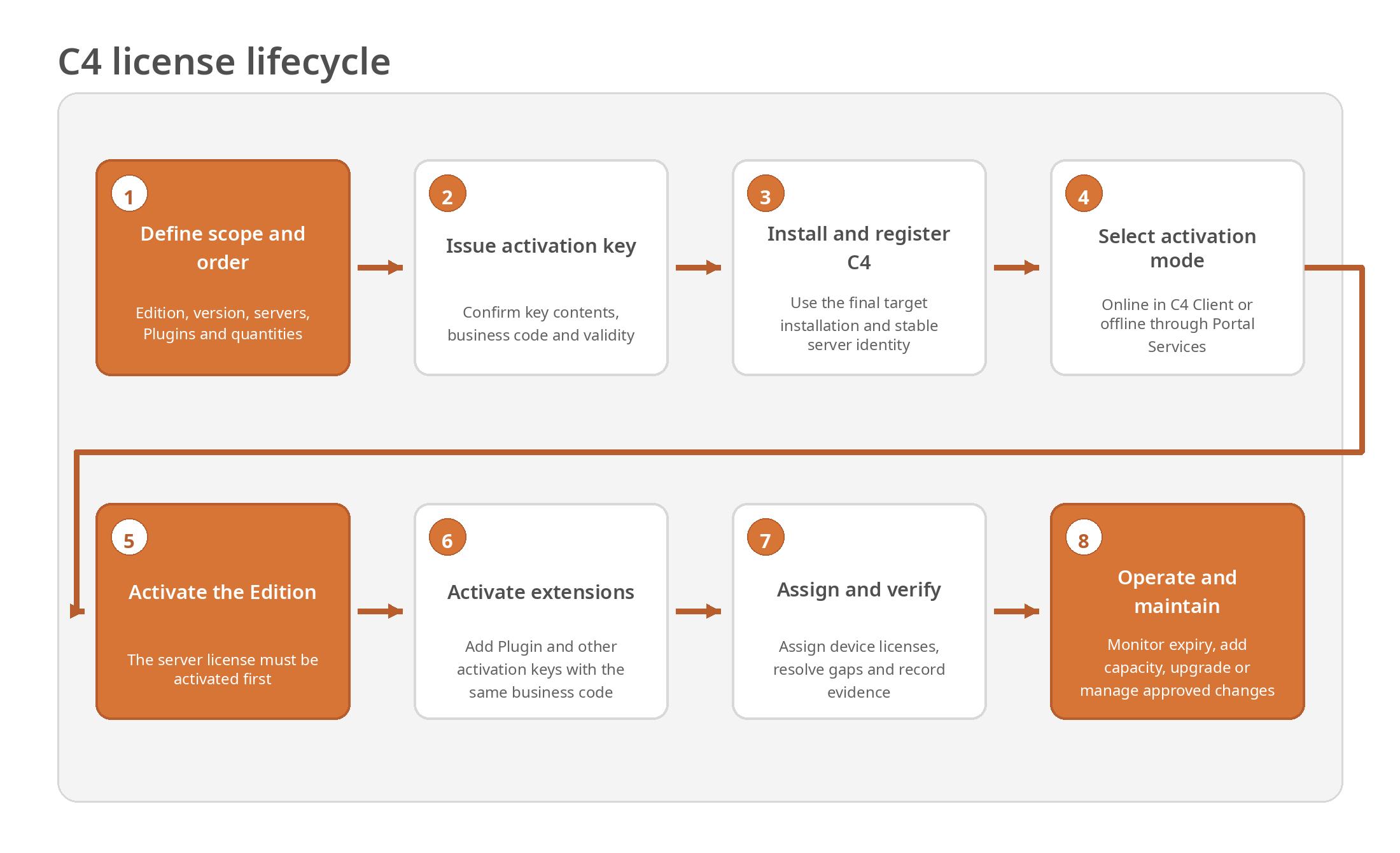
Figure 1. End-to-end C4 license lifecycle.
7.1 Process phases
Define the entitlement. Confirm the required Edition, C4 version, server topology, Plugins, licensed objects, quantities and validity.
Generate and deliver the key. The authorized supplier generates the activation key from the order or training entitlement. The key is delivered through an approved secure channel.
Install and register C4. Install the final target environment and complete registration so the installation can be managed in Portal Services.
Choose online or offline activation. Use C4 Client when the target has Internet access. Otherwise activate through Portal Services on a connected computer and import the resulting package.
Activate the Edition. Review the modules in the key and confirm the permanent activation only after the target and scope are verified.
Activate compatible extensions. Activate additional keys only after the Edition and only where their business code matches the active Edition.
Assign and verify. Assign addressable Plugin licenses, resolve any unlicensed devices and confirm all quantities and expiration dates.
Operate, monitor and change. Maintain records, monitor expiry, purchase additional capacity or an Upgrade, and manage hardware or migration changes through the approved process.
7.2 Process inputs and outputs
Process inputs |
Required outputs |
|---|---|
Approved entitlement, target installation, version, topology, activation key, Portal access and change authorization. |
Activated Edition and extensions on the correct installation. |
Plugin metrics, quantities and device inventory. |
Addressable licenses assigned to the correct devices. |
Validity periods and intended temporary use. |
Recorded expiry owner, monitoring and exit plan. |
Customer and project ownership information. |
Completed activation record, evidence and operational handover. |
8. Online and Offline Activation Procedures
8.1 Choosing the activation mode
Mode |
Use when |
Key characteristics |
|---|---|---|
Online activation in C4 Client |
The target C4 installation can access Portal Services. |
The administrator logs in, enters the key, reviews the entitlement and confirms activation. Changes synchronize with Portal Services. |
Offline activation through Portal Services |
The target C4 installation has no Internet access. |
The key is activated on an Internet-connected computer, a license package is downloaded and securely imported into C4 Client. |
8.2 Online activation through C4 Client
Open the Licenses panel. In C4 Client, open the license-management area and select Activate Key.
Start the Key Activation Process. Because the target is online, select Login and authenticate to Portal Services with an authorized account.
Enter the activation key. Enter the full key only in the authorized activation interface.
Review the activation overview. Confirm the Edition, Plugin modules, quantities and expiration dates shown by the key. If anything differs from the order, cancel and resolve the discrepancy.
Confirm activation. Select Activate and acknowledge that the key will be permanently used and that the action is irreversible.
Verify the result. Confirm that the new license rows appear in C4 Client and that the data is synchronized with Portal Services.
Repeat for compatible extension keys. If additional keys are supplied, activate them only after the Edition and only when the business code matches.
8.3 Offline activation through Portal Services
Open Portal Services. On an Internet-connected computer, open the Licenses section at https://my.c4portal.com/licenses and select the correct registered installation.
Select Activate Key. Enter the activation key and continue to the entitlement overview.
Review the key contents. Confirm the Edition, Plugin modules, quantities and expiration dates before activation.
Activate and download. Confirm the activation, then select Download license to obtain the license package for the target installation.
Transfer securely. Move the package to the target environment using an approved secure method, such as controlled removable media. Protect the package against alteration and unauthorized access.
Import in C4 Client. In the Licenses panel, select Activate Key, then Import License Package, and select the package downloaded for the same installation.
Verify and clean up. Confirm the new license data, record evidence and remove temporary copies from unsecured transfer locations.
Portal Services: https://my.c4portal.com/licenses
8.4 Post-activation verification
Verification area |
Acceptance criterion |
|---|---|
Installation identity |
The activated license is shown on the intended customer installation and environment. |
Edition |
The correct Edition, C4 version, server count and business code are active. |
Extensions |
All approved Plugin and add-on modules are visible with the ordered quantities. |
Validity |
Unlimited and time-limited validity periods are correct and understood. |
Assignment |
Required devices are licensed; Used and Non Licensed Devices values are reconciled. |
Synchronization |
C4 Client and Portal Services show consistent data. |
Evidence |
Activation date, responsible person, masked key identifier and screenshots or exported evidence are stored. |
Warning: There is no self-service rollback described for a key activated on the wrong installation. Stop further work, preserve evidence and escalate immediately through the authorized C4 support and commercial channel.
9. License Extension, Upgrade and
Installation Changes
9.1 Extending an existing installation
An installation can be extended with additional activation keys for Plugins, devices or other extensions. The same online or offline activation procedure is used, subject to the following controls:
The Edition is already active.
The additional key uses the same business code as the Edition.
The Plugin type, licensed object, quantity, validity and target customer match the approved change.
The administrator records the additional activation and assigns addressable licenses to devices.
The post-activation totals are reconciled with the order and device inventory.
9.2 Edition replacement and business-code change
A business-code change is not performed by adding a mismatched key. Where a commercial SLS Edition is intended to replace an EDU or other Edition, the replacement shall be treated as a controlled Edition change. The responsible business partner or supplier shall confirm the replacement scope, impact, activation order and required evidence before the key is used.
9.3 Upgrade to a newer C4 version
Use of a newer C4 version requires the applicable Upgrade. Before upgrading:
Confirm that the Upgrade covers the intended Edition and installation.
Verify compatibility of all Drivers, Connectors, Panels and other Plugins with the target C4 version.
Review server topology, backups, database and rollback arrangements according to the applicable upgrade procedure.
Confirm whether a new activation step or updated license package is required for the target version.
Record the previous and new version, Upgrade entitlement and completion evidence.
9.4 Hardware, MAC address and virtualization changes
Because the license is bound to server MAC addresses, infrastructure changes can affect license validity. Before replacing a server, network adapter, virtual NIC, cluster node or virtualization configuration:
Identify every server identity covered by the Edition and the planned change.
Contact the authorized business partner or support channel to determine the required replacement or exception process.
Do not assume that copying a license package, restoring a VM image or changing a MAC address transfers the entitlement.
Use stable virtual MAC addresses and prevent automated infrastructure processes from silently regenerating them.
Record the old and new identities, approval, date, reason and resulting license state.
9.5 Migration, disaster recovery and restoration
A backup restores software and data; it does not create a second licensed installation or a transferable entitlement. A recovery or migration that changes the licensed installation or server identity shall be coordinated with authorized support. The old environment shall not remain in use unless the Edition explicitly covers both environments or a separate approved entitlement exists.
9.6 Decommissioning
Stop C4 use on the decommissioned installation and preserve the final activation record.
Remove activation keys and offline packages from unsecured work folders, email, removable media and shared locations.
Do not attempt to reuse the activated key on a replacement installation.
Coordinate any replacement entitlement through the authorized supplier or support process.
10. Device License Assignment and Mixed Expiry
10.1 License status indicators
C4 Client value |
Meaning |
Required interpretation |
|---|---|---|
Licenses |
Total activated licenses for the same licensed device type and expiration date. |
Compare with ordered capacity and the number of devices that require this license. |
Used |
Licenses already assigned to specific devices. |
Confirm the assignment matches the intended device inventory. |
Non Licensed Devices |
Configured devices of the type that do not have a license assigned. |
Investigate every production value greater than zero and either assign, purchase, remove or formally exclude the device. |
Red status or row |
An item requires attention, commonly because expiry is approaching or has occurred. |
Review immediately and implement renewal, reassignment, removal or another approved corrective action. |
10.2 Manual assignment - Manage
Use manual assignment when the administrator must choose the exact device that receives a license, especially where capacity is limited or licenses have different expiration dates.
In the relevant license row, select Manage.
Review the eligible devices and the available, licensed and unlicensed counts.
Select the device or devices that shall receive the license.
Confirm the selection with Apply.
Verify that Used and Non Licensed Devices changed as expected and record any remaining gap.
10.3 Automatic assignment - Resolve Automatically
Use automatic assignment for bulk operations where the available licenses can be distributed without manually selecting each device.
Select Resolve Automatically in the Licenses panel.
Review the assignment proposed by C4 before applying it.
Confirm the assignment with Apply.
Verify the resulting Used and Non Licensed Devices counts and manually correct any assignment that does not match the operational intent.
10.4 Assignment rules
A license can be assigned only to an eligible device of the licensed type defined by the Plugin developer.
Assignment cannot exceed the activated quantity. Where devices exceed licenses, some devices remain unlicensed.
Automatic assignment does not remove the administrator responsibility to review the result.
A lifetime license and a time-limited license of the same type shall be assigned deliberately. Critical production operation should not depend on a temporary test license unless the license owner has approved the risk and exit plan.
When a device is removed, replaced or repurposed, review the license assignment and records so that available capacity is not unintentionally stranded.
10.5 Mixed validity periods and expiry
C4 Transformers can contain unlimited-duration and time-limited licenses for the same Plugin type. Each license expires independently. The expiry of a time-limited license affects the device to which that license is assigned; it does not expire unrelated lifetime licenses.
Identify every time-limited license, its assigned device, owner and expiration date.
Before expiry, purchase or issue a replacement entitlement, reassign an appropriate license, remove the device from service or conclude the approved test.
After any change, confirm that every required production device has a valid assigned license.
Note: Activation and assignment are separate steps. A successfully activated Plugin key can still leave devices unlicensed until the licenses are assigned.
11. Test, Demo and Developer Licenses
Entitlement |
Intended user / environment |
Controls |
|---|---|---|
EDU training license |
Engineer, administrator or partner participant who completed the applicable course. |
Time-limited; tied to training entitlement; used for learning, demonstration and test; not for customer production or commercial service. |
Course-specific Plugin entitlement |
Trained engineer testing the device or Plugin covered by the course. |
Bound to the entitled engineer computer; quantity and modules are defined by the issued key and current course entitlement. |
End-customer test license |
Named customer and installation evaluating a defined C4 scope. |
Time-limited; formally requested; scope, owner, expiration and exit plan recorded; not a substitute for a production purchase. |
Demo license |
Prospective user or organization without the applicable partner entitlement. |
Short-term evaluation only; no commercial production use. |
Developer SDK license |
Plugin developer who completed the applicable Developer course. |
Time-limited; bound to the developer computer; development and testing only; no commercial production use. |
11.1 Mandatory controls for time-limited licenses
Record the purpose, customer or individual, installation, scope, issue date, expiration date and responsible owner.
Keep the entitlement separate from production licensing unless the approved test specifically occurs on the production installation.
Do not use a training, demo, test or SDK license to avoid or delay a required commercial purchase.
Monitor expiry and agree the test exit: purchase, replacement, reassignment, removal or test closure.
Do not promise production continuity, support coverage or SLA performance that depends on a temporary entitlement beyond its validity.
At test completion, review assignments and remove temporary access material from customer and engineer systems.
11.2 Obtaining an end-customer test license
A defined time-limited license for testing at an end-customer site may be requested through the authorized C4 business partner or Gamanet sales. The request should identify the customer, installation, purpose, C4 version, Edition, server count, required Plugins and quantities, requested period, responsible engineer and planned next step after the evaluation.
Commercial and test-license contact: sales@gamanet.com
12. Monitoring, Security,
Records and Compliance
12.1 Monitoring
The C4 administrator and license owner shall review license status regularly and before an upgrade, hardware change, Plugin rollout, capacity expansion, test expiry or operational handover. Monitoring shall include:
Edition, version, business code and server count.
Plugin quantities, Used counts and Non Licensed Devices.
All time-limited expiration dates and red attention indicators.
Consistency among the accepted order, activation record, Portal Services and C4 Client.
Upcoming infrastructure changes that could alter a licensed server identity.
12.2 Activation-key and package security
Treat activation keys and offline license packages as confidential entitlement material.
Limit access to authorized commercial, project and technical personnel.
Use approved secure channels for delivery. Do not place a full key in general documents, public tickets, chat rooms or screenshots.
Record a masked key identifier, for example SLS-XXXX-XXXX-1234, unless the protected system of record is explicitly approved to store the full value.
Protect Portal Services credentials and do not share personal accounts.
For offline activation, control removable media, verify that the package belongs to the same installation and remove temporary copies after successful import.
Do not alter an activation key, license package or license-management data.
12.3 Minimum activation record
Record field |
Minimum content |
|---|---|
Installation |
Customer, installation name/ID, environment and responsible owner. |
C4 scope |
C4 version, Edition, licensed server count and server MAC addresses. |
Entitlement |
Masked activation-key identifier, business code, source, order/training reference and activation date. |
Modules |
Edition, Plugin and extension names, license metrics, quantities and expiration dates. |
Assignment |
Used and Non Licensed Devices totals and any deliberate exception. |
Execution |
Administrator, activation mode, change ticket, approval and completion time. |
Evidence |
Portal or C4 Client screenshots/export, offline package handling record and handover confirmation. |
Changes |
Upgrades, additional keys, Edition replacement, hardware changes, recovery and decommissioning history. |
12.4 Audit and reconciliation
The license owner shall be able to demonstrate that the active C4 installation matches the purchased or issued entitlement. Reconciliation should verify the installation identity, active Edition, business code, server identities, Plugin quantities, device assignments, expiration dates and approved exceptions. Records shall be retained according to contractual, legal and organizational retention requirements.
12.5 Prohibited use
Reusing an activated key on another installation.
Copying or cloning an activated environment to create an additional operational installation without entitlement.
Using more servers, Plugins, devices, functions or time than authorized.
Using EDU, demo, test or SDK licenses for unapproved commercial production.
Sharing Portal Services credentials or activation material with unauthorized persons.
Changing a server identity to evade license controls or attempting to alter the activation package.
Continuing operation after a known license breach without notifying the license owner and initiating remediation.
13. Exceptions, Support and Troubleshooting
13.1 Conditions requiring escalation
The activation overview does not match the order or expected course entitlement.
The business code does not match the active Edition.
The key is reported as already used, invalid or associated with another installation.
The key was activated on the wrong installation or server identity.
A server, MAC address, VM, cluster node or failover topology will change.
The installation must be migrated, restored to different hardware or activated during disaster recovery.
Portal Services and C4 Client do not show consistent license data.
A required production device remains unlicensed or a time-limited production entitlement is approaching expiry.
An end-customer test, replacement, exception or Upgrade entitlement is required.
13.2 Information to include in a support request
Customer, installation name/ID and environment.
C4 version, Edition and active business code.
Masked activation-key identifier and order, training or test reference.
Server count and relevant MAC address or addresses.
Date and time, responsible administrator and activation mode.
Exact error text, screenshots that do not expose the full key, and relevant logs.
Expected result, actual result and changes performed immediately before the issue.
Operational impact, deadline and whether a temporary workaround is in use.
13.3 Troubleshooting guide
Symptom |
Likely cause |
Required action |
|---|---|---|
Plugin key cannot be activated |
Edition is not active or the business code differs. |
Activate the Edition first; compare the first three key characters with the active Edition; do not force a mismatched key. |
Key is already used |
The key has been activated on an installation or a previous attempt completed. |
Stop retrying; identify the installation in Portal Services and escalate with the masked key and evidence. |
Installation not available in Portal Services |
Registration is incomplete or the account lacks access. |
Complete registration or request the correct installation permissions. |
Offline package will not import |
Package belongs to another installation, is incomplete or was altered. |
Redownload it for the correct installation, transfer it securely and retry only after verification. |
Licenses are visible but devices remain unlicensed |
Plugin licenses were activated but not assigned. |
Use Manage or Resolve Automatically, apply the assignment and verify Used and Non Licensed Devices. |
License row is red |
Expiry is approaching, has occurred or another condition requires attention. |
Review the exact validity and status; purchase, replace, reassign, remove or escalate before operational impact. |
License problem after hardware or VM change |
Licensed MAC address or topology changed. |
Stop unapproved changes, preserve the old and new identities and contact authorized support. |
SLS key supplied for an EDU installation |
Commercial key cannot extend an EDU Edition. |
Plan an approved Edition replacement; do not activate it as an extension. |
Key contents differ from the order |
Incorrect or incomplete entitlement was generated. |
Cancel activation and request correction through the business partner or supplier. |
Portal and C4 Client differ |
Connectivity, authentication or synchronization issue. |
Confirm Internet access and login, refresh the data, collect evidence and escalate if the discrepancy persists. |
Appendix A. Activation and Handover Checklist
Use this checklist as the minimum production record for an activation or material license change. Add project-specific controls where required.
Customer |
____________________________________________________________ |
Installation / environment |
____________________________________________________________ |
Order / entitlement reference |
____________________________________________________________ |
C4 version / Edition |
____________________________________________________________ |
Activation date and window |
____________________________________________________________ |
Responsible administrator |
____________________________________________________________ |
# |
Stage / Owner |
Control or evidence required |
Status |
|---|---|---|---|
1 |
Plan / License owner |
Approved scope identifies Edition, C4 version, server count, Plugins, metrics, quantities and validity. |
☐ |
2 |
Plan / Business partner |
Order or course/test entitlement is accepted and the target customer and installation are correct. |
☐ |
3 |
Plan / Administrator |
Final server topology and stable MAC address or addresses are recorded. |
☐ |
4 |
Plan / Administrator |
C4 is installed and registration is complete. |
☐ |
5 |
Plan / Administrator |
Target installation is visible in Portal Services under the authorized account. |
☐ |
6 |
Plan / Administrator |
Activation key contents, business code and validity have been reviewed against the entitlement. |
☐ |
7 |
Plan / Project owner |
Activation target and irreversible use of the key are approved. |
☐ |
8 |
Plan / Administrator |
Online or offline procedure, secure transfer method and evidence repository are prepared. |
☐ |
9 |
Plan / Administrator |
Backup or documented recovery point exists for a material change. |
☐ |
10 |
Activate / Administrator |
Edition is activated first on the intended installation. |
☐ |
11 |
Activate / Administrator |
Edition, C4 version, server count and business code are verified. |
☐ |
12 |
Activate / Administrator |
Compatible Plugin and extension keys are activated after the Edition. |
☐ |
13 |
Activate / Administrator |
For offline activation, the package is imported into the same installation and temporary copies are secured or removed. |
☐ |
14 |
Assign / Administrator |
Manual or automatic assignment is completed for all required addressable licenses. |
☐ |
15 |
Verify / Administrator |
Licenses, Used and Non Licensed Devices values are reconciled. |
☐ |
16 |
Verify / Administrator |
All expiration dates and red attention indicators are reviewed. |
☐ |
17 |
Verify / Administrator |
Portal Services and C4 Client show consistent license data. |
☐ |
18 |
Record / Administrator |
Masked key identifier, activation date, modules, quantities, server identities and evidence are stored. |
☐ |
19 |
Handover / License owner |
Time-limited licenses have an owner, monitoring and exit plan. |
☐ |
20 |
Handover / Project owner |
Customer or operational owner has accepted the activated scope and known exceptions. |
☐ |
21 |
Close / Administrator |
Activation material and offline packages are removed from unsecured locations. |
☐ |
22 |
Close / Business partner |
Any discrepancy, replacement, Upgrade or support action is tracked to closure. |
☐ |
A.1 Acceptance and sign-off
Activated by |
Name: ______________________________ Date: __________________ |
Verified by |
Name: ______________________________ Date: __________________ |
Accepted by license owner |
Name: ______________________________ Date: __________________ |
Exceptions / ticket |
____________________________________________________________ |
Evidence location |
____________________________________________________________ |
Appendix B. Business Code and Activation Decision Guide
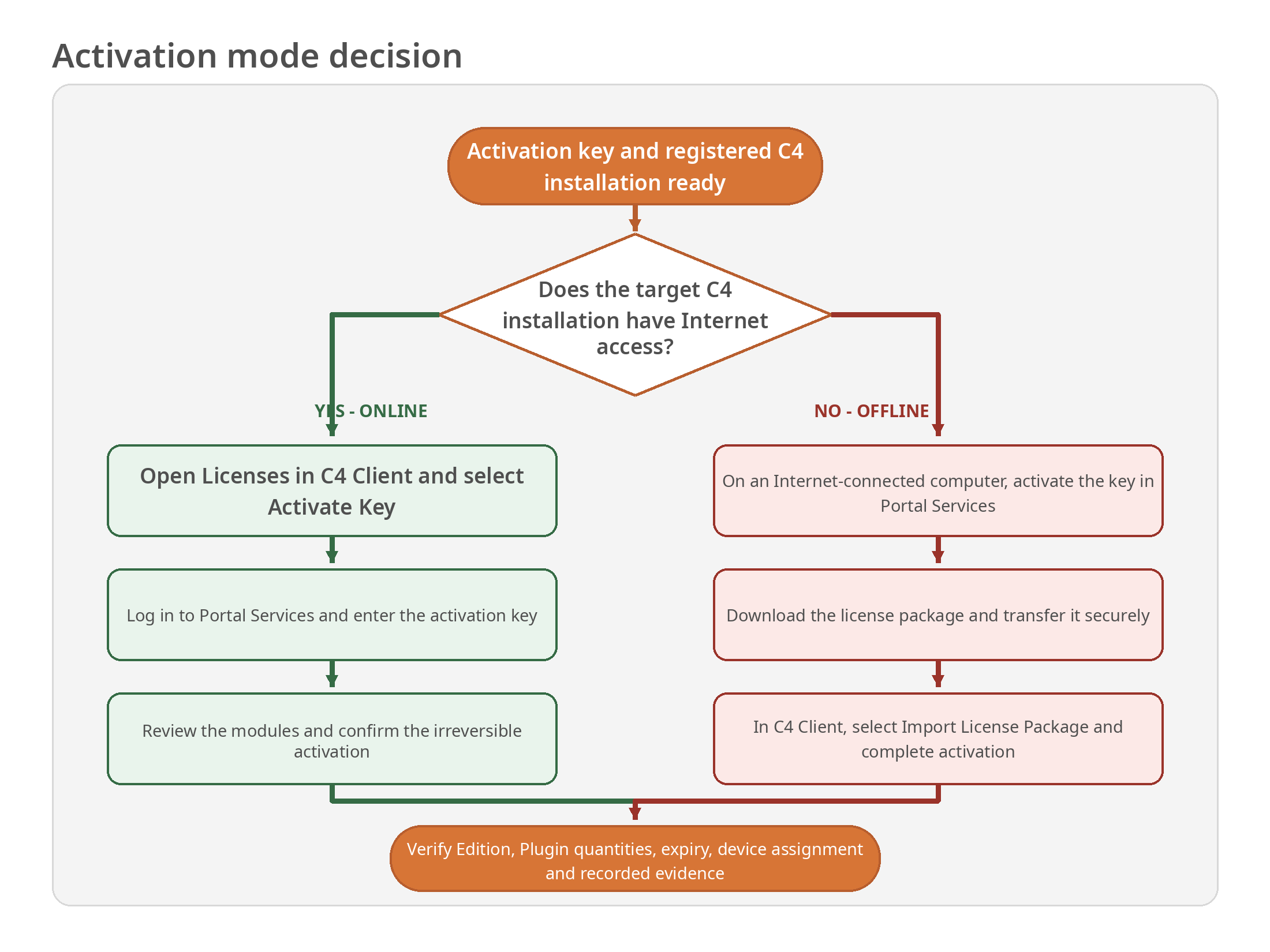
Figure 2. Decision guide for online and offline activation.
B.1 Business-code compatibility matrix
Active Edition |
Additional EDU key |
Additional SLS key |
Required result |
|---|---|---|---|
No Edition |
Not applicable |
Not applicable |
Activate an Edition first. |
EDU Edition |
Allowed when the key is compatible and within the training entitlement. |
Not allowed as an extension. |
To move to commercial licensing, plan an approved SLS Edition replacement. |
SLS Edition |
Not allowed. |
Allowed when the key is compatible and belongs to the installation. |
Activate the SLS extension after validating the scope. |
B.2 Activation order decision
Condition |
Action |
|---|---|
The key contains an Edition and Plugins |
Activate the key, verify the Edition, then assign the included addressable Plugin licenses. |
The Edition and Plugins are in separate keys |
Activate the Edition key first, verify it, then activate each compatible Plugin or extension key. |
An Edition is active and additional capacity is purchased |
Verify the business code and scope, activate the additional key, assign licenses and reconcile totals. |
A time-limited test license is added |
Record the purpose and expiry, activate it with the compatible business code, assign it deliberately and create an exit plan. |
The business code differs from the active Edition |
Do not activate as an extension. Escalate for correction or an approved Edition replacement. |
The server identity or installation will change |
Do not assume transfer. Coordinate the change with authorized support before modifying the environment. |
Appendix C. Glossary and
Activation Record Template
C.1 Glossary
Term |
Definition |
|---|---|
Activation key |
A code used to activate an issued entitlement on a registered C4 installation. |
Business code |
The first three key characters identifying the entitlement source, such as EDU or SLS. |
C4 Client |
The C4 application interface used for online key activation, offline package import, license status and assignment. |
C4 Transformers |
The C4 generation that supports addressable, independently expiring licenses assigned to specific devices. |
Commercial license |
An SLS entitlement purchased for customer use, normally with unlimited duration for the licensed version and scope. |
Edition |
The server license defining C4 functionality, version and number of licensed servers. |
EDU |
Business code for a time-limited education entitlement issued through the C4 Education portal. |
License addressability |
Ability to assign a specific independent license to a specific device. |
License package |
The file downloaded after offline activation in Portal Services and imported into the target C4 Client. |
Licensed device |
A device to which an eligible active Plugin license has been assigned. |
Non Licensed Devices |
C4 Client count of configured devices of a type that do not have an assigned license. |
Plugin license |
Entitlement defining a licensed Plugin metric, commonly a device type and quantity. |
Portal Services |
The C4 web service used to manage registered installations and activate or download licenses. |
SDK license |
A time-limited, developer-bound entitlement for Plugin development and testing, not commercial use. |
SLS |
Business code for a commercial entitlement obtained through an authorized C4 sales channel. |
Upgrade |
Entitlement required to use a newer C4 version than the version covered by the current Edition. |
Used |
C4 Client count of activated licenses already assigned to devices. |
C.2 Activation record template
The following fields may be copied into the organization document-management, service or asset-management system.
Customer / license owner |
____________________________________________________________ |
Installation name / ID |
____________________________________________________________ |
Environment / site |
____________________________________________________________ |
C4 version |
____________________________________________________________ |
Edition |
____________________________________________________________ |
Business code |
____________________________________________________________ |
Order / training / test reference |
____________________________________________________________ |
Masked activation key |
____________________________________________________________ |
Server count and MAC addresses |
____________________________________________________________ |
Activation mode |
Online / Offline |
Activation date and administrator |
____________________________________________________________ |
Edition / modules / quantities |
____________________________________________________________ |
Expiration dates |
____________________________________________________________ |
Used / Non Licensed Devices |
____________________________________________________________ |
Portal and C4 Client evidence |
____________________________________________________________ |
Approved exceptions / tickets |
____________________________________________________________ |
Handover owner and date |
____________________________________________________________ |
Next review / expiry action |
____________________________________________________________ |
C.3 Change history
Version |
Date |
Status |
Description |
|---|---|---|---|
1.0 |
11 October 2026 |
Production |
Initial production issue consolidating C4 license policy, activation flow, assignment, controls, records and troubleshooting. |
1.1 |
11 October 2026 |
Production |
Applied Gamanet Corporate Document v03 template throughout. Licensing policy, activation procedures and approved diagrams are unchanged. |
End of controlled document. Record future changes in the change history and revalidate the activation workflow after material product or policy updates.