Migration and
Cutover Guide
C4 Second Generation to C4 Transformers 2026
Document information
Field |
Value |
|---|---|
Purpose |
Controlled migration of second-generation C4 data and configuration to C4 Transformers 2026. |
Migration type |
Side-by-side migration using DataMigrator; not an in-place database upgrade. |
Audience |
C4 administrators, SQL Server administrators, Windows/server administrators, and change owners. |
Source platforms |
C4 2016 / C4 2024 (second-generation C4). |
Target platform |
C4 Transformers 2026, using the latest build approved for the deployment. |
Version / issue date |
3.0 / 3 October 2026 |
Document status |
Production |
Revision history
Version |
Date |
Description of change |
|---|---|---|
1.0 |
17 July 2026 |
First structured administrator guide created from the migration procedure. |
3.0 |
3 October 2026 |
Production editorial revision; corporate formatting, consistent navigation, procedure numbering, tables, and screenshot presentation. |
HOW TO USE THIS GUIDE: Complete the environment record and pre-migration checklist first. Perform a rehearsal in a test environment before the production cutover. Screenshots are illustrative and may differ slightly between builds.
1. Purpose and scope
This guide describes the end-to-end process for migrating a second-generation System C4 installation (C4 2016 or C4 2024) to C4 Transformers 2026. The procedure uses a restored copy of the legacy SQL Server database and the C4 DataMigrator utility supplied with the target installation.
The guide covers preparation, database backup and restore, installation of the target platform, driver and credential-type preparation, data selection and mapping, migration execution, technical validation, production cutover, and rollback planning.
IMPORTANT: The procedure is a side-by-side migration. Keep the original C4 environment intact until the new environment has passed acceptance and the rollback period has ended.
Items outside this procedure
Windows Server sizing, SQL Server licensing, and infrastructure design.
Release-specific patching or hotfix instructions not included in the supplied installer package.
Redesign of device integrations, networks, firewalls, or third-party interfaces.
Functional changes requested after migration; handle these as separate controlled changes.
2. Migration strategy
The target C4 installation is created first. The legacy database is then restored beside the new C4 database, and DataMigrator transfers the selected configuration and data into C4 Transformers.
1 |
2 |
3 |
4 |
5 |
|---|---|---|---|---|
Back up |
Install |
Restore legacy |
Run |
Validate |
Recommended deployment pattern
Rehearsal: use a recent backup in a test environment to discover missing driver packages, credential-type mappings, and data-quality issues.
Production: establish a configuration freeze, take a fresh final backup, and repeat the validated procedure in a clean destination environment.
Acceptance period: keep the legacy environment available but controlled until the new system is signed off.
RECOMMENDATION: Do not rely on an untested production-first migration. A rehearsal materially reduces cutover risk and identifies package and mapping dependencies before downtime begins.
3. Roles and responsibilities
Role |
Primary responsibilities |
|---|---|
C4 administrator |
Target installation, license activation, driver and credential-type preparation, migration selections, C4 validation, and operator handover. |
SQL Server administrator |
Legacy backup, backup-file validation, restore to the destination SQL instance, database visibility, and SQL connectivity. |
Windows/server administrator |
Destination Windows environment, local administrator access, storage, installer execution, and network reachability. |
Change owner |
Maintenance window, stakeholder communication, cutover decision, rollback authority, and formal acceptance. |
System owner / key user |
Business validation of persons, credentials, permissions, calendars, visualizations, and representative device operation. |
4. Prerequisites and preparation
Required access and materials
Local administrator access on the destination Windows server.
SQL Server privileges sufficient to back up and restore databases.
A C4 administrative or support account for the target C4 Transformers installation.
The C4 Transformers 2026 Full Installer approved for the deployment.
SQL Server Management Studio (SSMS), installed separately or by the Full Installer option.
License activation details for the target C4 installation.
Target-release driver packages for every device type used in the legacy system.
Required credential-type packages, for example PIN 5, PIN 6, or HID 32 Mifare Classic.
Secure storage with enough capacity for the database backup and migration records.
PRODUCTION SQL: A standard SQL Server installation rather than SQL Express is recommended for production use. Select the SQL edition and topology according to the approved production design.
Environment record
Complete this record before starting. Do not store passwords in the document.
Change / ticket ID |
Maintenance window |
||
Source C4 server |
Source C4 version |
||
Source SQL instance |
Legacy database name |
||
Destination C4 server |
Destination C4 build |
||
Destination SQL instance |
C4 server address / IP |
||
Backup file name |
Backup time |
||
Migration owner |
Rollback owner |
Pre-migration checklist
Check |
Owner |
Status / evidence |
|---|---|---|
Change approval and maintenance window confirmed |
Change owner |
|
Destination Windows server and storage ready |
Windows administrator |
|
Target C4 Full Installer and SQL/SSMS media available |
C4 / SQL administrator |
|
Target SQL topology and instance name confirmed |
SQL administrator |
|
C4 licenses available for activation |
C4 administrator |
|
All required driver packages identified |
C4 administrator |
|
All required credential types identified |
C4 administrator |
|
C4 and SQL administrative credentials tested |
C4 / SQL administrator |
|
Source backup and rollback storage locations confirmed |
SQL administrator |
|
Source configuration freeze communicated for final cutover |
Change owner |
|
Test migration completed or formally waived |
Change owner |
5. Detailed migration procedure
BEFORE YOU BEGIN: Use a verified backup and a clean target environment. Record every exception. Stop and resolve failed connection tests, missing packages, or ambiguous credential mappings before starting the migration.
Phase A - Back up and transfer the legacy database
Step 1 - Create the legacy database backup
Open SQL Server Management Studio and connect to the SQL instance used by C4 2016/2024.
Create a full database backup using the standard SSMS backup function. The output must be a file with the .bak extension.
Confirm that SSMS reports a successful backup and that the backup file exists and has a plausible size.
Keep an unchanged copy of the backup for rollback and audit purposes. Where your process permits, validate the backup with a test restore or backup verification.
Step 2 - Transfer the backup to the destination environment
Copy the .bak file to a protected location accessible from the destination SQL Server.
Verify the copied file size. If your organization uses checksums or hashes, compare them before proceeding.
Record the backup file name, timestamp, source server, and destination path in the migration record.
Phase B - Install and prepare C4 Transformers
Step 3 - Install C4 Transformers 2026
Run the C4 Full Installer in the new Windows environment. During installation, the installer can optionally install SQL Express and SQL Server Management Studio. These components may also be installed and managed separately.
For a test environment, SQL Express may be convenient when it matches the approved design.
For a live production environment, standard SQL Server rather than SQL Express is recommended.
Confirm the destination SQL instance selected during installation; it is needed later for the DataMigrator connection string.
Step 4 - Activate licenses and preload packages
Launch the newly installed C4 Transformers application.
Activate the required licenses.
Download or import every device driver package required by the legacy system.
Download or import every credential type required by the legacy system.
A device tree does not need to be created at this stage. The objective is to make the required driver and credential-type packages available to DataMigrator.
IMPORTANT: Preloading drivers and credential types is one of the most effective ways to prevent migration delays. Missing packages block device restoration or credential mapping later in the wizard.
Phase C - Restore the legacy database on the destination SQL Server
Step 5 - Restore the database backup
Open SQL Server Management Studio on the destination environment.
Right-click Databases and select Restore Database.
Select the transferred .bak file and restore the legacy database.
Ensure that the restore does not overwrite the destination C4DB database created by the new installation. The expected final state is that both the destination database and the restored legacy database are present.
WARNING: Do not restore the legacy backup over C4DB. DataMigrator requires the new C4 database and the legacy database to coexist so that it can read from the old system and write to the new one.
Step 6 - Verify C4DB and WASP
Expand Databases in SSMS. Confirm that both C4DB (the destination C4 Transformers database) and WASP (the restored legacy database shown in Figure 1) are visible. Close SSMS after verification.
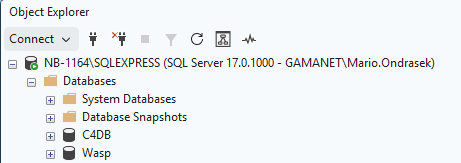
Figure 1. Expected SQL Server database state after restore: C4DB and WASP are both present.
Phase D - Run DataMigrator
Step 7 - Start the migration tool
On the C4 Transformers server, open the following folder and run DataMigrator.exe as a Windows administrator:
C:\Program Files\Gamanet\C4 Server\Application Server\Utils\MigrationTool\TransformersMigration\DataMigrator.exe
If the executable is not present at this path, confirm that the correct C4 Transformers build is installed and use the path delivered with that build.
Step 8 - Connect to the source database
The first wizard page tests the connection to the restored legacy database. Update only the server/instance portion of the connection string unless your SQL administrator instructs otherwise.
SQL Express locally: Data Source=.\SQLEXPRESS;...
Local default instance: Data Source=.;...
Named/remote instance: Data Source=<server>\<instance>;...
Select the authentication mode that matches the SQL installation.
Click Test Connection.
Wait until the C4 2016/2024 database is detected.
Click Next only after the connection test succeeds and the legacy database is recognized.
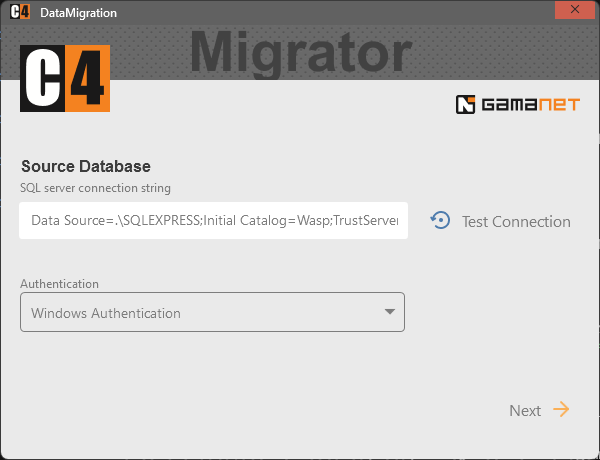
Figure 2. DataMigrator source database connection page.
Step 9 - Connect to the destination C4 installation
Enter a target C4 account with sufficient administrative rights. The support account is recommended. Enter the C4 server address; use localhost only when DataMigrator is running on the C4 server itself.
Enter the user name and password.
Enter the C4 server IP address or host name, or localhost for a local connection.
Click Test C4 Login and confirm that the result is Successful.
Click Next.
SECURITY: Do not record the password in this guide, screenshots, tickets, or migration evidence. Use your approved credential-handling process.
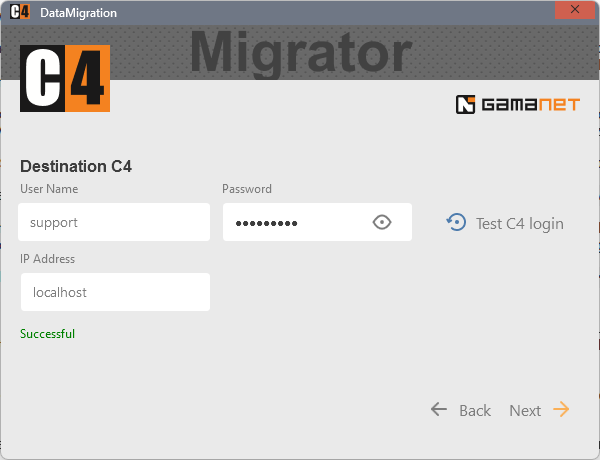
Figure 3. DataMigrator destination C4 login page.
Step 10 - Select the migration scope
Select every data category required in the target system. Review the complete list rather than accepting defaults without verification.
Typical categories shown by the wizard include credentials, devices, holidays, permissions, persons, and regions.
Calendars and Visualization may require explicit selection. Select them when they are used and must be transferred.
Record any intentionally excluded category and obtain system-owner approval.
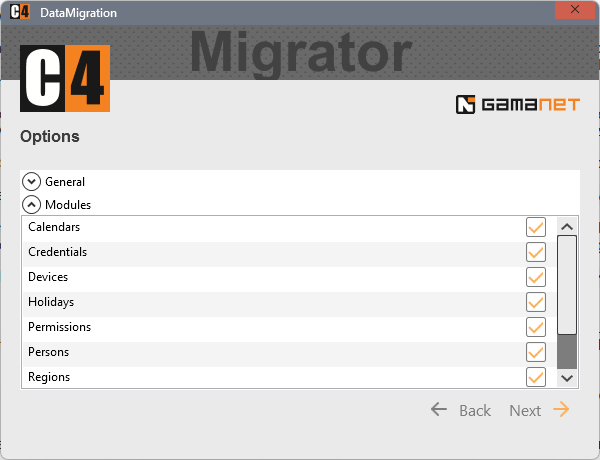
Figure 4. DataMigrator migration-scope selection page.
Step 11 - Validate and import device drivers
DataMigrator compares the drivers referenced by the legacy database with packages available in C4 Transformers.
Review every driver in the Required Packages list.
A green check mark means that the required package is available in the target environment.
If a package is missing, click Import and select the correct target-release driver package.
After import, click Refresh and confirm that the status changes to a green check mark.
Proceed only when every required driver has been resolved, or when an exception has been formally approved and its impact is understood.
WARNING: Unresolved driver packages can prevent DataMigrator from reconstructing the legacy device tree correctly. Do not treat a missing driver as a cosmetic warning.
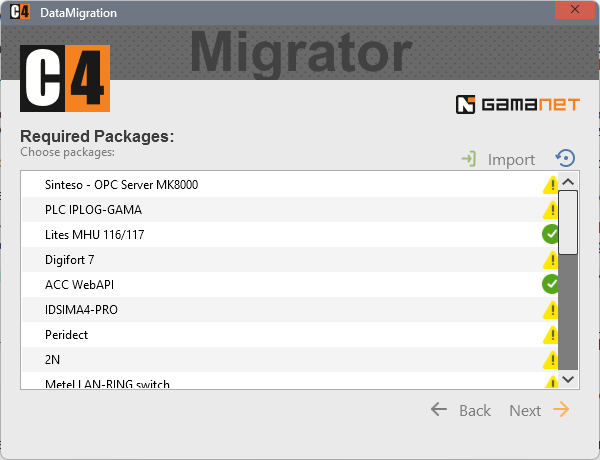
Figure 5. DataMigrator required driver packages page.
Step 12 - Map credential types
The wizard lists the credential types detected in the legacy database under Old Types and offers target credential types under New Types. Map each legacy type to its exact functional equivalent in C4 Transformers.
Review each Old Type.
Select the equivalent target type from the New Types drop-down list.
For example, map Old Type PIN 6 to New Type PIN 6.
If an equivalent target type is unavailable, stop and download or import the required credential-type package before continuing.
Recheck all mappings, then click Next.
WARNING: Do not map a credential type to a merely similar format. An incorrect mapping can change credential interpretation and may affect device operation or access decisions.
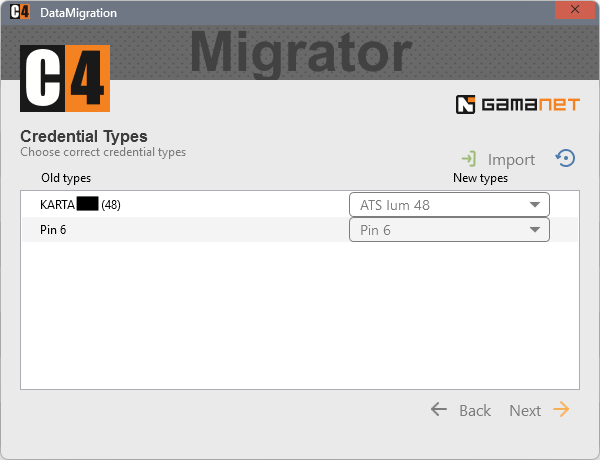
Figure 6. DataMigrator credential-type mapping page.
Step 13 - Start and monitor the migration
Review the selected scope, resolved packages, and credential mappings.
Click Start Migration.
Keep the wizard open and avoid restarting the server or SQL services while migration is running.
When the process completes, record the completion result and retain any migration log or report generated by the tool.
Do not declare the system operational until the post-migration validation in Section 6 is complete.
STOP CONDITION: If DataMigrator reports a critical error, do not repeatedly run it against a partially migrated production target. Preserve the evidence, return to a clean destination state, or follow the approved support procedure.
6. Post-migration validation
Initial startup
Start C4 Transformers 2026 and log in with an administrative account.
Confirm that license activation remains valid.
Open the migrated configuration and confirm that the main system tree loads without critical errors.
Review any migration summary, warning, or exception recorded by DataMigrator.
Validation checklist
Area |
Acceptance check |
Result / evidence |
|---|---|---|
Administrator login |
Administrative login succeeds and expected menus/modules are available. |
|
Regions / structure |
Expected regions and organizational structure are present. |
|
Persons |
Representative persons and key attributes match the source. |
|
Credentials |
Representative credentials and credential types are correct. |
|
Permissions |
Representative access/permission assignments match the approved source configuration. |
|
Calendars / holidays |
Required calendars and holidays are present when selected for migration. |
|
Device tree |
Expected devices and hierarchy are present. |
|
Drivers |
No critical device has a missing or incorrect driver package. |
|
Device communication |
Representative devices report the expected online/status condition. |
|
Events / alarms |
A controlled test produces the expected event or alarm in C4. |
|
Visualization |
Required visualizations are present when selected for migration. |
|
Operator rights |
Representative operator accounts have the intended permissions. |
Functional smoke test
Select at least one representative device from each driver family or critical technology.
Verify status, a permitted command or interaction, and the resulting event in C4.
Test at least one representative credential and permission path under controlled conditions.
Have a key user confirm the migrated data and daily operator workflow.
ACCEPTANCE: Use evidence, not only a visual spot check. Record the device, person/credential sample, event time, result, and tester for each critical validation.
Data reconciliation
Compare representative source and target records. Where practical, reconcile totals or sampled counts for persons, credentials, permissions, devices, calendars, and other selected objects. Explain any difference caused by an intentional exclusion, unsupported object, duplicate cleanup, or approved transformation.
7. Production cutover and rollback
Production cutover sequence
Confirm that the rehearsal results and all production prerequisites are approved.
Freeze source configuration changes for the final migration window.
Take and secure the final source database backup.
Perform the validated migration procedure in the clean production target environment.
Complete the post-migration validation and obtain the technical cutover decision.
Direct operators and approved integrations to the new C4 Transformers environment.
Monitor critical devices, events, operator access, and system behavior during the agreed stabilization period.
Rollback triggers
Administrative access to the target system is unavailable.
A critical migration error or material data mismatch remains unresolved.
Critical devices or driver families cannot be operated safely.
License activation or required modules are unavailable.
The system owner rejects the validation result.
Rollback actions
Stop the cutover and prevent additional operational changes in the target system.
Preserve migration logs, screenshots, timestamps, and the failed target state for diagnosis.
Return users and operational interfaces to the unchanged legacy C4 environment according to the approved rollback plan.
Confirm that the legacy environment is operational and communicate rollback completion.
Correct the issue in a test or clean target environment before scheduling another production attempt.
IMPORTANT: Rollback is operational, not reverse synchronization. Changes made only in C4 Transformers after cutover will not automatically appear in the legacy system. Minimize post-cutover changes until acceptance is complete.
8. Troubleshooting
Symptom |
Likely cause |
Action |
|---|---|---|
Test Connection fails |
Wrong SQL server/instance; SQL service unavailable; authentication or permission issue. |
Confirm the exact SQL instance, service state, authentication mode, account rights, and network reachability. Retest before continuing. |
Legacy database is not detected |
Backup restored to the wrong instance or under an unexpected state/name; restore incomplete. |
Verify that the restored legacy database is online in the same SQL instance addressed by the connection string and that C4DB is also present. |
Test C4 Login fails |
Wrong account, password, server address, or target application availability. |
Confirm the administrative account, use localhost only when local, verify the C4 server address, and confirm the target application is running. |
Driver shows warning / missing |
Required target driver package is not installed. |
Import the correct C4 Transformers driver package, click Refresh, and require a green check before proceeding. |
No equivalent New Type |
Required target credential type is not installed or the old type has no confirmed mapping. |
Download/import the required credential-type package. Do not guess; obtain an approved mapping for any non-obvious legacy type. |
Calendar or visualization missing |
Category was not selected in the migration scope or did not validate. |
Review the scope selection and migration result. Repeat only in a clean target or under approved support guidance. |
Devices present but not operating |
Driver mismatch, device configuration difference, network reachability, or post-cutover endpoint issue. |
Compare the migrated driver and device settings with the source, verify network reachability, and test one representative device at a time. |
Migration completes with exceptions |
Unsupported/excluded data, package problem, mapping issue, or source data inconsistency. |
Retain the migration evidence, classify each exception, correct the root cause in a clean target, and obtain acceptance for any residual difference. |
9. Handover and sign-off
Records to retain
Source and target server/version record.
Final database backup identification, timestamp, location, and validation evidence.
C4 installer/build identification and license activation evidence.
List of imported driver and credential-type packages.
Migration scope and all credential-type mappings.
Migration completion result, logs, warnings, and exceptions.
Post-migration validation results and key-user acceptance.
Cutover time, stabilization observations, and rollback decision/closure.
Final sign-off
Approval item |
Name |
Date / time |
Signature / reference |
|---|---|---|---|
Migration completed |
|||
Technical validation accepted |
|||
System owner / key user accepted |
|||
Production cutover approved |
|||
Rollback period closed |
Outstanding exceptions
ID |
Exception / impact |
Owner |
Due date / disposition |
|---|---|---|---|
Appendix A - Quick reference: paths and connection strings
A.1 DataMigrator executable
C:\Program Files\Gamanet\C4 Server\Application Server\Utils\MigrationTool\TransformersMigration\DataMigrator.exe
A.2 Common Data Source values
SQL topology |
Data Source example |
Notes |
|---|---|---|
Local SQL Express |
Data Source=.\SQLEXPRESS;... |
Use when the local named instance is SQLEXPRESS. |
Local default instance |
Data Source=.;... |
Use the local default SQL Server instance. |
Named instance |
Data Source=<server>\<instance>;... |
Use the actual server and instance configured by the SQL administrator. |
Remote default instance |
Data Source=<server>;... |
Use the reachable SQL Server host name or approved address. |
CONNECTION STRING RULE: Preserve the remainder of the connection string shown by DataMigrator. Change only the server/instance and authentication settings required for the approved SQL deployment.
A.3 Expected pre-migration database state
Database |
Purpose |
Required state |
|---|---|---|
C4DB |
Destination C4 Transformers database created by the new installation. |
Online; do not overwrite with the legacy backup. |
WASP |
Restored legacy C4 2016/2024 database shown in Figure 1. |
Online and detectable by DataMigrator. |
A.4 Migration gate summary
Gate |
Proceed only when... |
|---|---|
Backup gate |
The final .bak file is complete, transferred, recorded, and protected. |
Database gate |
C4DB and the restored legacy database are both online on the intended SQL instance. |
Connection gate |
Test Connection and Test C4 Login both succeed. |
Package gate |
Every required driver is resolved and every credential type has an approved mapping. |
Migration gate |
DataMigrator completes without an unresolved critical error. |
Cutover gate |
The validation checklist is accepted and rollback remains available. |