---
documentId: "SC-1000_INTEGRATION_MANUAL_FWK4"
title: "SC-1000 Integration Manual \u2013 FWK4"
version: "v03"
publisher: "Gamanet"
author: "Marian Gal"
datePublished: "2026-10-17"
dateModified: "2026-10-17"
effectiveFrom: "2026-07-01"
effectiveTo: ""
applicableProduct: "system-c4"
applicableProductModule: "driver"
applicableProductVersions: ["2026 SP3"]
documentType: "INT"
audience: ["system-administrator","installer","system-integrator","support-engineer"]
language: "en"
confidentiality: "public"
abstract: "Integration manual for connecting the ASSA ABLOY SC-1000 system to System C4 using the FWK4 driver, covering access control and intrusion alarm functionality in document revision v1.2. Describes MQTT over TLS connectivity, controller and certificate configuration, device-tree import, supported cards and combined Card and PIN credentials, credential synchronization, access-time restrictions, holidays, time management, lift functionality, remote commands, status information and device audit-log retrieval. Includes integration limitations, troubleshooting guidance and integration tests with steps and expected results for configuration, communication failures, credential uploads, access events, doors, partitions, detectors and relay outputs."
keywords: ["SC-1000","SC1000","ASSA ABLOY","System C4","FWK4","integration manual","device driver","access control","intrusion alarm","SC-1000 Configurator","Bus Controller","CAN module","MQTT","TLS","TCP 8883","certificate file","Load Configuration","device tree","credential synchronization","full upload","incremental upload","selective upload","card management","Card and PIN","access permissions","access time restrictions","holidays","time synchronization","antipassback","lift control","remote device control","status monitoring","audit log","integration tests","tamper","duress alarm","zone bypass"]
licenseOrUsageTerms: ""
canonicalUrl: "https://my.c4portal.com/Atlas/docs/SC-1000_INTEGRATION_MANUAL_FWK4/latest/index.html"
downloadFormats: ["HTML","PDF","Markdown"]
fileChecksum: "zXJeGlyBESKb/CH4nmk3TyzufNX3wMpsD200B13HZEA= "
citationText: ""
---
ASSA ABLOY Opening Solutions Hungary Kft.
C4 DRIVER DOCUMENTATION
SC-1000
Integration Manual
SC-1000 | FWK4
PUBLIC RELEASE v1.2
| Field | Required content |
| --- | --- |
| Document ID / revision | SC-1000 Integration Manual / v1.2 |
| Applies to | C4 FWK4 \| SC-1000 bus controller and integrated device tree |
| Document status | Public |
| Document owner | ASSA ABLOY Opening Solutions Hungary Kft. |
| Authors | Gabor Paksi / Tivadar Kecskes |
| Publication date / language | 2026-03-31 / English |
Configure. Operate. Validate.
# Contents
- [Document Information](#document-information)
- [Integration Overview and Supported Functionality](#integration-overview-and-supported-functionality)
- [Compatibility, Dependencies and Licensed Devices](#compatibility-dependencies-and-licensed-devices)
- [Restrictions and Important Notes](#restrictions-and-important-notes)
- [How to Connect Device to C4](#how-to-connect-device-to-c4)
- [Device Configuration](#device-configuration)
- [Configuration Transfer and Device Discovery](#configuration-transfer-and-device-discovery)
- [Supported Identifiers](#supported-identifiers)
- [Credentials Synchronization](#credentials-synchronization)
- [Time Management](#time-management)
- [Technology-Specific Functionality](#technology-specific-functionality)
- [Remote Device Control](#remote-device-control)
- [Status Information Display](#status-information-display)
- [Events and Audit Log](#events-and-audit-log)
- [Operation, Recovery and Maintenance](#operation-recovery-and-maintenance)
- [Troubleshooting, Support and References](#troubleshooting-support-and-references)
- [Integration Tests](#integration-tests)
This manual applies to the SC-1000 integration capabilities, restrictions and test cases documented for FWK4 in source revision v1.2.
# Document Information
## Purpose and scope
This manual describes the integration of the SC-1000 system with C4 through the FWK4 driver. It documents the supported device categories and functions, connection and configuration requirements, credential handling, remote operations, status mapping and integration tests contained in source revision v1.2.
The manual reproduces the source technical behavior and test procedures. Device installation and manufacturer-specific configuration are performed with the SC-1000 Configurator and remain subject to the applicable manufacturer documentation.
## Document control
| Field | Document value |
| --- | --- |
| **Integration identity** | ASSA ABLOY Opening Solutions Hungary Kft. \| SC-1000 \| C4 FWK4 integration |
| **Document revision / date** | v1.2 \| 2026-03-31 |
| **Authors** | Gabor Paksi / Tivadar Kecskes |
| **Classification** | Public |
| **Compatibility detail** | Exact C4 release, driver build and SC-1000 firmware versions are not stated in the source manual. |
| **Validation evidence** | The source manual defines integration tests; a separate executed test report or approval record is not included. |
## Revision history
| Revision / date | Changes and impact | Approval / evidence |
| --- | --- | --- |
| v1.2 / 2026-03-31 | Current source revision. The source manual does not include a revision-by-revision change history. | Not stated in the source manual. |
## Terminology and conventions
C4 property names, commands, statuses and audit-log messages are presented using the wording of the source manual. Placeholder tokens such as DEVICE, PERSON, READER and ADDRESS are defined within the applicable integration test.
# Integration Overview and Supported Functionality
## Device Category
| Category | Supported |
| --- | :---: |
| **ACS** | Yes |
| **IAS** | Yes |
| **FPS** | No |
| **CCTV** | No |
| **DVR** | No |
| **Perimetry** | No |
| **Building** | No |
| **Other** | No |
## Integration boundary and operating mode
The C4 driver connects as a client to the MQTT broker of the SC-1000 Bus Controller. The connection uses TLS on TCP port 8883. The Bus Controller is configured in C4 with the same IP address and SC-1000 serial number used by the device, together with the username, password and certificate-file path.
Hardware configuration is created and uploaded with SC-1000 Configurator. C4 can then retrieve the active hierarchy through Load Configuration, synchronize credentials and access data, monitor device status and audit events, and issue the documented remote commands.
## Supported Functionality
The source checklist is reproduced below. A checked source item is shown as Yes; an unchecked item is shown as No.
| Support | Functionality | Support | Functionality |
| :---: | --- | :---: | --- |
| No | Import From File | No | Fire Panel Networking Mode |
| Yes | Combined Credentials | No | Card Learning |
| Yes | Lift | No | Dynamic Upload |
| Yes | Encrypted Communication | Yes | Access Time Restrictions |
| Yes | Load Configuration | Yes | Holidays Support |
| Yes | Time Synchronization | Yes | PIN Management |
| Yes | Time Zone Support | Yes | Card Management |
| No | Live Video Streaming | Yes | Fingerprint Management |
| No | Recorded Video Streaming | No | Reserved Memory Zones |
| No | Video Records Downloading | Yes | Antipassback Forgiveness |
| No | Voice Transmitting | No | Handicapped Flag |
| No | Audio Streaming | Yes | Alarm Suppression |
| No | PTZ | No | Fire Alarm Counter |
| No | Presets | Yes | Device Audit Log Retrieval |
| No | Motion Detection | Yes | Remote Device Control |
| No | Live Stream Snapshot | No | Wiegand Biometric Support |
| No | Record Stream Snapshot | No | Discovery |
| No | Multiple Stream Types | No | Sending Configuration |
| Yes | Person Data Read | | |
# Compatibility, Dependencies and Licensed Devices
## Supported and identified combination
| Item | Source-defined value |
| --- | --- |
| **Manufacturer / developer** | ASSA ABLOY Opening Solutions Hungary Kft. |
| **Device family** | SC-1000 |
| **Integration framework** | FWK4 |
| **Communication** | MQTT over TLS to the SC-1000 Bus Controller, TCP port 8883 |
| **C4 release / driver build** | Not specified in the source manual |
| **SC-1000 firmware / hardware revision** | Not specified in the source manual |
## Prerequisites and dependencies
> • SC-1000 Configurator software for device-side configuration and upload.
>
> • A valid certificate file (\*.crt) for each SC-1000 Controller, stored on the computer running C4 Server.
>
> • The Bus Controller IP address, TCP port, serial number, username, password and exact certificate-file path.
>
> • Network routing and firewall rules that permit the configured MQTT/TLS communication.
>
> • Matching device addresses generated by SC-1000 Configurator for doors, turnstiles, readers, CAN modules and other child devices.
## Licensed Devices
The root element, SC-1000 Bus Controller, is licensed.
The source License attribute test states that one license is consumed when one licensed device node is present. When the driver starts, the system calculates the number of instances marked with the Licensed attribute and requests that quantity from the installed license.
# Restrictions and Important Notes
## Credential and identifier restrictions
> • Card formats are based on the Encoding option selected for each entry in SC-1000 Configurator and are enabled as raw-number formats.
>
> • PIN codes are supported only as part of combined Card and PIN credentials.
>
> • SC-1000 supports neither PIN code only nor Card or PIN access mode.
>
> • The Card and PIN access-point mode must be configured in SC-1000 Configurator.
>
> • Each PIN must match the controller PIN-length setting. The supported range is 4-6 digits, the default is 4, and the value is not configurable from C4.
## Configuration and discovery restrictions
> • Network discovery of the Bus Controller is not supported.
>
> • CAN module discovery is available in SC-1000 Configurator for completing device configuration.
>
> • Load Configuration updates addresses and names, but reader names are not updated because readers cannot be named in SC-1000 Configurator.
>
> • During full credential upload, users can continue to use card readers. The source states there is no detectable off time and no option to cancel the upload.
>
> • Time restriction number 0 is reserved as unrestricted time and must not be defined in C4 because the driver calculates it automatically.
>
> • Alarms are delivered upon detection; the source states that no active-status visualization is implemented on the SC-1000 side.
| Source consistency note |
| --- |
| The source manual contains two different time-restriction capacity statements. Access Memory Management states a limit of sixteen sets of different time restrictions. The Access Time Restriction test notes that SC-1000 can handle a maximum of 15 different time-restriction sets.
This conversion preserves both source statements. Confirm the applicable limit for the deployed firmware and driver before commissioning. |
# How to Connect Device to C4
## Topology and communication flow
| C4 Server
SC-1000 driver | **TLS MQTT
→
TCP 8883** | SC-1000 Bus Controller
MQTT broker |
| :---: | :---: | :---: |
| IP address
Serial number
Username and password
Certificate file path | SC-1000 Configurator
configures and uploads
device configuration | Device tree and local configuration
CAN modules, doors, readers, partitions, lift and I/O devices |
When started, the C4 driver connects as a client to the MQTT broker of the Bus Controller.
The same IP address and SC-1000 serial number configured for the controller must be entered in the C4 Bus Controller properties. The TLS-secured connection uses TCP port 8883.
For each SC-1000 Controller, obtain the certificate file supplied with the device, store it on the C4 Server computer, and enter its full path and file name in Path To Certificate File. Ensure that the firewall does not block communication.
## Addressing
| Element | Address source |
| --- | --- |
| **Bus Controller** | IP address |
| **Doors, turnstiles, readers, expander CAN modules and other child devices** | The same numeric address generated by SC-1000 Configurator |
## Device-side connection setup
Connection with SC-1000 is MQTT-based. Set the following Bus Controller properties to correct values: IP Address, Port, Serial number, Username, Password and Path to certificate file.
## Device-side configuration setup
Use SC-1000 Configurator to configure the device and upload the configuration.
> 1. Launch SC-1000 Configurator software.
>
> 2. Navigate to the appropriate node in Device Editor and add, edit or delete devices.
>
> 3. Save the device and repeat the previous step until the configuration is ready.
>
> 4. Upload the configuration to the device.
>
> 5. Start the C4 driver.
>
> 6. Use Load Configuration on the Bus Controller to download the active configuration into the C4 device tree.
| Reference |
| --- |
| See the SC-1000 Configurator Application User Manual for additional instructions. |
# Device Configuration
Most device configuration is performed in SC-1000 Configurator. To use SC-1000 in C4, the required C4 properties must also be set. Normally only the SC-1000 Bus Controller is created manually; the remaining hardware hierarchy can be downloaded with Load Configuration.
## Device tree and parent relationships
| C4 device type | Parent / placement | Configuration note |
| --- | --- | --- |
| **SC-1000 Bus Controller** | Root device | Created manually in C4. |
| **SC1000ControlModule Central Unit** | Bus Controller | Only one is allowed. |
| **SC1000CANModule Expander** | Bus Controller | Uses the address generated during device configuration. |
| **Door, Turnstile, Relay Controller, Partition, Lift Unit, Ramp** | Bus Controller | Uses the address generated during device configuration. |
| **Lift Door** | Lift Unit | Uses the address generated during device configuration. |
| **Card reader** | Door, Turnstile, Lift Unit or Lift Door | Uses the address generated during device configuration. |
| **Zone detector** | Partition | Uses the address generated during device configuration. |
## Bus Controller properties
| Property | Definition | Default Value | Range |
| --- | --- | --- | --- |
| Enabled | Defines whether circuit usage is enabled | Yes | |
| Credential Upload enabled | Allow user synchronization for this panel | Yes | Yes/No |
| Night Full Upload | | Night Upload | |
| Night Incremental Upload | | None | |
| IP Address | Device IP address | | |
| Port | TCP port | 8883 | 0 - 65535 |
| Username | SC-1000 user | | |
| Password | SC-1000 user password | | |
| Serial number | SC-1000 main-board serial number. It must be correct for a successful connection. | | |
| Timeout | Connection timeout | 00:00:10 | |
| Store recent events time limit hours | Older events are not logged in the audit log. | 24 | |
| Time synchronization interval | C4 Server acts as the time server for SC-1000. The driver checks the time at this interval. SC-1000 can alternatively be configured with an NTP server; see SC-1000 board documentation. | 01:00:00 | |
| Path to certificate file | Full path and file name of the valid SC-1000 certificate. Example: C:\sc1000\sn3456\cert.crt | | |
## Address property for child devices
| Device type | Property | Definition |
| --- | --- | --- |
| **SC1000ControlModule Central Unit** | Address | Hardware address generated during device configuration. |
| **SC1000CANModule Expander** | Address | Hardware address generated during device configuration. |
| **Door / Turnstile / Relay Controller / Partition / Lift Unit / Ramp** | Address | Hardware address generated during device configuration. |
| **Lift Door** | Address | Hardware address generated during device configuration. |
| **Card reader** | Address | Hardware address generated during device configuration. |
| **Zone detector** | Address | Hardware address generated during device configuration. |
# Configuration Transfer and Device Discovery
## Load Configuration
The SC-1000 Bus Controller supports automatic import of the hardware components below it in the hierarchy. Click Load Configuration to start the import. All Bus Controller network settings must be correct; the child hardware does not need to be created manually in the C4 device tree.
During import, device addresses and names are added to the C4 tree or updated when a change is detected by Address. Reader names are not updated because readers cannot be named in SC-1000 Configurator.
## Device Discovery
CAN module discovery is supported in SC-1000 Configurator to auto-complete the device configuration. Network discovery of the Bus Controller is not supported.
# Supported Identifiers
## Supported Card
The driver supports card formats according to the Encoding option selected for each entry under Entry > Readers > Encoding in SC-1000 Configurator. Each selected format is enabled as a raw-number format.
## Supported PIN Code
PIN codes are supported as part of combined credentials (Card and PIN). SC-1000 supports neither PIN code only nor Card or PIN access mode. Configure the Card and PIN operating mode in SC-1000 Configurator.
Every PIN must match the controller PIN-length setting. The permitted range is 4-6 digits and the default is 4. This setting is not configurable from C4.
# Credentials Synchronization
Credentials are uploaded to SC-1000 through standard C4 commands.
## Upload modes
| Mode | Behavior |
| --- | --- |
| **Full Upload** | Loads all configured user credentials, used time restrictions and holidays. SC-1000 uses transactions for mass upload; card readers remain usable and there is no cancel option. |
| **Incremental Upload** | Uploads only credentials changed since the previous upload. |
| **Selective Upload** | Uploads the selected user’s credentials. |
## Reserved memory positions
Time restriction number 0 is always unrestricted time and is the default restriction. It must not be defined in C4 because the driver calculates it automatically.
## Access Memory Management
Access rights are assigned in C4 as described by the C4 system user guide. The driver creates equivalent access rights and sends them to SC-1000.
The driver uploads usernames, card numbers and other credentials attached to card information.
The Access Memory Management section of the source states that time-restricted access rights are limited to sixteen sets of different time restrictions. See the source consistency note in Restrictions and Important Notes.
# Time Management
## C4 time synchronization
C4 Server acts as the time server for SC-1000. The Bus Controller Time synchronization interval defaults to 01:00:00, and the driver checks the device time at that interval.
SC-1000 can alternatively be configured with an NTP server. The source refers to the SC-1000 board documentation for this option.
## Time restrictions and holidays
Full credential upload includes all used time restrictions and holidays. The supported-functionality checklist marks Access Time Restrictions and Holidays Support as supported. The dedicated integration tests define the expected access-granted and access-denied behavior.
# Technology-Specific Functionality
## Antipassback
The anti-passback behavior of access points such as doors and turnstiles is configured in SC-1000 Configurator. Refer to the SC-1000 Configurator documentation for the available anti-passback options.
## Lift integration
The supported-functionality checklist marks Lift as supported. The C4 hierarchy includes Lift Unit below the Bus Controller and Lift Door below the Lift Unit. Lift Door supports Door Unlock and Reset Alarm; Lift Unit supports Reset Alarm.
## Alarm and I/O functions
The integration includes partitions, zone detectors and relay controllers. The remote-control and status-mapping sections define supported arming, bypass, relay, reset and alarm-status behavior.
# Remote Device Control
C4 can perform the following operations on individual SC-1000 elements.
| Element | Operation | Meaning |
| --- | --- | --- |
| Bus Controller | Start | The driver attempts to start communication with a Bus Controller. |
| | Stop | The driver attempts to stop communication with a Bus Controller. |
| | Restart | The driver attempts to restart communication with a Bus Controller. |
| | Full Upload | Clears device memory and uploads all access credentials, time restrictions, and holidays to the device |
| | Incremental Upload | Uploads the latest access credentials that changed since the last upload to the device. |
| | Load Configuration | Downloads current device configuration and creates/updates C4 device tree. |
| Door, Turnstile | Door Manual Override | Manually overrides the door lock. Even valid credentials won’t be able to gain access. |
| | Door Manual Override Off | Removes both manual override and open permanently statuses. |
| | Door Unlock | Unlock once |
| | Door Lock | Locks the door and removes both manual override and open permanently statuses if active. |
| | Reset Alarm | Removes alarm or failure status from device if there is an active alarm status. Sends tamper reset command to the device if there is an active tamper status. |
| | Door Unlock Permanently | Unlocks the door permanently |
| Lift Unit | Reset Alarm | Removes alarm or failure status from device if there is an active alarm status. Sends tamper reset command to the device if there is an active tamper status. |
| Lift Door | Door Unlock | Unlock once |
| | Reset Alarm | Removes alarm or failure status from device if there is an active alarm status. Sends tamper reset command to the device if there is an active tamper status. |
| Relay controller | On | Relay active |
| | Off | Relay inactive |
| | Reset Alarm | Removes alarm or failure status from device if there is an active alarm status. Sends tamper reset command to the device if there is an active tamper status. |
| Partition | Arm | Arm partition if possible. |
| | Disarm | Disarm partition |
| | Forced arm | Arm partition regardless of disturbed zones. |
| | Reset Alarm | Removes alarm or failure status from device if there is an active alarm status. Sends tamper reset command to the device if there is an active tamper status. |
| Zone detector | Bypass on | Bypass this detector, so that it doesn’t generate alarms on its partition. |
| | Bypass off | Reactivates this detector |
| SC1000CANModule, SC1000ControlModule | Reset Alarm | Removes alarm or failure status from device if there is an active alarm status. Sends tamper reset command to the device if there is an active tamper status. |
# Status Information Display
| Status behavior note |
| --- |
| Alarms come only upon detection; no active-status visualization is implemented on the SC-1000 side. |
Device status information is displayed on the following components.
## Bus Controller
| Status | Description |
| --- | --- |
| **Connecting in Progress** | A communicator is connecting to a device or external system, including reconnect attempts after disconnection. |
| **Initialized** | The plugin has started and is preparing background data. Plugin properties have been validated. |
| **Starting** | The system is starting after the start command is sent to communicators. |
| **Configuration Failure** | The device has issues caused by mistakes or wrong data in configuration parameters. |
| **Disconnected** | The communicator or device was connected and has lost communication. |
| **Load Configuration** | The C4 System is reading the device configuration. |
| **Idle** | Normal functioning state of a device. |
| **Unknown** | The driver is unable to identify the device status. |
| **Upload Credentials** | Access permissions are currently being uploaded to the device. |
| **Tamper** | Tampered device. |
## SC1000 CAN Module and SC1000 Control Module
| Status | Description |
| --- | --- |
| **Disconnected** | Communication has been lost after a connected state. |
| **Failure** | General technical failure on a device. |
| **Idle** | Normal functioning state of a device. |
| **Unknown** | The driver is unable to identify the device status. |
| **Tamper** | Tampered device. |
| **Configuration Failure** | The device has issues caused by mistakes or wrong data in configuration parameters. |
## Door, Turnstile and Ramp
| Status | Description |
| --- | --- |
| **Door Forcibly Opened** | The door was forcefully opened by unauthorized access. |
| **Door Manual Override** | The door is physically closed, locked and cannot be opened. |
| **Door Normal** | The door is physically closed and locked; entry is possible only for authorized persons. |
| **Door Opened** | The door is physically opened. |
| **Door Unlocked Permanently** | The door is closed but can be opened without access authorization until it is locked again. |
| **Door Unlocked** | The door is closed but can be opened after authorization or a remote unlock command for the configured device time. |
| **Unknown** | The driver is unable to identify the device status. |
| **Failure** | General technical failure on a device. |
| **Alarm** | Alarm on a device. |
| **Tamper** | Tampered device. |
| **Configuration Failure** | The device has issues caused by mistakes or wrong data in configuration parameters. |
## Relay controller
| Status | Description |
| --- | --- |
| **Idle** | The relay is inactive. |
| **Activated** | The relay is active. |
| **Unknown** | The driver is unable to identify the device status. |
| **Failure** | General technical failure on a device. |
| **Alarm** | Alarm on a device. |
| **Tamper** | Tampered device. |
| **Configuration Failure** | The device has issues caused by mistakes or wrong data in configuration parameters. |
## Partition
| Status | Description |
| --- | --- |
| **Disarmed** | The partition is not armed. |
| **Armed** | The partition is armed. |
| **Unknown** | The driver is unable to identify the device status. |
| **Failure** | General technical failure on a device. |
| **Alarm** | Alarm on a device. |
| **Tamper** | Tampered device. |
| **Configuration Failure** | The device has issues caused by mistakes or wrong data in configuration parameters. |
## Zone detector
| Status | Description |
| --- | --- |
| **Idle** | The zone is in normal state. |
| **Bypass** | The zone is bypassed. |
| **Unknown** | The driver is unable to identify the device status. |
| **Failure** | General technical failure on a device. |
| **Alarm** | Alarm on a device. |
| **Tamper** | Tampered device. |
| **Configuration Failure** | The device has issues caused by mistakes or wrong data in configuration parameters. |
# Events and Audit Log
## Device Audit Log Retrieval
After communication is established, the driver reads events from the device audit log, including events created during a disconnection. Events older than the Store recent events time limit hours value are skipped.
Events retrieved after reconnection are stored in the C4 audit log with their original device event time, not the time at which C4 read them.
## Audit-log text and identity resolution
The integration tests in the final chapter define the expected audit-log strings for connection changes, configuration failures, commands, access outcomes, alarms, tamper, power faults, uploads and device control. Placeholder definitions are provided with each test.
| Access-event condition |
| --- |
| Several source tests state that an Access granted event is sent only when the door actually opens. |
# Operation, Recovery and Maintenance
## Driver lifecycle
The Bus Controller supports Start, Stop and Restart commands. Start attempts to establish communication; Stop attempts to stop it; Restart stops and starts communication again.
## Network interruption and recovery
During a network disconnection, all device nodes under the endpoint are expected to enter Disconnected state. The source Network Connection Lost test states that the driver attempts to reconnect after approximately 30 seconds. After recovery, nodes return to their real device state.
## Internal communication and configuration recovery
> • When communication between SC-1000 devices is interrupted, affected nodes are set to Disconnected and return to their real state after communication is restored.
>
> • When a device is missing from the C4 tree, the endpoint continues to work and logs a configuration-failure event on the nearest expected parent or driver node.
>
> • Duplicate addresses cause one or both conflicting items to enter ConfigurationFailure while other devices continue to operate.
>
> • Additional C4 tree nodes that are not present on the device remain in Unknown state while present nodes show their real status.
# Troubleshooting, Support and References
## Troubleshooting guide
| Symptom | Checks supported by the source manual |
| --- | --- |
| **Bus Controller does not connect** | Verify IP Address, Port 8883, Serial number, Username, Password, Path to certificate file and firewall communication. |
| **Configuration Failure** | Check incorrect or missing configuration properties and duplicate addresses. |
| **Imported tree is incomplete or unexpected** | Verify the active SC-1000 Configurator configuration, upload it to the controller and run Load Configuration again. |
| **Reader name is not updated** | Reader names are not updated because readers cannot be named in SC-1000 Configurator. |
| **Bus Controller is not found by discovery** | Network discovery of the Bus Controller is not supported. |
| **Expected connection error is logged as an exception** | The Plugin Exception Logging test states that expected conditions such as a wrong password should be handled and logged as a warning rather than as an unexpected exception. |
| **Driver package contains unexpected files** | The Files in Driver Package test requires only files needed to run the driver; any non-common file must be justified. |
## References
> • SC-1000 Configurator Application user manual
>
> • SC-1000 Configurator documentation
>
> • SC-1000 board documentation
>
> • C4 system user guide
# Integration Tests
| Applicability note |
| --- |
| Tests that apply to Door nodes in the device hierarchy should also be applied to Turnstile nodes unless the test states otherwise.
The following content defines test procedures and expected results from the source manual. It does not constitute an executed test record. |
## License attribute
This test verifies correct implementation of licensed attribute in driver.
### Test Steps
| No. | Test Steps |
| :---: | --- |
| 1 | Create device tree with one licensed device node. |
| 2 | Check License bus controller. |
### Expected Results
| No. | Expected Results |
| :---: | --- |
| 1 | When one licensed device node is present, one license is consumed for this driver. |
| Notes |
| --- |
| When driver is started, system calculates number of instances marked with Licensed attribute and requests that amount from the currently installed license. |
## Driver Copyright
This test verifies if driver copyright information is defined correctly
### Test Steps
| No. | Test Steps |
| :---: | --- |
| 1 | Check driver copyright information |
### Expected Results
| No. | Expected Results |
| :---: | --- |
| 1 | Driver copyright information is in this format: Copyright © 'COMPANY' 'YEAR' |
### Parameters
> • COMPANY represents the name of company who developed the driver
> • YEAR represents the year when driver was released
## Device Tree Import
This test verifies the behavior of the device configuration tree importing from the SC-1000 controller.
### Test Steps
| No. | Test Steps |
| :---: | --- |
| 1 | Create and upload configuration in SC-1000 Configurator software. Configuration should contain additional nodes (e.g. CAN modules, doors, etc.). |
| 2 | In C4 create a SC-1000 Bus Controller in configuration device tree with all necessary properties filled correctly. No other nodes are needed at the moment. |
| 3 | Click Load Configuration command on SC-1000 Bus Controller. |
| 4 | Follow import instructions. |
| 5 | Check results in updated device tree. |
### Expected Results
| No. | Expected Results |
| :---: | --- |
| 1 | Nodes that were configured in SC-1000 Configurator are present in C4 device tree. |
| 2 | Device works as configured. |
## Device Tree Import Changes
This test verifies the behavior of the device configuration tree importing from the SC-1000 Bus Controller.
### Test Steps
| No. | Test Steps |
| :---: | --- |
| 1 | Modify configuration through the SC-1000 Configurator application by adding a new node and changing the name of an existing node and upload it to the SC-1000 Bus Controller. |
| 2 | In C4 click Load Configuration command on SC-1000 Bus Controller. |
| 3 | Follow import instructions. |
| 4 | Check results in updated device tree. |
### Expected Results
| No. | Expected Results |
| :---: | --- |
| 1 | C4 device tree is updated. |
| 2 | Device works as configured. |
## Unified Time Management - Time Synchronization on Connection
This test verifies the correct implementation of the unified time management in the driver. The driver is expected to set up the time on the device once the communication is established.
### Test Steps
| No. | Test Steps |
| :---: | --- |
| 1 | Set the device time 60 min back. |
| 2 | Start the endpoint |
| 3 | Wait until driver is fully started |
| 4 | Check the time on device |
### Expected Results
| No. | Expected Results |
| :---: | --- |
| 1 | Device time is synchronized with C4 server current time. |
| Audit log evidence |
| --- |
| Time set to 'DEVICE'. Offset with real time was 'OFFSET' minutes |
### Parameters
> • DEVICE represents the name of the device
> • OFFSET is an absolute value of the time difference in minutes. Here it is expected to have value 59-61, depending on the exact timing and measurement precision
| Notes |
| --- |
| Event is stored only when the time difference is greater than C4 preset value |
## Network Connection Lost
This test verifies the behavior of the driver in case of connection drop between C4 server and the device. Device is the nearest IP point where C4 communicates to.
### Test Steps
| No. | Test Steps |
| :---: | --- |
| 1 | Start the endpoint |
| 2 | Wait for connection establishment. |
| 3 | Drop the connection on the switch or router, in such a way that the Windows system still detects the Ethernet connection. |
| 4 | Wait until the disconnection is signaled. |
| 5 | After circa 30 seconds, the driver attempts to reconnect. Wait until the attempt is finished. |
| 6 | Recover the connection. |
| 7 | Wait for connection reestablishment. |
### Expected Results
| No. | Expected Results |
| :---: | --- |
| 1 | During a disconnection, all device nodes under the endpoint are set to "Disconnected" state. |
| 2 | After the connection is recovered, all device nodes under the endpoint are set to their real state. |
| Audit log evidence |
| --- |
| 'DEVICE' network connection interrupted.
'DEVICE' network connection restored. Number of retries: RETRYCOUNT. |
### Parameters
> • DEVICE represents driver name.
> • RETRYCOUNT represents a number of retries until the connection was reestablished.
## Missing device
This test verifies the behavior of the driver in case the device configuration tree is incomplete. In that situation the driver must, whenever it receives an event from device, log the missing Device event on the nearest parent node of the device configuration or the driver node itself.
### Test Steps
| No. | Test Steps |
| :---: | --- |
| 1 | Create an incomplete configuration tree with missing device. |
| 2 | Establish connection. |
### Expected Results
| No. | Expected Results |
| :---: | --- |
| 1 | Endpoint continues to work. |
| Audit log evidence |
| --- |
| Configuration failure 'PARENTDEVICE': Missing device 'DEVICENAME' with address: 'ADDRESS'. Detail: 'EVENT\_DESCRIPTION' |
### Parameters
> • PARENTDEVICE represents the expected nearest parent device or the highest driver node.
> • DEVICENAME represents the missing device.
> • ADDRESS represents the address/identifier of the missing device.
> • EVENT\_DESCRIPTION represents untranslated text from the driver that should describe the event that appear in the audit log in case of correct device tree configuration. Empty means device is missing from device tree.
| Notes |
| --- |
| Test must be repeatable on each node type that can be created in a tree and that can be removed from device tree configuration without harming the core functionality (e.g. it doesn’t make sense to remove the driver node itself or panel node when only one panel is allowed in configuration, but it’s perfectly valid for detectors, contacts, etc.). |
## Internal Communication Failure
This test verifies the behavior of the driver in case of lost communication between devices.
### Test Steps
| No. | Test Steps |
| :---: | --- |
| 1 | Start the endpoint. |
| 2 | Interrupt the connection between some devices |
| 3 | Wait until the disconnection is signaled |
| 4 | Recover the communication and wait until the driver states recover. |
### Expected Results
| No. | Expected Results |
| :---: | --- |
| 1 | During disconnection, the disconnected device nodes under the endpoint are set to "Disconnected" state. |
| 2 | After the connection is recovered, device nodes under the endpoint are set to their real state. |
| Audit log evidence |
| --- |
| Internal communication error 'DEVICE'. Description: 'DESC'
Restored 'DEVICE' after an internal communication error. Description: 'DESC' |
### Parameters
> • DEVICE represents driver name.
> • DESC represents untranslated text from the driver that should describe the event that appear in the DEVICE audit log.
## Duplicated Addresses
This test checks the presence and behavior of the duplicated address check for particular device types. The purpose of this test is to ensure there are no duplicated items in the device configuration tree, representing the same object (e.g. the same terminal created twice in the configuration).
### Test Steps
| No. | Test Steps |
| :---: | --- |
| 1 | Create two devices of the same type (see notes for same types) that are identified by the address, in the device configuration tree. |
| 2 | Set the same address value for both devices. |
| 3 | Start the endpoint. |
### Expected Results
| No. | Expected Results |
| :---: | --- |
| 1 | One or both items with the same address value have their status set to “ConfigurationFailure”. If driver can maintain communication with one of the conflicted devices, then only the not communicating device’s status is set to “ConfigurationFailure”. |
| 2 | Other devices work normally. |
| Audit log evidence |
| --- |
| Duplicated address 'NUMBER' detected between 'DEVICE1' and 'DEVICE2'. |
### Parameters
> • DEVICE1 and DEVICE2 represents the names of devices that shares the address value.
> • NUMBER represents address value.
| Notes |
| --- |
| All devices are considered as same type as follows: door, turnstile, partition, lift unit, lift door, relay controller, ramp.
All modules (main module and CAN module expanders) are considered as same type. |
## Plugin Exception Logging
This test verifies the behavior of the plugin in the case of an exception.
### Expected Results
| No. | Expected Results |
| :---: | --- |
| • | Ideally, no exception should occur. If an exception happens, plugin should log it only in unexpected scenarios. |
| • | If plugin logs exceptions in expected scenarios, it's bad design. |
| • | For example, if plugin cannot connect to device because wrong password is entered in C4, exception should not be logged, warning is recommended, since such exception should be handled in the code. |
## Files in Driver Package
This test verifies whether the plugin file only contains files necessary to run the driver.
### Test Steps
| No. | Test Steps |
| :---: | --- |
| 1 | Download plugin(\*.c4plugin) |
| 2 | Extract all files from it. You can use 7-Zip, or some other packer you prefer. |
| 3 | In normal conditions, driver package should contain only common files, which might be part of driver (dll, pdb, package, etc.). We try to avoid distribution of unnecessary files, which might appear in the driver's package accidentally. However, there might be valid reasons to distribute such files. |
| 4 | If driver package contains non-common files developer should prove that he really needs these files. |
### Expected Results
| No. | Expected Results |
| :---: | --- |
| • | Plugin contains only necessary files. |
## Device Properties Definition
This test verifies correct functionality and documentation of device properties.
### Test Steps
| No. | Test Steps |
| :---: | --- |
| 1 | Add each device node category to device tree. |
| 2 | Make sure that description of every device property is in the manual. |
| 3 | Test functionality of each device property. |
### Expected Results
| No. | Expected Results |
| :---: | --- |
| 1 | Each property is described in manual |
| 2 | Functionality of each property corresponds to the manual. |
## Mains Failure
This test verifies the behavior of the driver in case of mains failure of the device that is backed up by battery or other additional power source.
### Test Steps
| No. | Test Steps |
| :---: | --- |
| 1 | Disconnect the mains power |
| 2 | Wait until the disconnection is signaled |
| 3 | Reconnect mains power |
| 4 | Wait until the recovery is signaled. |
### Expected Results
| No. | Expected Results |
| :---: | --- |
| 1 | When mains power is disconnected device status is set to Fault state |
| 2 | After mains power is reconnected device status is set to real status of device. |
| Audit log evidence |
| --- |
| 'DEVICE' mains failed.
Restore 'DEVICE' after a mains failure. |
### Parameters
> • DEVICE represents the device where the power failure was detected.
| Notes |
| --- |
| This test must be replicable on all types of devices that have independent powering and are backed up by battery or another power source |
## Battery Failure
This test verifies the behavior of the driver’s event handling in case of battery or other backup power fault.
### Test Steps
| No. | Test Steps |
| :---: | --- |
| 1 | Disconnect the backup power |
| 2 | Wait until the disconnection is signaled |
| 3 | Reconnect the backup power |
| 4 | Wait until the recovery is signaled |
### Expected Results
| No. | Expected Results |
| :---: | --- |
| 1 | When backup power is disconnected device status is set to Fault state |
| 2 | After backup power is reconnected device status is set to real status of device. |
| Audit log evidence |
| --- |
| 'DEVICE' – low battery.
'DEVICE' – low battery restored. |
### Parameters
> • DEVICE represents the device where the power failure was detected.
| Notes |
| --- |
| This test must be replicable on all types of devices that have independent power and are backed up by battery or another power source. |
## Combined Credentials
This test verifies if driver implementation of credentials upload suits with combined credentials upload feature.
### Test Steps
| No. | Test Steps |
| :---: | --- |
| 1 | Configure an access point to combined credentials mode using SC-1000 Configurator. (Only Card + PIN is supported.) |
| 2 | Upload configuration, and wait until it is applied to the device |
| 3 | Create new person. |
| 4 | Grant the person access to the access point. |
| 5 | Assign the person a valid credential which support merging |
| 6 | Merge these credentials together |
| 7 | Send credentials to the device. |
| 8 | Use the credential to access the access point |
### Expected Results
| No. | Expected Results |
| :---: | --- |
| 1 | The person got access to specific access point |
| Audit log evidence |
| --- |
| Access granted to 'PERSON' at 'DEVICE' using ‘Card’ at ’READER’. |
### Parameters
> • PERSON stands for the name of the test person
> • DEVICE stands for the access point name
> • READER stands for the reader where was credentials read
| Notes |
| --- |
| SC-1000 stores card only in event message, so card is stored in audit log, even if combined credentials are used. Combined access mode is configured in SC-1000 Configurator.
The SC-1000 supports neither “PIN code only” nor “Card or PIN” access mode.
If the door did not open, Access granted message will NOT be sent. |
## Personal Management - Card Management
This test verifies the behavior of the driver implementation for transferring the card credentials into the device memory, allowing to define access permissions based on them.
### Test Steps
| No. | Test Steps |
| :---: | --- |
| 1 | Create a new person |
| 2 | Grant the person access to the access point |
| 3 | Assign valid Card to this person |
| 4 | Send credentials to the device |
| 5 | Use the credential to access the access point |
| 6 | Door is opened. |
### Expected Results
| No. | Expected Results |
| :---: | --- |
| • | Person has correctly defined permissions in a device |
| Audit log evidence |
| --- |
| 'UPLOAD\_TYPE' upload to 'DEVICE' successfully completed (duration'TIME').
Access granted to 'PERSON1' at 'DEVICE1'. |
### Parameters
> • UPLOAD\_TYPE type of issued upload
> • DEVICE stands for the device where the credentials are sent into
> • PERSON1 stands for the name of a person who used credentials on access point
> • DEVICE1 stands for the name of the access point
| Notes |
| --- |
| If the door did not open, Access granted message will not be sent. |
## Upload Scenarios
This test verifies the behavior of upload. Test provides example scenarios that should be performed to
test upload.
Tables on the left show first upload and tables on the right show second incremental upload. (Send
credential changes)
After each test, access permissions should be verified on the device and access event checked in C4.
Access event must refer to the person in question.
During testing, add also access for some fake doors (door not present on the device). It should not
cause any issues for driver upload. During testing, some persons are under root, company, departments,
etc.
### Test Steps
| No. | Test Steps |
| :---: | --- |
| | Follow Test Scenarios section |
| | Example case 1: Create 2 persons. Add valid credentials to both persons. |
| | Add access to both persons on both doors. |
| | Perform credential upload. |
| | Change access so Person A has access only to Door 1 and Person B only to door 2. |
| | Perform incremental credential upload. |
| | Verify that persons only have access to expected access point. |
| | Verify that access events contain correct person name. |
| | Example case 6: Create 2 persons. |
| | Add Card 1 to person A. Add card 2 to person B. |
| | Add access to access points. |
| | Perform credential upload. |
| | Change credentials, so Person A has Card 2 and Person B has Card 1. |
| | Perform incremental credential upload. |
| | Verify that persons only have access to expected access points, with correct card. |
| | Verify that access events contain correct person name. |
### Expected Results
| No. | Expected Results |
| :---: | --- |
| | All upload scenarios finish successfully. Upload does not fail in any case. |
| | Persons have access to all expected access points with expected credentials. |
| | Access events contain correct person which accessed the access point. |
### Test Scenarios
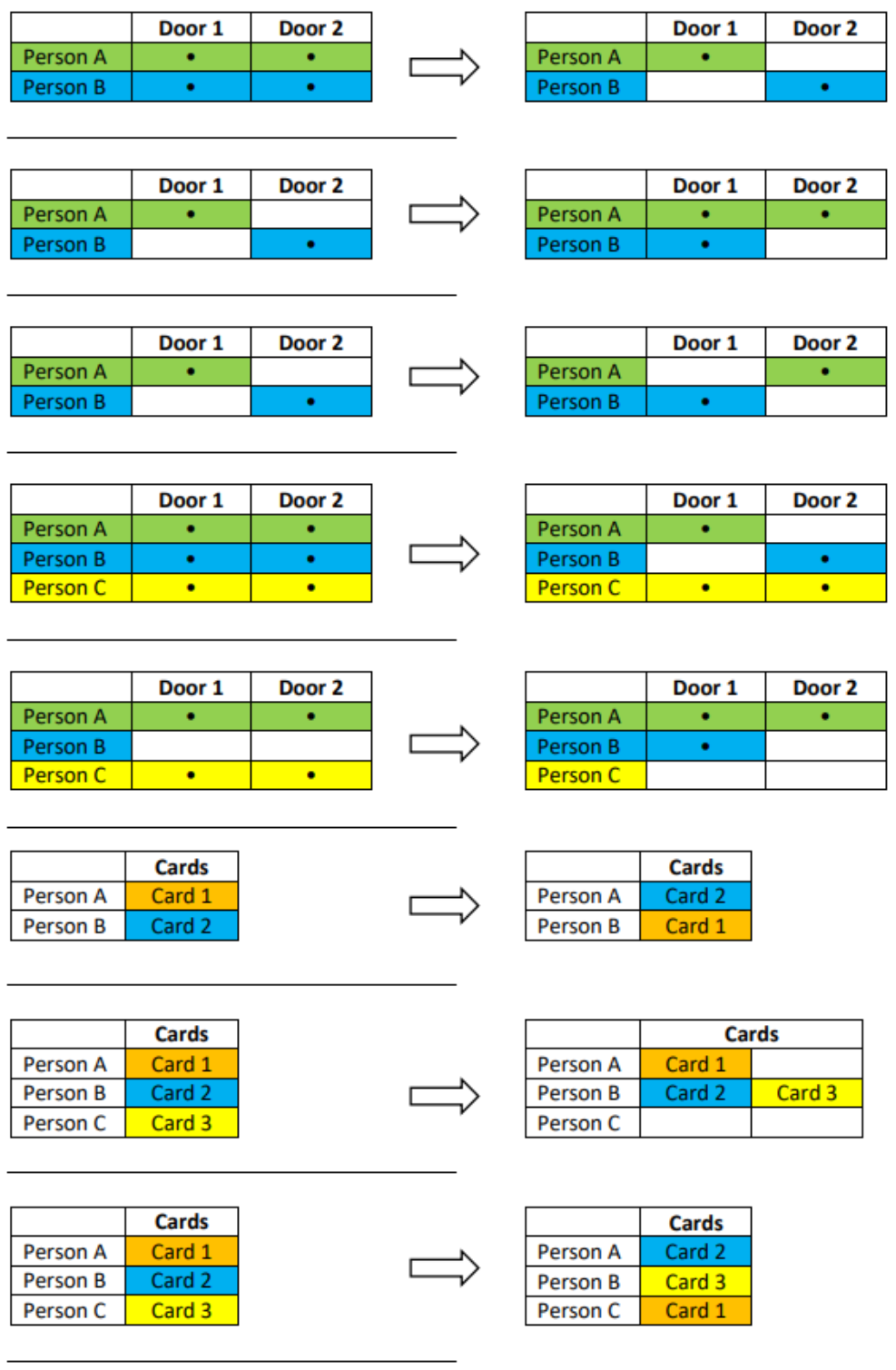
*Figure 1 - Upload scenario matrix (part 1)*
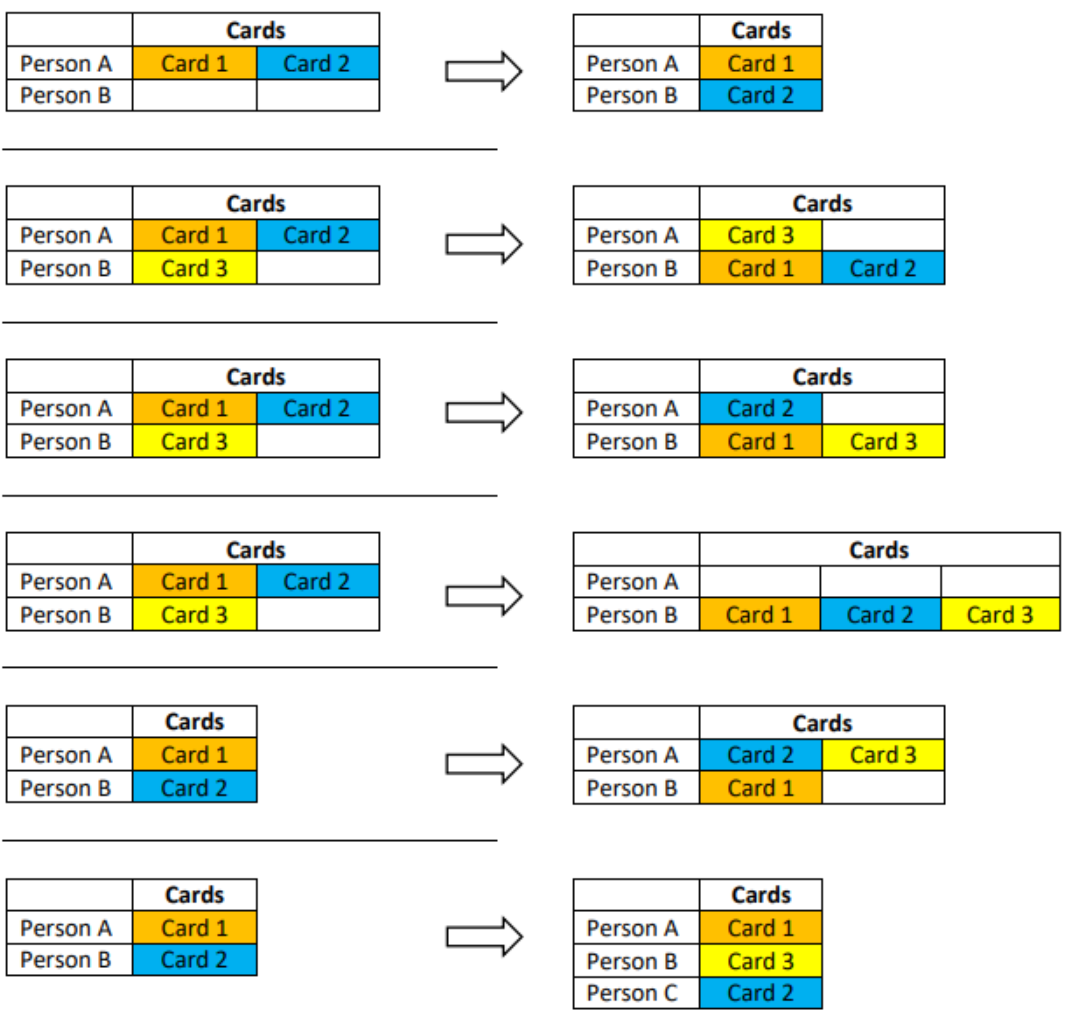
*Figure 2 - Upload scenario matrix (part 2)*
## Door Manual override on/off
This test verifies the behavior of the driver implementation for controlling manually overridden doors. Manually overridden doors do not allow the person to enter, even when they have a valid credential with proper access rights.
### Test Steps
| No. | Test Steps |
| :---: | --- |
| 1 | Execute command “Door manual override” on door |
| 2 | Try to open the door using valid credential |
| 3 | Execute command “Door manual override off” on door |
### Expected Results
| No. | Expected Results |
| :---: | --- |
| 1 | During door lockout door ignores any attempt to open it with valid credentials |
| 2 | Status of the door is DoorManualOverrideOn when overridden. |
| Audit log evidence |
| --- |
| 'PERSON' sent command 'Door Manual Override Off' to 'DEVICE'.
Command 'Door Manual Override Off' from 'PERSON' was delivered to 'DEVICE'.
'DEVICE' manual override finished.
'PERSON' sent command 'Door Manual Override' to 'DEVICE'.
Command 'Door Manual Override' from 'Support' was delivered to 'Door 1'.
‘DEVICE' manual override started. |
### Parameters
> • DEVICE represents the door name
> • PERSON represents the name of person who executed the command
## Door Unlocked Permanently
This test verifies the behavior of the driver implementation for remote controlling of doors. This test focuses on handling events and states when door is unlocked permanently.
### Test Steps
| No. | Test Steps |
| :---: | --- |
| 1 | Execute command “Door unlock permanently” on door |
| 2 | When door contact is present, simulate real door opening |
| 3 | Execute command “Door lock” on door |
| 4 | When door contact is present, simulate real door closing |
### Expected Results
| No. | Expected Results |
| :---: | --- |
| 1 | After issuing the command "Door unlock permanently ", the door status is set to Unlocked Permanently. |
| 2 | During real door opening, the door contact is activated, and the door status is set to Opened. |
| 3 | After issuing the command " Door lock ", but door contact is still open, the door status remains Opened. |
| 4 | After real door closing, the door contact is deactivated or the door relay timer expires, the door status returns to Locked (normal) state. |
| Audit log evidence |
| --- |
| 'PERSON' sent command 'Door Unlock Permanently' to 'DEVICE'.
Command 'Door Unlock Permanently' from 'PERSON' was delivered to 'DEVICE'.
'DEVICE' unlocked permanently.
'PERSON' sent command 'Door Lock' to 'DEVICE'.
Command 'Door Lock' from 'PERSON' was delivered to 'DEVICE'.
'DEVICE' locked. |
### Parameters
> • DEVICE represents the door name
> • PERSON represents the name of person who executed the command.
## Door Forced Open
This test verifies the behavior of the driver implementation for remote controlling of doors. This test focuses on handling events and statuses during the unauthorized opening of the door in a protected system.
### Test Steps
| No. | Test Steps |
| :---: | --- |
| 1 | Activate door contact when door is locked |
### Expected Results
| No. | Expected Results |
| :---: | --- |
| 1 | Door status is set to Forcibly open |
| Audit log evidence |
| --- |
| Door 'DEVICE' forced open. |
### Parameters
> • DEVICE represents the door name
## Door Open Too Long
This test verifies the behavior of the driver implementation for remote controlling of doors. This test focuses on handling events and states during the held open alarm on the door.
### Test Steps
| No. | Test Steps |
| :---: | --- |
| 1 | Use the credential to access the access point |
| 2 | Activate door contact |
| 3 | Keep the contact activated longer than the predefined time |
### Expected Results
| No. | Expected Results |
| :---: | --- |
| 1 | Door status is set to Open when the door contact is activated. |
| 2 | After predefined open time expiration, the door status is set to Open Too Long. |
| 3 | Two Room Closed events are received. |
| Audit log evidence |
| --- |
| 'DEVICE' opened.
Door 'DEVICE' open too long. |
### Parameters
> • DEVICE represents the door name
## Door Remote Unlock
This test verifies the behavior of the driver implementation for remote controlling of doors.
### Test Steps
| No. | Test Steps |
| :---: | --- |
| 1 | Execute command “Door unlock” on door |
| 2 | When door contact is present, simulate real door opening |
| 3 | When door contact is present, simulate real door closing |
### Expected Results
| No. | Expected Results |
| :---: | --- |
| 1 | After issuing the command "Door unlock", the door status is set to Unlocked. |
| 2 | During real door opening, the door contact is activated, and the door status is set to Opened. |
| 3 | After real door closing the door contact is deactivated, and the door status is set to Unlocked. |
| 4 | If the door relay timer also expires, the door status returns to Locked (normal) state. |
| Audit log evidence |
| --- |
| 'PERSON' sent command 'Unlock' to 'DEVICE'.
Command 'Unlock' from 'PERSON' was delivered to 'DEVICE'
'DEVICE' unlocked.
'DEVICE' opened.
Access granted for 'UNKNOWN CREDENTIAL ' at 'DEVICE'.
'DEVICE' unlocked.
'DEVICE' locked. |
### Parameters
> • DEVICE represents the door name
> • PERSON represents the name of person who executed the command
## Request to Exit Button
This test verifies the behavior of the driver implementation for manual controlling of doors. This test focuses on handling events and statuses during the use of Request to Exit Button.
### Test Steps
| No. | Test Steps |
| :---: | --- |
| 1 | Activate Exit Button. |
| 2 | When door contact is present, simulate real door opening |
### Expected Results
| No. | Expected Results |
| :---: | --- |
| 1 | During real door opening, the door contact is active, and the door status is set to Open. |
| Audit log evidence |
| --- |
| Exit button pushed 'DEVICE'. |
### Parameters
> • DEVICE represents the door name
## Personal Management - Handling Access Granted Event
This test verifies the behavior of the driver when receiving the access granted event from the device.
### Test Steps
| No. | Test Steps |
| :---: | --- |
| 1 | Create a new person |
| 2 | Assign the person a valid credential |
| 3 | Grant the person access to the access point |
| 4 | Send credentials to the device |
| 5 | Use the credential to access the access point |
| 6 | Open the door |
### Expected Results
| No. | Expected Results |
| :---: | --- |
| 1 | Person got access to specific access point |
| Audit log evidence |
| --- |
| Access granted to 'PERSON' at 'DEVICE' using ' CREDENTIAL\_TYPE' 'CREDENTIAL\_NAME' at reader 'READER'. |
### Parameters
> • DEVICE represents the door name
> • PERSON represents the name of person who used authorized credential
> • CREDENTIAL\_TYPE represents credential type used to get access
> • CREDENTIAL\_NAME name of credential used to get access
> • READER represents reader where credentials where read
| Notes |
| --- |
| If the door did not open, Access granted message will not be sent. |
## Personal Management - Handling Access Denied Event - Door not allowed
This test verifies the behavior of the driver when receiving the access denied event from the device.
### Test Steps
| No. | Test Steps |
| :---: | --- |
| 1 | Create new person |
| 2 | Assign the person a valid credential |
| 3 | Grant the person access to the access point |
| 4 | Deny the person access to another access point |
| 5 | Send credentials to the device |
| 6 | Use the credential to access another access point |
### Expected Results
| No. | Expected Results |
| :---: | --- |
| 1 | Person did not get access to specific access point |
| Audit log evidence |
| --- |
| Access denied to 'PERSON' at 'DEVICE' using credential 'CREDENTIAL\_NAME' on reader 'READER'.
Reason: Door not allowed |
### Parameters
> • PERSON represents the name of person who did not get access to device
> • DEVICE represents the device name.
> • CREDENTIAL\_NAME name of credentials used to get access
> • READER name of reader where was credential read
## Personal Management - Handling Access Denied Event – Unknown Credential
This test verifies the behavior of the driver when receiving the access denied event from the device.
### Test Steps
| No. | Test Steps |
| :---: | --- |
| 7 | Revoke all access rights for Person |
| 8 | Issue Full Upload command |
| 9 | Slide a card on correct reader |
### Expected Results
| No. | Expected Results |
| :---: | --- |
| 2 | Card will be recognized as unknown |
| Audit log evidence |
| --- |
| Access denied to 'PERSON' at 'DEVICE' using credential 'CREDENTIAL\_NAME' on reader 'READER'.
Reason: Credential unknown at this door |
### Parameters
> • PERSON represents the name of person who did not get access to device
> • DEVICE represents the device name.
> • CREDENTIAL\_NAME name of credentials used to get access
> • READER name of reader where was credential read
## Personal Management - Access Time Restriction
This test verifies the behavior of the driver implementation for time limited access scenarios, allowing the update the device configuration in that a way, that the access can be limited to some specific hours and/or days of the week.
### Test Steps
| No. | Test Steps |
| :---: | --- |
| 1 | Create a new person |
| 2 | Assign the person a valid credential |
| 3 | Grant the person access to the access point |
| 4 | Restrict access permission with time restriction |
| 5 | Send credentials to the device |
| 6 | Check whether the restriction is applied correctly |
### Expected Results
| No. | Expected Results |
| :---: | --- |
| 1 | The assigned time restriction is correctly applied |
| 2 | When a person has no limitation in access it gets access granted event (with the condition that the door was actually opened). When person has limited access by time restriction it gets access denied event. |
| Audit log evidence |
| --- |
| Access granted to 'PERSON' at 'DEVICE' using 'CREDENTIAL\_TYPE' 'CREDENTIAL\_NAME' at reader 'READER'.
Access denied to 'PERSON' at ‘DEVICE' using credential 'CREDENTIAL\_TYPE' on reader 'READER'. Reason: Active time restriction |
### Parameters
> • PERSON represents the name of a person who used credentials on access point
> • DEVICE represents an access device where person requested access out of time restriction
> • CREDENTIAL\_TYPE represents credential type used to get access
> • CREDENTIAL\_NAME name of credential used to get access
> • READER name of reader where was credential read
| Notes |
| --- |
| SC-1000 can handle maximum 15 different time restriction sets.
Access granted message will be sent only if the door was opened. |
## Personal Management - Holiday Support
This test verifies the behavior of the driver implementation for manipulation with a list of holidays in the device, allowing the definition of the different rules for holidays, for normal working days or weekends.
### Test Steps
| No. | Test Steps |
| :---: | --- |
| 1 | Create a new person |
| 2 | Assign the person a valid credential |
| 3 | Create holiday set, having today’s date |
| 4 | Send credentials to the device |
| 5 | Check whether the restriction is applied correctly |
| 6 | Modify holiday set in a way that it doesn't contain today’s date |
| 7 | Send credentials to the device |
| 8 | Check whether the restriction is applied correctly |
### Expected Results
| No. | Expected Results |
| :---: | --- |
| 1 | The assigned time restriction is correctly applied |
## Tamper
This test verifies the behavior of the driver when processing the events about the device tampers on Access systems, Alarm systems or devices with similar functionality.
### Test Steps
| No. | Test Steps |
| :---: | --- |
| 1 | Issue a tamper on a device |
| 2 | Restore the tamper |
| 3 | Confirm the alarm from C4 UI (Reset alarm command). |
### Expected Results
| No. | Expected Results |
| :---: | --- |
| 1 | Until the alarm confirmation, the detector has active tamper status. |
| Audit log evidence |
| --- |
| Tamper on 'DEVICE'.
Tamper completed on 'DEVICE'. |
### Parameters
> • DEVICE where tamper was issued
| Notes |
| --- |
| Test must be reproducible on all devices that are capable of generating the tamper alarm
In case the device ends the tamper state automatically, there is no need to confirm the tamper from C4 UI and the test is also considered as passed. |
## Device Tree Configuration Validation
This test verifies the behavior of the driver in case the device configuration tree is complete and contains additional nodes that are not present on device.
### Test Steps
| No. | Test Steps |
| :---: | --- |
| 1 | Create a complete configuration device tree with additional nodes of each type that are not presented on device. |
| 2 | Set address of additional nodes to a fictive value. |
| 3 | Start the endpoint. |
| 4 | Check the status of all nodes in device tree. |
### Expected Results
| No. | Expected Results |
| :---: | --- |
| 1 | Driver starts. |
| 2 | Nodes that are presented on device have equal status to real status of device. |
| 3 | Nodes that are not presented on device have unknown status (black). |
## Output Activation and Deactivation
This test verifies the behavior of the driver implementation for output contact monitoring and controlling support.
### Test Steps
| No. | Test Steps |
| :---: | --- |
| 1 | A RelayController node must be configured to the device. |
| 2 | Execute command “On” on RelayController. |
| 3 | After the output is opened, execute command “Off” on it. |
### Expected Results
| No. | Expected Results |
| :---: | --- |
| 1 | When output is activated, its status is Open. |
| 2 | When output is deactivated, its status is Normal. |
| Audit log evidence |
| --- |
| 'PERSON' sent command 'On' to 'DEVICE'.
Command 'On' from 'PERSON' was delivered to 'DEVICE'.
'DEVICE' opened.
'PERSON' sent command 'Off' to 'DEVICE'.
Command 'Off' from 'PERSON' was delivered to 'DEVICE'.
'DEVICE' closed. |
### Parameters
> • PERSON represents the name of the person who executed the commands
> • DEVICE represents the RelayController name
## Device Audit Log Retrieval
This test verifies the behavior of the driver when transferring events from the device audit log after establishing communication. Standard behavior is that the driver reads all events from the device audit log, even events that happened during periods of disconnection. Too old events (defined in the StoreRecentEventsTimeLimitHours property) are skipped.
### Test Steps
| No. | Test Steps |
| :---: | --- |
| 1 | Disconnect the endpoint |
| 2 | Wait for 1 minute |
| 3 | Execute operation on device that leads to the entry in the device audit log |
| 4 | Wait for 1 minute |
| 5 | Connect the endpoint. |
### Expected Results
| No. | Expected Results |
| :---: | --- |
| 1 | All events from the device that happened during disconnection are stored in audit log with original time of the events on device, not with the time when they were read out from the device. |
## Contact Monitoring from Device
This test verifies the behavior of the driver implementation for input contact monitoring support.
### Test Steps
| No. | Test Steps |
| :---: | --- |
| 1 | In SC-1000 Configurator software create a Partition |
| 2 | Create a zone under the partition with the Zone Type property set to Intruder alarm |
| 3 | Create a zone under the partition with the Zone Type property set to Fire alarm |
| 4 | Create a zone under the partition with the Zone Type property set to 24 hours |
| 5 | Upload configuration |
| 6 | After successful reconnect in C4, import configuration |
| 7 | Make sure the partition is not armed |
| 8 | Activate input contacts on device |
| 9 | Deactivate input contacts on device |
| 10 | Arm (or forced arm) the partition |
| 11 | Activate input contacts on device |
| 12 | Deactivate input contacts on device |
| 13 | Confirm the alarm on partition (Reset alarm command) |
### Expected Results
| No. | Expected Results |
| :---: | --- |
| 1 | Partition status is Normal if not armed, and Armed after successfully armed |
| 2 | When partition is not armed and contact is activated, the 24 hours type zone status is Alarm. |
| 3 | After partition is armed, when contact is activated, its status is Alarm. |
| 4 | After Reset alarm command, all deactivated zones status is Normal |
| Audit log evidence |
| --- |
| 'DEVICE' armed.
Alarm on 'DEVICE1'.
Alarm restored on 'DEVICE1'.
Fire Alarm on 'DEVICE2'.
Fire Alarm restored on 'DEVICE2'.
If partition arm was unsuccessful: 'DEVICE' arming failed. |
### Parameters
> • DEVICE represents the partition name, DEVICE1 represents the zone name, DEVICE2 represents the fire zone name
| Notes |
| --- |
| An SC-1000 zone generates alarm only if the partition is armed. A zone will remain in alarm state until acknowledgement even if the detector is not in alarm anymore. Disarming a partition will clear any active alarm from the zone detectors. |
## Duress Alarm
This test verifies the behavior of the driver when it is notified about duress alarm.
### Test Steps
| No. | Test Steps |
| :---: | --- |
| 1 | Issue a duress alarm (the PIN code must be one number higher than the correct one, e.g. instead of 1234 type 1235). |
| 2 | Confirm the duress alarm (Reset alarm command) |
### Expected Results
| No. | Expected Results |
| :---: | --- |
| 1 | A device where the duress alarm is reported has Alarm status. |
| 2 | After confirming the duress alarm, duress alarm is finished and the device where the duress alarm was reported has normal status. |
| Audit log evidence |
| --- |
| Duress alarm from 'DEVICE' |
### Parameters
> • DEVICE represents the name of device where the duress alarm occurred.
## Bypass Zone
This test verifies the behavior of the driver when a zone node is bypassed from UI.
### Test Steps
| No. | Test Steps |
| :---: | --- |
| 1 | A partition and a zone under it must be in the device hierarchy. |
| 2 | Arm the partition |
| 3 | Bypass the zone |
| 4 | Activate input contacts on device |
| 5 | Deactivate input contacts on device |
| 6 | Bypass Off command on the zone |
| 7 | Activate input contacts on device |
| 8 | Deactivate input contacts on device |
### Expected Results
| No. | Expected Results |
| :---: | --- |
| 1 | When bypassed, zone status is Bypass. |
| 2 | After Bypass Off command, zone status is Normal or Alarm |
| 3 | During bypass, no Alarm state is displayed, no Alarm audit log is stored on the Zone. |
| Audit log evidence |
| --- |
| 'DEVICE' bypass on
'DEVICE' bypass off
After Bypass Off: Alarm on 'DEVICE'.
Alarm restored on 'DEVICE'. |
### Parameters
> • DEVICE represents the name of zone device.