System C4
Platform Overview
Building security in one software platform
Bring diverse technologies into one operating environment. Monitor events and device status, manage identities and access, and coordinate actions across connected systems.
Connect technologies. Simplify operations.
Build around your needs.
An introduction to the platform, its practical value and the ecosystem that supports it.
Document information
Field |
Value |
|---|---|
Document title |
System C4 - Platform Overview |
Document type |
Product overview |
Product |
System C4 |
Intended audience |
Potential users, business partners and developers |
Version / issue date |
9.0 / 4 October 2026 |
Status |
Production |
1. Meet System C4
System C4 is an integration platform for the centralized management of physical security systems and building technologies. It brings supported technologies from different manufacturers into one application for consistent monitoring, control and configuration.
Instead of operating separate tools for every subsystem, teams can work in a shared environment for events, device status, identities and access rights. C4 combines three complementary capabilities:
See what is happening
Physical Security Information Management (PSIM) unifies the monitoring and control of connected security systems. Events and device information are brought together to support a consistent view of the installation.
Manage who has access
Identity, Credential and Access Management (ICAM) brings identities, credentials and access rights into a common management environment for connected access control and alarm systems.
Coordinate a response
Command & Control connects information with action. Operators can issue commands through the platform, while automated workflows help connected systems and users work together.
Designed for integration: C4 combines an open, modular architecture with vendor-independent integration, precise user permissions and deployment options for both compact and complex installations.
2. Value for users and partners
The value of integration is not only connecting systems. It is making them easier to operate together, using common information and a consistent way of working.
For users: less fragmentation, more visibility
Bring daily monitoring, device control and access administration into one environment. Centralized events and device status make it easier to understand what is happening, while shared reporting supports operational review, auditing and security analysis.
For partners: build around the customer
Combine device integration, information-system connections, automation, tailored interfaces and reporting within one modular platform. The comprehensive Simple Client API and SDK Documentation on the C4 Wiki support developers in building customer-specific extensions and independent applications. Partners can focus on the functions and user experience that distinguish their solution, while building on a common C4 foundation.
3. Connect technologies and information
C4 connects supported systems from different manufacturers across physical security, building technologies and external information systems.
Technology area |
What C4 brings together |
|---|---|
Access control |
Access rights, device status and supported control commands in one environment. |
Intrusion and alarm systems |
Alarm events, device status, control and centralized access-rights management. |
Video surveillance |
Supported video systems as part of integrated security operations. |
Fire protection |
Supported fire-protection systems within centralized monitoring and operation. |
Parking and building automation |
Parking systems, elevators, heating, ventilation and air conditioning (HVAC), and other supported building technologies. |
Information systems |
Data synchronization with human resources systems, Active Directory and other compatible information systems. |
Integration enables connected components to be identified, monitored and controlled as part of a wider system. Drivers and IS Connectors translate information between external systems and the C4 environment.
Integration scope: The functions available for a particular technology depend on the external system's integration interface and the selected plugin.
4. One environment for daily operations
C4 brings the core activities of an integrated security operation into a common working environment. Teams can move from information to action without treating each subsystem as a separate application.
Monitor continuously
Monitor the health, availability and status of connected devices around the clock. A unified view helps operators follow conditions across different technologies rather than checking each manufacturer's software separately.
Control and configure connected systems
Send supported commands directly from C4, such as an instruction to open a door. Where the integration provides configuration functions, manage device parameters in the same environment instead of switching to a separate device application.
Manage identities, credentials and access
Manage identities, credentials and access rights centrally. C4 provides a unified approach to access administration across connected access control and alarm systems, bringing related information and permissions into one place.
Automate recurring actions
Smart Routines support automated processes based on application or external-system events, device status and user activity. Actions can include device commands, email or SMS notifications, client-application actions and customer-specific extensions.
Match access to responsibilities
Define what each user can see and do according to their responsibilities. C4 supports role-based access and fine-grained permissions, including restrictions at the level of individual devices in complex installations.
Illustrative workflow: An event from a connected subsystem can trigger a Smart Routine that sends a notification or issues a supported command. The conditions and actions are configured for the project.
5. An architecture that grows with you
System C4 is an on-premises, modular client/server platform installed within the end-user environment. The application server coordinates access to shared information, while dedicated services handle integration, automation and notifications. Each C4 installation stores its configuration, logs and user settings in a central Microsoft SQL Server database.
Within one installation, C4 Server describes a logical server environment rather than a single physical computer. Services can run together on one computer or be multiplied and distributed across additional computers to match the workload. This allows large installations to retain one shared database and one operating environment.
C4 supports two distinct multi-site approaches. The most widely used model connects multiple sites to one C4 Server and database, with remote monitoring through the C4 Client application. C4 Enterprise Edition instead connects independently operating site installations to a central operations room. The choice is driven by the need for local independence, not by the number of sites alone.
The following deployment approaches combine these operating models with the required service capacity and availability:
Deployment approach |
How it fits the project |
|---|---|
Compact single-site |
Host C4 server services and the database on one computer for a compact installation. |
Centralized multi-site |
Manage multiple sites through one C4 Server and database. Multiply services for large workloads and monitor remotely with C4 Client. |
C4 Enterprise |
Connect independently operating, locally clustered sites to a central operations room for monitoring and control. |
High availability |
Use clustered infrastructure for the shared C4 Server or for the local C4 installation at each independent site. |
Project design: Site independence determines the overall deployment model. Device quantities, service workloads, availability requirements and licensing determine the detailed implementation.
6. Typical C4 implementation scenarios
System C4 can support one facility, multiple sites managed through a shared server environment, or independent site installations linked by C4 Enterprise Edition. These scenarios address different operating requirements. A geographically distributed project does not, by itself, require an independent C4 installation at every site.
The following four scenarios describe a compact starting point, the most common centralized multi-site model, the enterprise model for independent sites, and cluster-based availability. Service multiplication and clustering can be combined with the selected operating model. The required Edition, plugins and infrastructure are confirmed during solution design.
Single-site deployment
Project scope
A single-site deployment provides a compact starting point for an organization that wants to bring the supported security systems and building technologies of one facility into a common operating environment. An illustrative project could connect access control, intrusion detection and video surveillance at an office building or another standalone facility.
Implementation approach
C4 server services and the database are hosted on one computer within the end-user environment. Operator clients connect to the application server, while integration, automation and notification services run within the same server environment. Connected technologies are brought into C4 through the relevant Drivers and IS Connectors.
This arrangement concentrates the server-side components in a compact infrastructure. The actual functions available to the customer depend on the selected Edition, licensed plugins and capabilities exposed by each integrated system.
Value for users and partners
For users, the main value is a shared working environment for monitoring, supported control commands, event information and access administration. For partners, it provides a clearly defined starting configuration in which the integration scope and operating requirements can be established before a more distributed architecture is considered.
A compact installation can be extended as the project develops. Where additional sites can share the same C4 Server and database, the centralized model in Section 6.2 provides the basis for expansion. The required service capacity, infrastructure and licensing are reviewed as the scope grows.
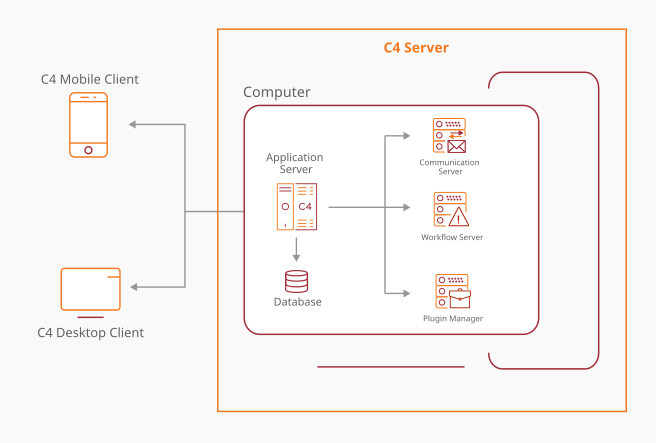
Figure 1. Single-site C4 deployment.
C4 server services and the database are hosted on one computer within the customer environment. Operator clients use C4 to monitor and manage the supported technologies connected at the site.
Centralized multi-system and multi-site deployment
Project scope
Centralized multi-system deployment is the most widely used C4 configuration for managing multiple sites through one C4 Server. It brings technologies from geographically separated facilities into one installation, with a common database and a consistent operating environment.
Implementation approach
Data from all sites is centralized in one database. Operators use the C4 Client application for remote monitoring and supported control from the central operations room or other authorized workplaces, with visibility and actions governed by their permissions.
For projects integrating thousands of devices, C4 is designed to multiply services across additional computers. Additional Plugin Manager and workflow service instances spread integration and automation workloads while retaining one logical C4 Server and one database. This expands capacity without creating an independent C4 installation for each site.
External information systems, such as human resources systems or Active Directory, can be connected through suitable integrations. Supported functions depend on the selected connectors and project requirements.
Value for users and partners
Users gain centralized information, consistent administration and remote visibility across their sites. Partners can scale service capacity within the shared solution rather than maintaining separate installations solely because devices are located at different sites.
Service multiplication addresses processing capacity, not failover protection. Clustering and availability are designed separately where continuity requirements call for redundancy.
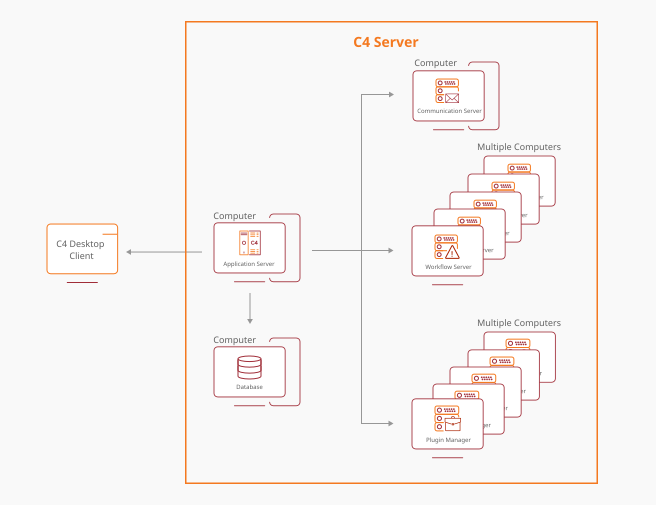
Figure 2. Service scaling within one centralized C4 Server.
The diagram shows multiplied services within one C4 Server, not independent site installations. This shared environment uses one database for centralized multi-site management and remote C4 Client access.
C4 Enterprise deployment for independent sites
Project scope
C4 Enterprise Edition is used when sites require central monitoring and control while each site must be able to operate independently. This is a typical solution for critical infrastructure projects, where local security operations must not depend on the central operations room.
Implementation approach
In this configuration, each site runs its own clustered C4 installation, with a local database and local monitoring through the C4 Client application. Local operators manage the site through this environment, which provides the basis for independent operation.
C4 Enterprise Server adds a central monitoring and control layer above these local installations. It brings information and supported control functions to the central operations room, allowing central operators to oversee participating sites without replacing their local C4 environments.
Solution design defines the information available centrally, operator permissions, local responsibilities and the scope of commands. Local continuity and central connectivity are addressed separately, with communication and recovery requirements agreed for the project.
Value for users and partners
Users combine independent local operations with central visibility and coordinated control. Local teams retain the tools needed to manage their own sites, while the central operations room gains a wider view across the organization.
Partners can address critical-infrastructure requirements through a layered solution: clustered C4 at each site and C4 Enterprise Edition for central operations. Unlike the centralized model in Section 6.2, this architecture retains a separate operating environment at each site instead of one shared installation for all sites.
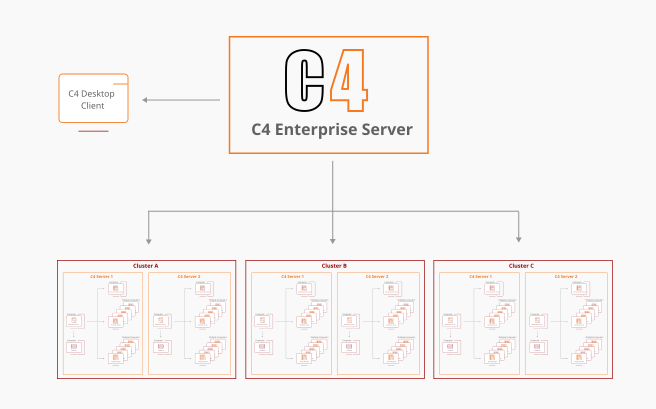
Figure 3. C4 Enterprise monitoring and control of independent sites.
Each site uses clustered C4 with its own database and local monitoring for independent operation. C4 Enterprise Server brings information and control from these installations to the central operations room.
Redundant and failover deployment
Project scope
A redundant or failover deployment addresses projects where the availability of the C4 management environment is an important operational requirement. It is an availability choice rather than a definition of project size: a single important facility may require it, and it can also form part of a larger multi-site solution.
Implementation approach
C4 server environments can be deployed within failover or high-availability cluster infrastructure. The cluster arrangement provides the basis for protecting the selected server services according to the project's availability requirements. The illustration shows two C4 server environments within one cluster without prescribing a particular cluster technology or operating mode.
The complete design must also address the database, storage, network connections and communication with integrated systems. Protecting the application services alone does not define the availability of every part of the installation. The scope of protection, service dependencies and recovery responsibilities must therefore be considered together.
Recovery behavior depends on the selected infrastructure and configuration. Expected interruption, recovery objectives and acceptance tests should be agreed for the project; the deployment diagram does not imply uninterrupted service or a guaranteed recovery time.
Value for users and partners
For users, the value is an architecture in which service recovery and availability are explicit design objectives rather than assumptions. For partners, it creates a clear basis for coordinating the C4 application design with the customer's infrastructure and operational requirements.
Clustering can protect the shared C4 Server in a centralized multi-site solution or the local C4 installation at each independent site. In the latter model, C4 Enterprise Edition provides central monitoring and control across the clustered site installations.
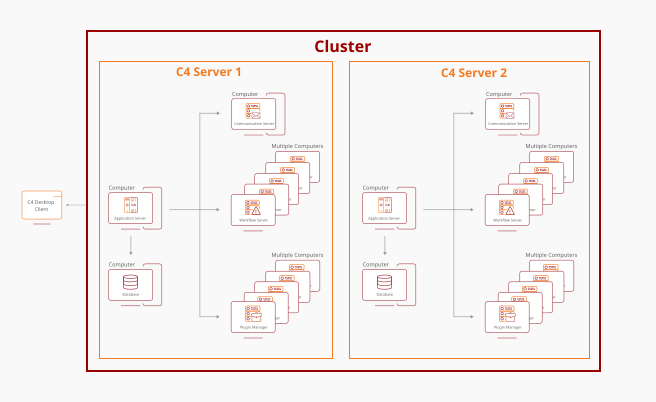
Figure 4. C4 deployment with cluster-based resilience.
C4 server environments operate within a cluster designed to support service availability and failover. The protection scope and recovery behavior depend on the complete project infrastructure and its configuration.
Choosing the right configuration
Choose one C4 Server and database for shared multi-site management, or C4 Enterprise Edition for independently operating sites. Then define device quantities, integration and automation workloads, operator locations and availability requirements. These determine service multiplication, clustering, infrastructure and licensing. Thousands of devices can be managed within one centralized installation; local independence, not device quantity alone, distinguishes the Enterprise deployment model.
7. Adapt C4 to your requirements
C4 is designed to be extended rather than limited to one fixed application scope. Plugins connect additional technologies and add functions tailored to the needs of a customer or project. Five main extension areas support this approach:
Extension area |
Purpose |
|---|---|
Drivers |
Connect supported external devices and systems for continuous monitoring and control. |
IS Connectors |
Synchronize data between C4 and external information systems, such as employee information from a human resources system. |
Panels |
Extend the C4 Client with additional interfaces, device-configuration functions or customer-specific information about persons, devices and regions. |
Smart Routines |
Create automated processes and interactions between connected systems and users. |
Reporting |
Provide reusable, customer-specific reporting and prepare or aggregate data for reports. |
A controlled plugin lifecycle
Plugins can be developed by Gamanet or third-party developers and have their own development, deployment and maintenance lifecycle. The Plugin Store is the distribution channel for installation plugins, and C4 accepts digitally signed plugins.
Plugins use controlled C4 interfaces rather than direct SQL Server access. Their permitted data scope is defined, and sandbox restrictions apply to plugin requests. Installation of third-party plugins requires approval by the installation manager on the end-user side.
Build around the requirement: Select integration, automation, interface and reporting extensions according to the functions the installation needs, while retaining a common operating environment.
8. Build with the Simple Client API
Simple Client is C4's comprehensive application programming interface (API), provided through the Simple Client SDK. It gives partners and developers a common way to access platform data and coordinate supported actions through the C4 application server, using the same interface as C4's own client applications and plugins.
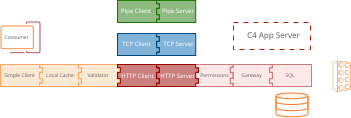
Figure 5. Modular and scalable Simple Client API.
One interface for a broad range of functions
Simple Client is not limited to a narrow data export or an isolated device connection. It provides methods to access and manage C4 data within the assigned permission scope. This makes it a foundation for customer-specific data processing, tailored interfaces and interactions with connected systems.
Access is mediated by the application server, so extensions work with the C4 data model and permission framework rather than accessing the C4 SQL Server database directly. Partners can focus on the customer's requirements instead of creating a separate database-access mechanism for each extension.
Combine information with operational actions
Simple Client supports both transaction calls and message-based communication. Transaction calls retrieve or modify data. For example, an application requesting a list of persons receives only the records that the current user is allowed to see, because the server evaluates the request and filters the result.
Message communication enables interactions between applications, services and plugins. An authorized "Open Door" command, for example, can be routed through C4 to the responsible Driver, which sends the supported instruction to the device. An application can therefore combine access to information with operational actions through one integration approach.
Create plugins or independent applications
Developers can use the shared interface when building Drivers, IS Connectors, Panels, Smart Routines and reporting extensions. A C4 plugin host initializes Simple Client and makes it available to the hosted plugin, giving extensions a common route to the application server.
C4 also supports independent applications that use the platform to monitor and manage devices. This creates scope for customer-specific applications that use C4 as their integration foundation instead of duplicating connections to each supported device. Their functional scope and licensing are defined separately for the project.
Focus development on the customer's needs
The SDK provides a .NET-based development interface. Its connector layers handle tasks such as user login, local caching, time-zone conversion, communication with the application server and server-side permission evaluation. Developers work with the Simple Client interface rather than separately implementing each stage of that communication path.
This shared foundation can reduce repeated integration effort and help development teams concentrate on customer-specific logic and the user experience. Each extension retains its own development, deployment and maintenance lifecycle, allowing the partner to manage its functionality as a distinct part of the solution.
Keep data access and commands under control
Permissions are evaluated on the server, with separate permissions for operations such as reading, adding, changing and deleting data. Access can be defined at the level of individual records, so an integration can be limited to its agreed information and responsibilities instead of receiving unrestricted access to the installation.
External Simple Client connections use encrypted and authenticated HTTPS. The authentication strategy is selected for the deployment; the security specification requires OpenID Connect for Enterprise Security. Internal communication channels have separate security characteristics and must be assessed as part of the deployment design.
Create value for users, partners and developers
For users, Simple Client provides a route to software that fits their operating processes while continuing to use C4 as the common integration and management platform. A customer-specific interface can work with permitted C4 information and supported commands instead of introducing a disconnected operating tool.
For partners and developers, the API opens opportunities to deliver specialized applications, reusable extensions and project-specific workflows. The combination of a shared interface and SDK documentation supports a consistent development approach, while the partner contributes the industry knowledge and functionality that make the solution relevant to the customer.
Integration scope: Available functions depend on configured permissions, licensing and the capabilities of the connected systems. Security requirements and available controls must be checked for the selected C4 release and deployment.
Technical reference: Cyber Security and Architecture Specification, version 14, Sections 8-10 and 14-15.
9. An ecosystem that supports your project
C4 Portal Services complement the installed platform with web services for licensing, training, project management and system customization. Together, the application and portal ecosystem support the people who operate, deliver and extend C4.
For users and administrators
Training supports the skills needed to work with the platform. Licensing and project services help manage the installation scope, while the Plugin Store provides access to the extensions used in customer projects.
For integration partners and developers
Partners can build solutions from the platform's integration and customization capabilities. Developers can create plugins under a developer agreement with Gamanet, with responsibility for their own extensions defined separately from the core platform.
SDK Documentation on the C4 Wiki
SDK Documentation on the C4 Wiki complements the Simple Client API with a dedicated documentation resource for developers. It gives teams a reference point for their C4 development work, helping them build their understanding of the platform before implementing an integration or extension.
Developers can use this resource during project preparation, implementation and maintenance. Together with the shared API, it supports a more consistent approach to development and helps partners evaluate C4 as a foundation for customer-specific solutions. For users, this creates a clearer route from an operating requirement to an extension developed within the C4 ecosystem.
A defined route from development to delivery
The developer ecosystem extends beyond writing code. For integration plugins, the security specification defines verification of the plugin's use of C4 interfaces and certification of its communication with an external system as separate requirements before customer release. This provides a framework for planning quality and security reviews alongside implementation.
Distribution through the Plugin Store, digital signing and installation approval connect development with a managed delivery process. Combined with SDK documentation, platform training and a developer agreement, this gives partners a structured route for turning their expertise and customer requirements into C4 extensions.
Developer value: A common API, a dedicated SDK documentation resource and a defined plugin lifecycle help partners build on C4 rather than treating each project as a separate integration platform.
10. Plan your C4 project
Licensing follows the installation scope
A C4 installation combines a server license, called an Edition, with the required plugin licenses and other extensions. The Edition defines the functional scope, applicable C4 version, usage period and server scope. Plugin licensing defines the relevant integrations, device quantities or additional functions.
For drivers, the item being licensed depends on the particular integration. The required Edition, plugins, deployment scope and any upgrade needs should therefore be confirmed as part of the project specification.
Independent applications that use C4 for device monitoring and management have a separately defined licensing scope. Projects that include custom development should confirm the intended API operations, the required permissions and the applicable plugin or application licenses during solution design.
Start with the operating requirements
Define the environment. Identify the sites, technologies, manufacturers and information systems that need to work together, and establish whether the sites must operate independently.
Confirm the required capabilities. Describe monitoring, device control, access management, automation and reporting priorities, together with user responsibilities.
Shape the solution. Confirm integration capabilities and licensing, select the centralized or independent-site deployment model, and agree the required service capacity and availability.
Include developers early in the project
Where the solution includes a custom application or plugin, involve the developer when defining the data, commands and user experience the project needs. Agree the scope of the extension, its permission boundaries, the external interfaces it must use and the responsibilities for testing and maintenance. Use the SDK documentation and the security specification as references when preparing the implementation.
Start the conversation: Discuss your connected-security requirements with Gamanet or your solution partner. Bring your technology list, operating priorities and integration needs.