C4 DRIVER DOCUMENTATION
Intercom2N Integration Manual
2N IP intercoms and access units in System C4
Intercom2N | C4 FWK4
Field |
Document value |
|---|---|
Document reference |
Intercom2N_integration_manual |
Document owner |
ARYKA IN-WEST a.s. |
Author |
Egor Červinka |
Version |
v02 |
Issue date |
2026-11-13 |
Applies to |
C4 FWK4 | Intercom2N driver 2026.4.1.58 | 2N IP intercoms and access units |
Language |
English |
Classification |
Public |
Revision history
Revision / date |
Changes and impact |
|---|---|
v1.0 / 2026-11-02 |
Initial manual for driver build 2026.3.1.54. |
v1.1 / 2026-11-12 |
Updated to driver build 2026.4.1.58: HTTPS default port (Port 0) and certificate pinning (Certificate Fingerprint). Lift floor access uploaded to the 2N device; lift events and statuses; Enable Lift removed, Floor ID required. Supported credential types resolved per access point. New events: authentication failures, Communication restored, Command failed. Relay timed command is Device On Timed; LIM-002 and LIM-004 resolved; tests updated. |
v02 / 2026-11-13 |
Applied the blue integration-manual format, updated document controls and Contents, retained the existing revision history, added the documented connection diagram, and placed each test on a new page. Confirmed ARYKA IN-WEST a.s. as document owner and Egor Červinka as author. Technical settings, limits and test expectations are unchanged. |
This manual applies only to the combinations and capabilities identified in its compatibility and supported-functionality sections.
Integration Overview and Supported Functionality
Purpose and scope
This manual describes the integration of 2N IP intercoms with C4 through the Intercom2N driver (ARYKA.C4.Driver.Intercom2N). It defines supported functionality, prerequisites, configuration, operating behavior, restrictions and integration tests for the versions listed in this document.
The manual is intended for system integrators, commissioning engineers, C4 administrators, technical support and QA. Installation of the 2N hardware and its local configuration (network, HTTP API, switches, lift module, SIP) are performed in the 2N web interface.
Driver developer: ARYKA IN-WEST a.s.
Terminology and conventions
C4 labels, device types, property names, commands, statuses and event identifiers are written exactly as shown in C4. 2N API resources are written as /api/... paths.
Term |
Meaning |
|---|---|
2N HTTP API |
REST interface of the 2N device used by the driver for all communication. |
Switch |
2N logical output (switch 1-4) driving a door lock or relay. A C4 Door or Relay is mapped to one switch. |
Directory |
User database of the 2N device. C4 persons are written there as directory users. |
UUID |
Identifier of a 2N directory user. The driver uses the C4 person ID as the UUID. |
Owner |
2N directory field identifying the system that manages a user. The driver writes owner "C4" and never modifies or deletes users with any other owner. |
Profile |
2N weekly access schedule of a user, e.g. D=1@08:00-16:00 (day 0 = Sunday). |
Call position |
2N directory entry defining the phone numbers called by a user/button. |
Floor index |
2N lift floor number 0-63 = (relay module - 1) x 8 + (relay - 1), e.g. io_1_1 = 0, io_2_1 = 8. Entered as Floor ID on a C4 Lift Floor. |
Public floor |
Lift floor the 2N device has opened to everyone (LiftFloorsEnabled type=public), for example by a schedule. |
Certificate fingerprint |
SHA-256 hash of the HTTPS certificate presented by the 2N device. Used to pin the device certificate. |
Device Category
Category |
Selection / scope |
|---|---|
ACS |
Yes - door and relay control, credential and lift floor synchronization, access and lift events. |
IAS |
No |
FPS |
No |
CCTV |
No |
DVR |
No |
Perimetry |
No |
Building |
No |
Other |
Yes - intercom phone numbers (call positions) synchronized to the 2N directory. |
Integration boundary and operating modes
C4 connects directly to each 2N device as an HTTP(S) client of the 2N HTTP API with basic authentication. No gateway or manufacturer server is involved. The driver always initiates communication; the 2N device never connects to C4.
Access decisions, including lift floor access, are made autonomously by the 2N device from its local directory. C4 owns the directory users it creates (owner "C4"): persons, credentials, access profiles, lift floor access and phone numbers. Users created locally or by other systems (My2N, Access Commander) remain under their own management. C4 monitors switch and lift states and events and issues door and relay commands. The 2N device keeps its own clock (NTP).
Supported Functionality
Use S = Supported, P = Partially supported, N = Not supported by this driver, NA = Not applicable to the device family.
Each supported function identifies its configuration, restrictions and the test that validates it.
Functionality catalog
ID |
Functionality |
State |
Documentation / test seed |
|---|---|---|---|
F01 |
Import From File |
N |
Configuration transfer NA |
F02 |
Combined Credentials |
N |
Supported Identifiers NA |
F03 |
Lift |
S |
Technology-specific functions T-ACS-03 |
F04 |
Encrypted Communication |
S |
Connection/security T-SEC-01 |
F05 |
Load Configuration |
N |
Configuration transfer NA |
F06 |
Time Synchronization |
N |
Time Management NA |
F07 |
Time Zone Support |
P |
Time Management T-TIM-02 |
F08 |
Live Video Streaming |
N |
Video module NA |
F09 |
Recorded Video Streaming |
N |
Video module NA |
F10 |
Video Records Downloading |
N |
Video module NA |
F11 |
Voice Transmitting |
N |
Video/audio module NA |
F12 |
Audio Streaming |
N |
Video/audio module NA |
F13 |
PTZ |
NA |
Video module NA |
F14 |
Presets |
NA |
Video module NA |
F15 |
Motion Detection |
N |
Video module NA |
F16 |
Live Stream Snapshot |
N |
Video module NA |
F17 |
Record Stream Snapshot |
N |
Video module NA |
F18 |
Multiple Stream Types |
N |
Video module NA |
F19 |
Person Data Read |
N |
Identity read/learning NA |
F20 |
Fire Panel Networking Mode |
NA |
Fire module NA |
F21 |
Card Learning |
N |
Identity read/learning NA |
F22 |
Dynamic Upload |
N |
Credentials Synchronization NA |
F23 |
Access Time Restrictions |
S |
Credentials Synchronization T-ACL-01 |
F24 |
Holidays Support |
N |
Credentials Synchronization NA |
F25 |
PIN Management |
S |
Supported Identifiers T-ID-01 |
F26 |
Card Management |
S |
Supported Identifiers T-ID-01 |
F27 |
Fingerprint Management |
S |
Supported Identifiers T-ID-01 |
F28 |
Reserved Memory Zones |
N |
Credentials Synchronization NA |
F29 |
Anti-passback Forgiveness |
N |
Access-control module NA |
F30 |
Handicapped Flag |
N |
Access-control module NA |
F31 |
Alarm Suppression |
NA |
Alarm module NA |
F32 |
Fire Alarm Counter |
NA |
Fire module NA |
F33 |
Device Audit Log Retrieval |
P |
Events and Audit Log T-EVT-02 |
F34 |
Remote Device Control |
S |
Remote Device Control T-CMD-01 |
F35 |
Wiegand Biometric Support |
N |
Supported Identifiers NA |
F36 |
Discovery |
N |
Configuration transfer NA |
F37 |
Sending Configuration |
P |
Configuration transfer T-2N-01 |
F38 |
Migration to C4 Transformers |
NA |
Upgrade and Migration NA |
Function ID / mode |
Conditions or exclusions |
Additional test variants |
|---|---|---|
F03 / Lift |
Floor access of persons is uploaded to the 2N directory with time profiles. Lift events and statuses are processed whenever a Lift Unit exists in the tree. Requires licensed and active lift control on the 2N device; one Lift Unit per device. |
T-ACS-03 |
F04 / HTTPS |
Optional (Use SSL). Port 0 = 80 (HTTP) / 443 (HTTPS). With Certificate Fingerprint set, the device certificate is pinned (SHA-256); without it the connection is encrypted but the device identity is not verified. |
T-SEC-01 HTTP, HTTPS, pinned and wrong-fingerprint variants |
F07 / Time zone |
The Bus Controller Time Zone is used to calculate access and lift floor profiles. Event timestamps are taken from the 2N UTC time. |
T-TIM-02 |
F27 / Fingerprint |
Templates are uploaded from C4 biometric credentials, FingerEntered events require Enable Fingerprint. |
T-ID-01 fingerprint variant |
F33 / Audit log |
A new 2N log subscription is created at driver start. |
T-EVT-02 |
F37 / Phone numbers |
Phone Number nodes are written as directory users with call positions during every Full Upload (requires Enable Phone). |
T-2N-01 |
FX1 / License Plate Management |
Up to 20 license plates per person, unknown plates are reported as Vehicle registration plate recorded. |
T-ID-01 license plate variant |
Compatibility, Dependencies and Licensed Devices
Supported and validated combinations
Combination ID |
C4 / driver / framework |
Device / firmware / protocol |
Evidence / limits |
|---|---|---|---|
COMP-01 |
C4 2026.3.x SP 3 / 2026.4.x SP4 Intercom2N 2026.4.1.58 FWK4 (.NET Standard 2.0) |
2N IP intercom family / API version 3.3 / 2N HTTP API over HTTP/HTTPS |
Full scope of this manual. |
Prerequisites and dependencies
Field |
Required content |
|---|---|
C4 prerequisites |
C4 Server with the Intercom2N driver package installed, Intercom2N licence for each Bus Controller. |
Manufacturer prerequisites |
HTTP API enabled with Basic authentication. API account with access to the System, Switch, Directory (Access control) and Logging services. Switches 1-4 configured for the doors/relays controlled from C4. NTP configured on the 2N device. Lift (optional): lift control licensed and active on the 2N device. HTTPS (recommended): SHA-256 fingerprint of the device certificate. |
External dependencies |
TCP connectivity from the C4 Server to the 2N device on the configured port (default 80 HTTP / 443 HTTPS). |
Optional equipment |
Fingerprint reader module (fingerprints), license-plate recognition (license plates), lift control relay modules (lift floors). |
Framework dependencies |
Gamanet.C4.SDK.Framework4 4.1.0.598, Gamanet.C4.SDK.Framework4.Access 4.1.0.291, Gamanet.C4.SimpleInterfaces 2026.4.0.58. |
Licensed Devices
Licensed element / unit |
Counting rule and exclusions |
Required entitlement |
|---|---|---|
BusController |
One licence per BusController node (one per 2N device). Child nodes are not counted. |
C4 Intercom2N driver licence |
When the driver starts, C4 counts the instances marked with the Licensed attribute and requests that quantity from the installed licence.
Restrictions and Important Notes
Capacity and functional restrictions
Object / operation |
Limit and counting rule |
Impact / verification |
|---|---|---|
Credentials per person |
1 PIN (2-15 digits) 2 cards 20 license plates (max. 10 characters each, 255 characters in total) 1 fingerprint credential (may contain several fingers) |
A person exceeding a limit, or with an invalid PIN/plate, is not uploaded and keeps the previous state on the device, a configuration error names the person. An invalid card is skipped, the rest of the person is uploaded. T-ID-01 |
Directory users |
One directory user per C4 person with access to the device, plus one per Phone Number node. |
Users over capacity fail with EDIRLIM_USER and are reported as out of range. |
Access profile |
One profile per person, the calendars of all access points of the person are combined. |
Different schedules per reader of the same device are not possible. T-ACL-01 |
Device tree |
At least one Door and one MultiFunctionReader are required. |
Missing nodes: driver does not start, Bus Controller Configuration Failure. T-CFG-01 |
Lift |
One Lift Unit per 2N device; up to 64 Lift Floors with a unique Floor ID 0-63. |
An extra Lift Unit or an invalid/duplicate Floor ID sets the node to Configuration Failure with a configuration error; the rest of the driver keeps working. T-CFG-01 |
Operational warnings
Upload commands write the 2N directory. Users with owner "C4" are created, replaced or deleted by C4, any local change to such users is overwritten by the next upload.
Full Upload deletes C4-owned users that no longer have access in C4.
Door Manual Override On locks the 2N switch: valid credentials are rejected until Door Manual Override Off is executed.
Door Unlock Permanently keeps the door unlocked until Door Lock is executed.
Security and safety boundaries
With Use SSL disabled (default), basic-auth credentials and personal data (PINs, card numbers, fingerprint templates) are transmitted unencrypted. Enable HTTPS in production.
With HTTPS, set Certificate Fingerprint. Without it the connection is encrypted but any certificate is accepted (a warning is written to the trace log). A factory reset or certificate renewal on the 2N device changes the fingerprint; update the property afterwards.
Use a dedicated 2N API account limited to the services required by the driver.
Known limitations
ID / affected versions |
Observed limitation |
Workaround / resolution |
|---|---|---|
LIM-001 / 2026.3.1.54, 2026.4.1.58 |
All access events of a device are attributed to the first Door and first MultiFunctionReader in the tree; lift access events to the first MultiFunctionReader. |
Use one Door and one reader per 2N device. |
LIM-002 / 2026.3.1.54 |
Lift floor assignment is not uploaded to the 2N device. |
Resolved in 2026.4.1.58 (lift floor access uploaded). |
LIM-003 / 2026.3.1.54, 2026.4.1.58 |
Holiday sets are not transferred to the 2N device. |
Leave Holiday Set empty on the Access Panel. |
LIM-004 / 2026.3.1.54 |
A connection that cannot be verified sets the Bus Controller to Configuration Failure (not Disconnected). |
Resolved in 2026.4.1.58: an unverified connection sets Disconnected. |
LIM-005 / 2026.4.1.58 |
Public lift floors cannot be read over the 2N API. After a (re)connect every Lift Floor shows Door Normal until the next public-floor event. |
Check the lift schedule on the 2N device; the status corrects itself on the next change. |
How to Connect Device to C4
Topology and communication flows
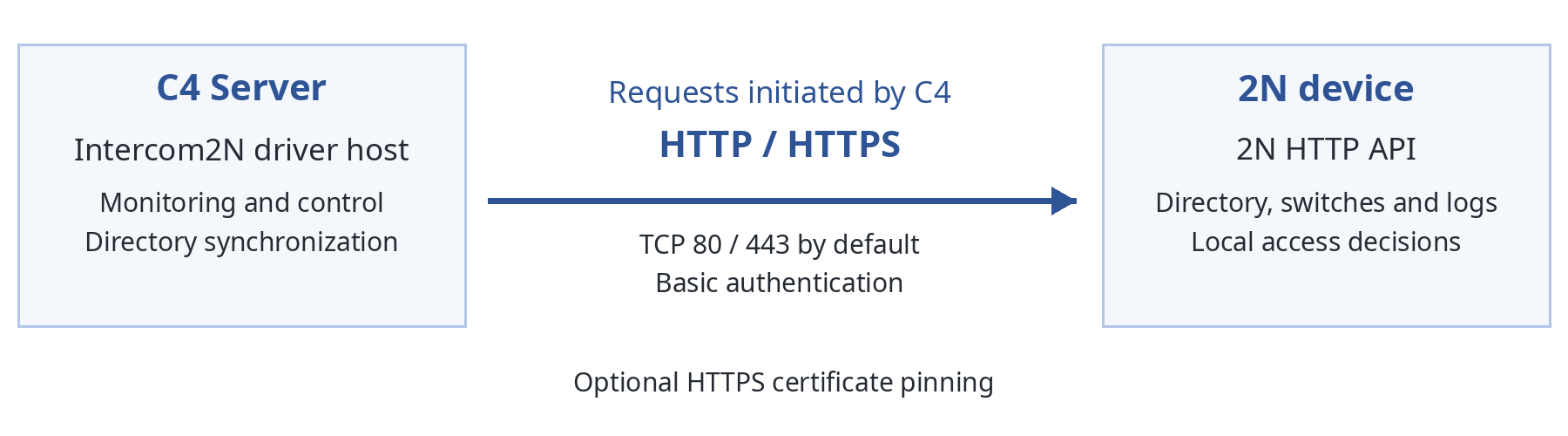
Field |
Required content |
|---|---|
Operating mode |
Direct device: C4 Server (Intercom2N driver) -> 2N device HTTP API. |
Connection endpoints |
C4 Server driver host -> 2N device IP address / host name; port 80 (HTTP) or 443 (HTTPS) by default (Port 0), otherwise the configured Port. |
Data paths |
Status check: /api/system/status Capabilities (lift licence): /api/system/caps Switch state and control: /api/switch/status, /api/switch/ctrl Events: /api/log/subscribe, /api/log/pull Directory: /api/dir/create, /api/dir/delete, /api/dir/query, /api/dir/get |
Polling |
Events (access, switch and lift) every Log Interval (default 30 s); switch states every 60 s, after every switch event and after every command. |
Source -> destination |
Protocol / port |
Initiator / direction |
Protection / purpose |
|---|---|---|---|
C4 Server -> 2N device |
HTTP TCP 80 or HTTPS TCP 443 (defaults; configurable) |
C4 Server; outbound from C4 |
Basic authentication; optional TLS with certificate pinning. Monitoring, control, credential and lift floor synchronization. |
Device preparation and secure access
Services > HTTP API: enable the API, select HTTP or HTTPS and Basic authentication.
Services > HTTP API > Account: create an account and grant monitoring and control access to System, Switch, Directory (Access control) and Logging.
Hardware > Switches: enable and configure the switches used for doors and relays.
Date and time: configure NTP and the time zone matching the C4 Bus Controller Time Zone.
Lift (optional): license and activate lift control, configure the relay modules and note the floor index of each floor (io_1_1 = 0 ... io_8_8 = 63).
HTTPS: read the SHA-256 fingerprint of the device certificate (for example in the browser certificate viewer) for the Certificate Fingerprint property.
Connection and initial commissioning procedure
Step |
Action |
Verification |
|---|---|---|
1 |
Confirm versions, licences and prerequisites. |
HTTP API licence present on the 2N device. |
2 |
Prepare the 2N device (HTTP API, account, switches, NTP). |
API account can log in to the 2N web interface services. |
3 |
Install the Intercom2N driver package (Intercom2N.c4plugin). |
Driver is listed in C4 with version 2026.4.1.58. |
4 |
Create a BusController and fill in IP Address, Port (0 = default), Use SSL, Certificate Fingerprint (HTTPS), Username and Password. |
Properties are accepted. |
5 |
Create AccessPanel2N, Door (Switch), MultiFunctionReader and optional Relay, Phone Number, Lift Unit and Lift Floor (Floor ID) nodes. |
Tree matches Device Configuration. |
6 |
Start the driver. |
Bus Controller Connecting In Progress, then Idle; audit events Driver connecting to device and Driver connected to device; doors/relays show their switch state. |
7 |
Assign access rights to the MultiFunctionReader (and Lift Floors) and run Full Upload on the Access Panel. |
Upload successfully completed; users visible in the 2N directory with owner C4. |
Device Configuration
Device tree and addressing
C4 device type |
Represents / allowed parent |
Creation / addressing / licensing |
|---|---|---|
BusController |
One 2N device; root |
Manual; IP address; licensed |
AccessPanel2N |
2N directory (credential upload point); BusController |
Manual; one per BusController |
Door |
Door lock on a 2N switch; AccessPanel2N |
Manual; Switch1-Switch4; at least one required |
MultiFunctionReader |
Reader of the device (access point); Door |
Manual; at least one required |
Relay |
Output on a 2N switch; Door |
Manual; Switch1-Switch4 |
LiftUnit / LiftFloor |
Lift module / floor (access point); AccessPanel2N / LiftUnit |
Manual; optional; one Lift Unit per device; Floor ID 0-63 |
PhoneNumber |
Directory entry with call positions; AccessPanel2N |
Manual; optional (Enable Phone) |
Example: BusController "Main entrance" > AccessPanel2N > Door (Switch1) > MultiFunctionReader + Relay (Switch2); AccessPanel2N > Lift Unit > Lift Floor (Floor ID 0) + Lift Floor (Floor ID 1). Two Door or Relay nodes mapped to the same switch both follow that switch state.
BusController
Property |
Definition |
Default Value |
Range |
|---|---|---|---|
IP Address |
IP address or host name of the 2N device. Required. |
Not set |
|
Port |
TCP port of the 2N HTTP API. 0 = standard port of the protocol (80 HTTP, 443 HTTPS). |
0 |
0-65535 |
Use SSL |
Use HTTPS instead of HTTP. |
No |
Yes/No |
Certificate Fingerprint |
SHA-256 fingerprint of the device HTTPS certificate. When set, any other certificate is refused (Configuration Failure, Authentication to device failed - invalid security certificate). Empty = any certificate accepted. Ignored with Use SSL off. |
Not set |
64 hex digits; colons or spaces allowed |
Username |
2N HTTP API account. Required. |
Not set |
|
Password |
Password of the API account. Required, protected. |
Not set |
|
Timeout |
Response timeout of a request; also the status-check retry interval. Directory requests time out after 4 x Timeout + 10 s. |
00:00:30 |
|
Retry Attempts |
Status-check attempts before the connection is declared lost. Required. |
3 |
|
Log Interval |
Event polling interval. Required. |
00:00:30 |
0 = 5 s |
Supported Credential Types |
Credential types uploaded. The nearest device with supported credential types wins (reader or Lift Floor, Door, Access Panel, Bus Controller); read at every upload. Empty everywhere = all. |
Not set |
|
Time Zone |
Time zone of the 2N device, used to calculate access and lift floor profiles. Empty = C4 Server time zone. |
Not set |
|
Enable Fingerprint |
Subscribe to FingerEntered events (fingerprint access events). |
No |
Yes/No |
Enable Phone |
Write Phone Number nodes to the 2N directory during Full Upload. |
No |
Yes/No |
AccessPanel2N
Property |
Definition |
Default Value |
Range |
|---|---|---|---|
Holiday Set |
Passed to the C4 access calculation. Holidays are not transferred to the device (LIM-003). |
Not set |
Door
Property |
Definition |
Default Value |
Range |
|---|---|---|---|
Switch |
2N switch controlled by the door. Required. |
Switch1 |
Switch1-Switch4 |
Hold Timer |
Duration of Door Unlock Timed (whole seconds). |
00:00:05 |
Relay
Property |
Definition |
Default Value |
Range |
|---|---|---|---|
Switch |
2N switch controlled by the relay. Required. |
Switch1 |
Switch1-Switch4 |
Relay Open Duration |
Duration of Device On Timed (whole seconds). |
00:00:05 |
LiftUnit / LiftFloor
Property |
Definition |
Default Value |
Range |
|---|---|---|---|
Floor ID (LiftFloor) |
2N floor index of the floor = (relay module - 1) x 8 + (relay - 1). Unique within the device. Required. |
Not set |
0-63 |
LiftUnit |
No driver properties. One Lift Unit per 2N device. |
PhoneNumber
Property |
Definition |
Default Value |
Range |
|---|---|---|---|
Phone Number 1 / 2 / 3 |
Number (peer) called. Empty numbers are skipped. |
Not set |
|
Time Profile Number 1 / 2 / 3 |
Comma-separated 2N time profile numbers (sent as P=1,2). |
Not set |
0-19 |
Call in a group with the following number 1 / 2 / 3 |
Call together with the next number (2N grouped flag). |
No |
Yes/No |
Button Position |
2N quick-dial button of the entry. 0 = none. |
Not set |
|
Tree Path |
Directory tree path; the node name is appended. |
Not set |
Configuration example and validation
Missing Door or MultiFunctionReader: the driver does not start; Bus Controller Configuration Failure; audit event Configuration error - invalid property value ("Device tree must contain a Door device").
Door or Relay without a valid Switch: commands fail with Command failed ("No 2N switch is configured ...").
Second Lift Unit, Floor ID outside 0-63 or duplicate Floor ID: the affected node gets Configuration Failure and a configuration error names it; the rest of the driver keeps working.
Lift control not licensed or not active on the 2N device: the Lift Unit gets Configuration Failure.
Port above 65535: the driver does not start; Bus Controller Configuration Failure.
Configuration Transfer and Device Discovery
Load Configuration
Not supported. The C4 device tree is created manually.
Device Discovery
Not supported.
Import From File
Not supported.
Sending Configuration
Phone Number nodes are written to the 2N directory during every Full Upload when Enable Phone is set. Each node becomes a directory user (UUID = C4 node ID, owner C4) with up to three call positions, the button position and the tree path. Phone users are replaced as a whole; nodes without any number, or all phone users when Enable Phone is cleared, are deleted by the next Full Upload. Write errors are reported as Configuration error - invalid property value naming the phone number.
Configuration-transfer acceptance checks
After a Full Upload the 2N directory contains one user per Phone Number node with the configured numbers (T-2N-01).
Supported Identifiers
Supported credential formats
Credential / operation |
Format and limits |
Mapping and verification |
|---|---|---|
PIN |
2-15 digits, one per person. |
2N access.pin. Invalid PIN: person not uploaded. T-ID-01 |
Card |
6-32 hexadecimal characters, max. 2 per person |
2N access.card. Invalid card skipped with a configuration error. T-ID-01 |
Combined Credentials |
Not supported by the driver. Card + PIN modes are configured on the 2N access point. |
NA |
License plate |
Max. 20 per person, max. 10 characters each (whitespace ignored), 255 characters in total. Duplicates are compared without spaces, case-insensitive. |
2N access.licensePlates. T-ID-01 |
Fingerprint |
One C4 fingerprint credential per person; each finger template is mapped to the 2N finger index (left little 0 ... left thumb 4, right thumb 5 ... right little 9). |
2N access.fpt T-ID-01 |
Person and identifier mapping
Each C4 person with access to a MultiFunctionReader or Lift Floor of the device becomes one 2N directory user: UUID = C4 person ID, name = C4 display name, owner = C4. Credentials of all access points are combined into the one user, filtered by the supported credential types of the access point or its nearest parent device. Access events are resolved back to the C4 person through the UUID and to the C4 credential through its code.
Card Learning and Person Data Read
Card learning and person data read are not supported.
Credentials Synchronization
Credentials are uploaded through the standard C4 upload commands on the AccessPanel2N. During an upload the Access Panel shows Uploading Credentials and returns to Idle afterwards.
Ownership and object mapping
C4 object / field |
Device object / record |
Ownership and mapping rules |
|---|---|---|
Person with access to the device |
Directory user (UUID = person ID, owner C4) |
C4 -> device. Created or replaced as a whole (api/dir/create?force=1); local changes are overwritten. |
Credentials (PIN, cards, plates, fingerprint) |
access.pin, access.card, access.licensePlates, access.fpt |
Union of the credentials of all access entries of the person, filtered by the supported credential types of each access point (nearest device). |
Access time restrictions |
access.accessPoints[0].profiles |
Combined weekly profile (see Time Management). No time range = unrestricted. |
Lift floor access (Lift Floors with access rights) |
access.liftFloors |
Floors grouped by time profile, e.g. F=0,2|F=5@D=1@08:00-16:00. No time range = unrestricted floor. Floor access also counts for the access point profile. |
Phone Number node |
Directory user with callPos |
Written during Full Upload when Enable Phone is set. |
Users with another owner |
Directory users created locally / My2N / Access Commander |
Never modified or deleted by C4. |
Upload modes and triggers
Mode |
Trigger / scope |
Data impact / completion evidence |
|---|---|---|
Full Upload |
Full Upload command on AccessPanel2N. |
Writes every person with access to the device in batches. Deletes C4-owned users that no longer have access (and users written by the previous driver version). Writes phone numbers. The directory is not cleared: persons keep access during the upload. Upload successfully completed / completed with warning / failed. |
Incremental Upload |
Incremental Upload command; persons changed since the last upload. |
Changed persons are replaced, persons without access are deleted. Only persons the device accepted are recorded as uploaded; failed persons are retried by the next upload. |
Selective Upload |
Selective Upload for chosen persons. |
As Incremental, for the selected persons. |
Dynamic Upload |
Not supported. |
NA |
Lifecycle, access rights and exceptional conditions
A person who loses all access to the device is deleted from the 2N directory.
A person failing validation (credential limits, invalid PIN or plate) is not written; the previous state on the device is kept and the upload reports the person as failed (Upload failed for person / invalid credential).
Per-user errors returned by the 2N device are reported per person: directory limits (EDIRLIM_*) as out of range, invalid field values as invalid credential, others as generic failure.
If the device cannot be reached during an upload, the remaining persons are reported as failed and are retried by the next upload. Writes are idempotent, so repeating an upload is safe.
Giving access to a reader the driver has not initialized logs "You attempted to give access to uninitialized reader, restart bus controller and retry."; that access entry is skipped.
Reserved memory positions
Record type / range |
Purpose / owner |
Protection / capacity effect |
|---|---|---|
Directory users with an owner other than C4 |
Users created locally, by My2N or by Access Commander |
Never modified or deleted by C4; they consume device capacity. |
Capacity: users = persons with access to the device + Phone Number nodes with at least one number. C4 reports the usage against a capacity of 10 000 users.
Verification and recovery
Upload results are visible in the C4 audit log and per person in C4. On the device, C4 users are visible in the 2N web interface (Directory > Users). A Full Upload reconciles the device with C4 at any time.
Time Management
Time source and synchronization
Field |
Required content |
|---|---|
Clock authority |
2N device (NTP). The driver does not set the device time. |
Startup / periodic behavior |
None. |
Conversion |
Access calendars of readers and Lift Floors are converted to 2N profiles in the Bus Controller Time Zone (C4 Server time zone when empty). Ranges crossing midnight are split per day; a week fully covered is written as unrestricted. |
Profile format |
D=<day>@HH:MM-HH:MM entries separated by ";" (day 0 = Sunday ... 6 = Saturday). Lift floors: F=<floors>[@<profile>] groups separated by "|". The calculation covers the next 7 days. |
Event and access-time interpretation
Event timestamps are taken from the 2N event (utcTime, UTC) and stored in C4 with the original device time, not the time C4 read them.
Verification
T-TIM-02 verifies time-zone handling of profiles and event timestamps. Time synchronization is not supported.
Technology-Specific Functionality
Access control, doors and lifts
Door and Relay nodes are mapped to 2N switches. Their status is read from /api/switch/status on connect, every 60 s, after commands and whenever a switch event (SwitchStateChanged, SwitchOperationChanged) is pulled: locked -> Door Manual Override, held -> Door Unlocked Permanently, active -> Door Unlocked, otherwise Door Normal (relay: held or active -> Activated, otherwise Idle). Door contact and request-to-exit are not reported.
Access events are obtained from a 2N log subscription (1 hour, renewed 5 minutes before expiry) pulled every Log Interval. Credential events (CardEntered, CodeEntered, LicensePlateRecognized, FingerEntered) are correlated with UserAuthenticated / UserRejected by UUID, session and time into one C4 access event.
Lift: when the tree contains a Lift Unit, the driver checks that lift control is licensed and active (/api/system/caps) and subscribes to LiftFloorsEnabled and LiftStatusChanged. A user event (type=user) logs Access granted on each enabled Lift Floor, with the person and the credential of the same authentication. A public event (type=public) sets the listed floors to Door Unlocked Permanently (Door unlocked permanently is logged when a floor becomes public, Door locked when it stops being public). LiftStatusChanged reports the relay modules: Communication lost / restored on the Lift Unit and Failure status while any module is down. Floor access of persons is uploaded with the credentials (see Credentials Synchronization).
Intrusion and fire alarm functions
Not applicable.
CCTV, DVR, video and audio
Not supported by this driver.
Perimetry, Building and Other integrations
Phone numbers: see Sending Configuration.
Remote Device Control
Supported commands
Element |
Operation |
Meaning / precondition |
Result / test |
|---|---|---|---|
AccessPanel2N |
Full / Incremental / Selective Upload |
See Credentials Synchronization. |
Upload events; T-UPL-01 |
Door |
Door Unlock Timed |
2N switch hold for Hold Timer. |
Door Unlocked, then Door Normal; T-ACS-01 |
Door |
Door Unlock Permanently |
2N switch hold until locked. |
Door Unlocked Permanently; T-ACS-01 |
Door |
Door Lock |
2N switch release. |
Door Normal; T-ACS-01 |
Door |
Door Manual Override On |
2N switch lock; credentials are rejected. |
Door Manual Override; T-ACS-01 |
Door |
Door Manual Override Off |
2N switch unlock. |
Door Normal; T-ACS-01 |
Relay |
Device On / Device Off |
2N switch hold / release. |
Activated / Idle; T-IO-01 |
Relay |
Device On Timed |
2N switch hold for Relay Open Duration. |
Activated, then Idle; T-IO-01 |
Control restrictions
After a successful command the driver reads back the real switch state; the C4 status always reflects the device. The audit event of a command is logged only when the 2N device accepted it; a rejected or unsent command logs Command failed with the reason. BusController Start/Stop/Restart are provided by C4 at driver level.
Status Information Display
BusController
Status |
Description / source condition |
Clearing / update behavior |
|---|---|---|
Unknown |
Driver initialized, status not determined yet. |
Startup only. |
Starting |
Driver start in progress. |
Connecting In Progress when started. |
Connecting In Progress |
Connecting to the device; connection not verified yet. |
Idle when verified. |
Idle |
Connection verified (/api/system/status succeeded). |
Until connection loss. |
Disconnected |
Connection not verified after Retry Attempts, connection lost, or driver stopped. |
Cleared when verification succeeds (retried automatically). |
Configuration Failure |
Invalid device tree or Port; Username/Password rejected by the device; certificate does not match Certificate Fingerprint. |
Rejected login: retried every 60 s, cleared when it succeeds. Otherwise cleared after correcting the configuration and restarting. |
AccessPanel2N
Status |
Description / source condition |
Clearing / update behavior |
|---|---|---|
Idle |
Normal state. |
|
Uploading Credentials |
An upload is in progress. |
Returns to Idle when the upload ends. |
Disconnected |
Connection to the device lost. |
Idle after reconnection. |
Door
Status |
Description / source condition |
Clearing / update behavior |
|---|---|---|
Door Manual Override |
2N switch locked. |
Precedence 1. Updated on switch events, every 60 s and after commands. |
Door Unlocked Permanently |
2N switch held. |
Precedence 2. |
Door Unlocked |
2N switch active. |
Precedence 3. |
Door Normal |
2N switch inactive. Also used when the switch state cannot be read after connecting. |
|
Disconnected |
Connection lost. |
Real state after reconnection. |
Relay
Status |
Description / source condition |
Clearing / update behavior |
|---|---|---|
Activated |
2N switch held or active. |
Updated on switch events, every 60 s and after commands. |
Idle |
2N switch inactive or locked. |
|
Disconnected |
Connection lost. |
Real state after reconnection. |
MultiFunctionReader and PhoneNumber
Status |
Description / source condition |
Clearing / update behavior |
|---|---|---|
Idle |
Connected. |
|
Disconnected |
Connection lost. |
Idle after reconnection. |
LiftUnit
Status |
Description / source condition |
Clearing / update behavior |
|---|---|---|
Idle |
All lift relay modules ready. |
|
Failure |
A relay module reported not ready (LiftStatusChanged). |
Idle when all modules are ready again. |
Configuration Failure |
Second Lift Unit, or lift control not licensed/active on the 2N device. |
After correcting and restarting. |
Disconnected |
Connection lost. |
Real state after reconnection. |
LiftFloor
Status |
Description / source condition |
Clearing / update behavior |
|---|---|---|
Door Normal |
Floor not public. Also set after every (re)connect (LIM-005). |
|
Door Unlocked Permanently |
Floor public (LiftFloorsEnabled type=public). |
Door Normal when the floor stops being public. |
Configuration Failure |
Floor ID outside 0-63 or used by another floor. |
After correcting and restarting. |
Disconnected |
Connection lost. |
Real state after reconnection. |
Initialization, connection and freshness
After the connection is verified, the Bus Controller and child nodes are set to Idle, Door/Relay nodes receive their real switch state and lift nodes their lift state. Switch states are re-read every 60 s as a safety net for missed events.
State precedence and restoration
For doors: locked > held > active > inactive. On connection loss all nodes are set to Disconnected.
Acceptance criteria
Compare the C4 status with the switch state shown in the 2N web interface (T-STS-01).
Events and Audit Log
Event mapping
Source event / code |
C4 event / message |
Object / person / time |
|---|---|---|
Driver start |
Driver connecting to device |
BusController |
Status check succeeded |
Driver connected to device; Communication restored after an outage |
BusController |
Status check failed after Retry Attempts / link lost |
Communication lost (once per outage) |
BusController |
Username/Password rejected by the device |
Authentication to device failed - invalid password (once until a login succeeds) |
BusController |
Certificate differs from Certificate Fingerprint |
Authentication to device failed - invalid security certificate |
BusController; presented fingerprint |
Invalid tree, upload validation, phone write error, lift configuration |
Configuration error - invalid property value |
BusController; description names the person/node |
CardEntered / CodeEntered / FingerEntered / LicensePlateRecognized + UserAuthenticated |
Access granted |
First Door; person (UUID), credential, reader; 2N UTC time |
Credential not assigned to a user |
Access denied - unknown credential |
First Door |
Credential used while the switch is locked |
Access denied - reader is disabled |
First Door; person |
UserRejected reason invalidProfile |
Access denied - active time restriction |
First Door; person |
UserRejected other reason |
Access denied - other |
First Door; person |
Invalid credential without reason |
Access denied - door not allowed |
First Door; person |
LicensePlateRecognized without user |
Vehicle registration plate recorded |
First Door; plate |
Door commands accepted |
Door unlocked timed / unlocked permanently / locked / manual override start / end |
Door |
Relay commands accepted |
Device turned on / off / turned on timed |
Relay |
Command rejected by the device or not sent |
Command failed |
Door, Relay; reason |
LiftFloorsEnabled type=user |
Access granted |
Each enabled Lift Floor; person, credential of the same authentication, first reader; 2N time |
LiftFloorsEnabled type=public |
Door unlocked permanently / Door locked |
Lift Floors becoming / ceasing to be public |
LiftStatusChanged |
Communication lost / Communication restored |
LiftUnit; relay module |
Upload |
Upload started; Upload successfully completed / completed with warning / failure / cancelled; Upload failed for person / invalid credential / person out of range |
AccessPanel2N; person |
Event context and interpretation
DEVICE = C4 node name; PERSON = C4 person resolved from the 2N UUID; READER = first MultiFunctionReader of the tree (also for lift events). Events without a known UUID are logged without a person.
Device Audit Log Retrieval
The driver creates a new 2N log subscription at every start and renews it before expiry.
Diagnostics and evidence
Driver uses Trace Logs for more technical events. Trace log filing depends on C4 server setup.
Operation, Recovery and Maintenance
Normal operation and health checks
Healthy state: Bus Controller Idle, doors/relays showing their switch state, Lift Unit Idle, no pending upload. Periodic tasks: event pull (access, switch, lift) every Log Interval, switch re-read every 60 s, subscription renewal every hour.
Failure and recovery behavior
Condition |
Observable impact |
Recovery / data integrity |
|---|---|---|
Network/session loss |
All nodes Disconnected; Communication lost (once per outage). |
Verification retried every Timeout up to Retry Attempts, then on the next link reconnect; statuses and log subscription restored; Communication restored. |
Username/Password rejected |
Bus Controller Configuration Failure; Authentication to device failed - invalid password. |
Login retried every 60 s so the 2N device does not block logins; correct the credentials. |
Certificate mismatch |
Bus Controller Configuration Failure; Authentication to device failed - invalid security certificate with the presented fingerprint. |
Verify the device; update Certificate Fingerprint (e.g. after a factory reset or certificate renewal) and restart. |
Device restart/power loss |
As network loss. The 2N device keeps its directory and decides access autonomously. |
Switch states re-read after reconnection; public lift floors shown after the next change (LIM-005). |
Driver/service/C4 restart |
Statuses re-initialized. |
Uploaded users are stored per device; the next upload sends only changes. |
Interrupted upload |
Remaining persons reported as failed. |
Run the upload again; writes are idempotent. Full Upload reconciles everything. |
Connection ownership and deployment constraints
Other API clients can use the 2N device in parallel. Users they create must use a different owner (or none) to stay outside C4 management.
Backup, restore, reset and decommissioning
After replacing or resetting a 2N device, reconfigure the HTTP API account, switches and lift control, update Certificate Fingerprint (new certificate), then run a Full Upload. To remove all C4 users from a device, remove the access rights in C4 and run a Full Upload.
Upgrade and Migration
Supported paths
Source |
Target |
Preconditions / impact |
Verification |
|---|---|---|---|
Intercom2N builds before the directory-ownership upload |
Intercom2N 2026.3.1.54 or later |
Users written by the previous version have no owner. Run one Full Upload after the upgrade: it re-writes every person with owner C4 and deletes previously written users that no longer have access. |
T-UPL-01 |
Intercom2N 2026.3.1.54 |
Intercom2N 2026.4.1.58 |
Install the updated plugin package on the C4 Server (new properties, events and statuses). Enable Lift is removed: lift functions are active whenever a Lift Unit exists. Set Floor ID on every Lift Floor, then run Full Upload to write the lift floor access. Port default is now 0; existing values are kept. With Use SSL, set Port 0 or 443. Optionally set Certificate Fingerprint. |
T-ACS-03, T-SEC-01 |
Driver migration to C4 Transformers
Not applicable (native FWK4 driver).
Procedure and rollback
Back up the C4 configuration.
Install the new driver package and restart the driver.
Set Floor ID on Lift Floors and review Port and Certificate Fingerprint.
Run Full Upload on every AccessPanel2N.
Verify persons on the device (owner C4) and access with test credentials.
Post-upgrade validation
Run T-UPL-01.
Troubleshooting and Support
Troubleshooting / Knowledge base
Symptom / diagnostic |
Checks and likely cause |
Resolution / verification |
|---|---|---|
Bus Controller Configuration Failure right after start |
Device tree lacks a Door or MultiFunctionReader. |
Add the nodes and restart. |
Bus Controller Disconnected / Communication lost |
IP Address, Port, Use SSL, Username, Password; HTTP API and account services on 2N; firewall. |
Correct the settings; the connection is re-verified automatically; Bus Controller Idle. |
Configuration Failure; Authentication to device failed - invalid password |
Username/Password; account enabled; 2N login blocking after repeated failures. |
Correct the credentials; login retried every 60 s. |
Configuration Failure; Authentication to device failed - invalid security certificate |
Device certificate changed (factory reset, renewal) or another device at the address. The event shows the presented fingerprint. |
Verify the device, update Certificate Fingerprint, restart. |
Door/Relay command has no effect |
Switch property; switch enabled on 2N; switch locked (Manual Override). Command failed names the reason. |
Correct the mapping or execute Door Manual Override Off. |
Status differs from reality |
API account lacks Switch monitoring rights. |
Status corrects itself within 60 s. |
No access events |
Logging API rights; Log Interval; trace log subscription errors. |
Grant rights; restart driver. |
Person not uploaded |
Audit log configuration errors: credential limits (more than 2 cards: check Supported Credential Types), PIN/card/plate format, uninitialized reader. |
Correct the person or restart the Bus Controller after adding readers; run Incremental Upload. |
Users created on 2N disappeared |
They had owner C4 or were written by the previous driver version. |
Create local users only in the 2N web interface, without owner C4. |
Phone numbers missing on 2N |
Enable Phone not set; phone numbers are written only by Full Upload. |
Set Enable Phone; run Full Upload. |
Time profiles shifted |
Bus Controller Time Zone differs from the 2N time zone; NTP. |
Align time zones; run Full Upload. |
Lift Unit / Lift Floor Configuration Failure |
Second Lift Unit; Floor ID outside 0-63 or duplicate; lift control not licensed or not active on the 2N device. |
Correct the tree or the 2N licence; restart. |
Lift Unit Failure |
A lift relay module is disconnected (Communication lost on the Lift Unit names the module). |
Check the relay module wiring and power. |
No lift access events |
Credential presented, but no floor selected or enabled; first MultiFunctionReader missing. |
Check floor access on the 2N user (access.liftFloors). |
Support information package
Driver and C4 version, 2N model and firmware, sanitized device tree and properties (without passwords), driver trace log of the incident, audit log export and the time of the incident.
Additional technical reference material
Directory user written by C4 (sanitized): {"uuid":"<person id>","owner":"C4","name":"<display name>","access":{"accessPoints":[{"profiles":"D=1@08:00-16:00"}],"pin":"1234","card":["0A1B2C3D"],"licensePlates":"1AB2345","liftFloors":"F=0,2"}}
Integration Tests
Test scope, environment and safety
The test set validates the documented integration scope. Record the exact environment before execution; the expected results are stated in each test.
Field |
Required content |
|---|---|
Test run / purpose |
Driver release qualification |
Version combination |
COMP-01 |
Baseline and data |
Synthetic persons and credentials; at least one directory user created locally on the 2N device (no owner) as a protection fixture. |
Authorizations / safety |
Isolated test door/relay; authorized maintenance window. |
Evidence and instruments |
C4 audit log, 2N web interface (Directory, Switches, Log), driver trace log; automated integration test suite against a real 2N device (Intercom2N Integration Tests). |
Coverage and selection rules
Requirement / function |
Manual record / variant |
Test ID(s) |
Coverage decision |
|---|---|---|---|
Connection, security |
Connection; Security and safety boundaries |
T-CON-01, T-CON-02, T-SEC-01 |
Required |
Configuration |
Device Configuration |
T-CFG-01, T-CFG-02 |
Required |
F05, F36, F01, F37 (non-phone) |
Configuration Transfer |
NA |
NA - not supported |
F06 / F07 |
Time Management |
NA / T-TIM-02 |
NA / Required |
Status, events, commands |
Status; Events; Remote Device Control |
T-STS-01, T-EVT-01, T-EVT-02, T-CMD-01 |
Required |
F25-F27, FX1, F23, uploads |
Supported Identifiers; Credentials Synchronization |
T-ID-01, T-UPL-01, T-UPL-02, T-UPL-03, T-ACL-01 |
Required |
F19, F21, profiles |
Identity read; Profiles |
NA |
NA - not supported |
Doors, lift, relays |
Technology-specific; Remote Device Control |
T-ACS-01, T-ACS-02, T-ACS-03 (lift variant), T-IO-01 (output part) |
Required |
Alarm, fire, health, video, other |
Technology-specific |
NA |
NA - not supported |
F37 phone numbers |
Sending Configuration |
T-2N-01 |
Required |
Operation, upgrade |
Operation; Upgrade |
T-OPS-01 |
Required |
Upload scenario variants for T-UPL-01
Use synthetic persons A, B and C; access points D1 and D2 (MultiFunctionReader and Lift Floor of the same device) and distinct valid cards C1, C2 and C3. Note that both access points are on one 2N device, so access to D1 or D2 results in the same directory user.
Variant |
Before -> After |
Required verification |
|---|---|---|
U01 |
A and B: D1+D2 -> A: D1; B: D2 |
Both keep a directory user; profiles follow the remaining access point. |
U04 |
A, B, C: access -> revoke all access for B |
Only B is deleted from the directory; A and C unchanged. |
U05 |
Three active persons -> delete B in C4 |
B is deleted from the directory; no orphan user. |
U06 |
A: C1; B: C2 -> A: C2; B: C1 |
Cards resolve to their new owners. |
U07 |
A: C1; B: C2; C: C3 -> A: C1; B: C2+C3; C: none |
C3 no longer belongs to C; C has no card. |
U09 |
A: C1+C2; B: none -> A: C1; B: C2 |
A keeps one card; B gets C2. |
U12 |
A: C1+C2; B: C3 -> A: none; B: C1+C2+C3 |
B is rejected (more than 2 cards) and keeps its previous state; configuration error names B. |
U14 |
A: C1; B: C2 -> A: C1; B: C3; new C: C2 |
New user C is linked to C2. |
T-CON-01 | Connection, DNS and driver lifecycle
Description: Verify a valid connection and the startup, stop and restart behavior.
Applicability: Core; DNS variant with a host name in IP Address.
Prerequisites: Valid tree and 2N API account.
Step |
Test Steps |
Expected Results |
|---|---|---|
1 |
Start the driver. |
Bus Controller Connecting In Progress, then Idle; Driver connecting to device, Driver connected to device; doors/relays show their switch state. |
2 |
Repeat with a resolvable host name, then an invalid one. |
Valid name connects; invalid name: Bus Controller Disconnected and Communication lost after Retry Attempts. |
3 |
Stop and restart the driver. |
All nodes Disconnected on stop; real states after restart. |
Expected audit / evidence: Lifecycle events and initial-state timestamps.
Cleanup: Restore the approved address.
T-CON-02 | Network loss and reconnection
Description: Verify failure detection and recovery when communication is interrupted.
Applicability: Core.
Prerequisites: Healthy baseline; interruption on the switch/router keeping the C4 host link up.
Step |
Test Steps |
Expected Results |
|---|---|---|
1 |
Interrupt the network path. |
All nodes Disconnected; Communication lost. |
2 |
Execute Door Unlock Timed while disconnected. |
Command is not executed; no Door unlocked timed event. |
3 |
Restore the path. |
Bus Controller Idle; Communication restored; real switch states; events generated after reconnection are reported. |
Expected audit / evidence: Outage/restoration times.
Cleanup: Restore network rules.
T-SEC-01 | Authentication and protected communication
Description: Verify basic authentication, the optional HTTPS and certificate pinning.
Applicability: Core; HTTPS variants with Use SSL.
Prerequisites: Valid and invalid test accounts; SHA-256 fingerprint of the device certificate.
Step |
Test Steps |
Expected Results |
|---|---|---|
1 |
Connect with Use SSL = No, Port 0 and valid credentials. |
Connection established on port 80. |
2 |
Change the Password to an invalid value and restart. |
Bus Controller Configuration Failure; Authentication to device failed - invalid password, logged once; login retried every 60 s. |
3 |
Enable HTTPS on 2N; set Use SSL = Yes, Port 0, Certificate Fingerprint empty. |
Connection established on port 443; trace log warns that the device identity is not verified. |
4 |
Set Certificate Fingerprint to the device fingerprint and restart. |
Connection established. |
5 |
Set a wrong fingerprint and restart. |
Connection refused; Bus Controller Configuration Failure; Authentication to device failed - invalid security certificate with the presented fingerprint. |
Expected audit / evidence: Sanitized authentication errors.
Cleanup: Restore valid credentials.
T-CFG-01 | Property and device-tree validation
Description: Verify rejection of an incomplete tree and invalid door/relay mapping.
Applicability: Core.
Prerequisites: Backed-up tree.
Step |
Test Steps |
Expected Results |
|---|---|---|
1 |
Remove the MultiFunctionReader and start the driver. |
Driver does not start; Configuration Failure; Configuration error "Device tree must contain a MultiFunctionReader device". |
2 |
Restore it; set a Door Switch to a switch not enabled on 2N and execute Door Unlock Timed. |
No unlock; Command failed with the reason. |
3 |
Map two doors to the same switch. |
Both doors show the same switch state. |
4 |
Add a second Lift Unit and a Lift Floor with a duplicate Floor ID; start the driver. |
Those nodes show Configuration Failure with configuration errors; the rest of the tree works. |
Expected audit / evidence: Configuration events and states.
Cleanup: Restore the tree.
T-CFG-02 | Missing and additional device-tree nodes
Description: Verify behavior when the tree and the device differ.
Applicability: Core.
Prerequisites: Known switch configuration on 2N.
Step |
Test Steps |
Expected Results |
|---|---|---|
1 |
Configure a Relay on a switch that is disabled on the 2N device. |
Relay shows Idle; commands have no effect. |
2 |
Remove the Relay node. |
Remaining nodes unaffected. |
3 |
Restore the tree and restart. |
Real states shown. |
Expected audit / evidence: States and trace log.
Cleanup: Restore the tree.
T-TIM-02 | Time zones and event timestamps
Description: Verify profile calculation in the Bus Controller Time Zone and event timestamps.
Applicability: Conditional: time restrictions used.
Prerequisites: Bus Controller Time Zone different from the C4 Server zone; 2N set to the same zone as the Bus Controller.
Step |
Test Steps |
Expected Results |
|---|---|---|
1 |
Upload a person with access Mon-Fri 08:00-16:00. |
The 2N user profile reads D=1@08:00-16:00 ... D=5@08:00-16:00 in device local time. |
2 |
Upload an access calendar crossing midnight (22:00-06:00). |
Profile split: D=x@22:00-24:00;D=y@00:00-06:00. |
3 |
Generate an access event. |
C4 event time equals the 2N event time. |
Expected audit / evidence: Profiles in the 2N web interface; event times.
Cleanup: Restore time zones.
T-STS-01 | Status mapping and freshness
Description: Verify that door and relay statuses follow the 2N switch state.
Applicability: Core; doors and relays.
Prerequisites: Switch state visible in the 2N web interface.
Step |
Test Steps |
Expected Results |
|---|---|---|
1 |
Activate, hold and lock a switch from the 2N web interface. |
Door: Door Unlocked / Door Unlocked Permanently / Door Manual Override within one Log Interval (max. 60 s). |
2 |
Release the switch. |
Door Normal; Relay Idle. |
3 |
Interrupt communication. |
Disconnected; real state after recovery. |
Expected audit / evidence: Status transitions with times.
Cleanup: Restore normal switch states.
T-EVT-01 | Event mapping and identity attribution
Description: Verify access events and person/credential attribution.
Applicability: Core.
Prerequisites: Synthetic persons uploaded; one unknown card.
Step |
Test Steps |
Expected Results |
|---|---|---|
1 |
Present a valid card, PIN, license plate and fingerprint. |
Access granted with person, credential and reader. |
2 |
Present an unknown card and an unknown license plate. |
Access denied - unknown credential; Vehicle registration plate recorded. |
3 |
Present a valid card outside its time profile. |
Access denied - active time restriction. |
Expected audit / evidence: Audit log entries.
Cleanup: Remove temporary identities.
T-EVT-02 | Device Audit Log Retrieval
Description: Verify events generated while C4 is disconnected.
Applicability: Conditional.
Prerequisites: Known event sequence.
Step |
Test Steps |
Expected Results |
|---|---|---|
1 |
Interrupt communication and generate access events. |
Events are stored on the 2N device. |
2 |
Reconnect. |
events delivered with correct timestamp. |
3 |
Restart the driver during an outage. |
new subscription for logs created. |
Expected audit / evidence: Expected versus retrieved events.
Cleanup: Restore normal operation.
T-CMD-01 | Remote Device Control end-to-end
Description: Verify every command on Door and Relay.
Applicability: Core.
Prerequisites: Isolated test door/relay.
Step |
Test Steps |
Expected Results |
|---|---|---|
1 |
Execute each Door command (Unlock Timed, Unlock Permanently, Lock, Manual Override On/Off). |
Switch changes on 2N; matching status and audit event. |
2 |
Execute Device On / Off / On Timed on a Relay. |
Activated / Idle; Device turned on / off / on timed. |
3 |
Execute a command while disconnected. |
Not executed; no success event. |
Expected audit / evidence: Command and audit sequence.
Cleanup: Leave doors in Door Normal.
T-ID-01 | Credential formats
Description: Verify credential validation and mapping to the 2N user.
Applicability: Core; PIN, card, license plate, fingerprint.
Prerequisites: Synthetic persons with valid and boundary credentials.
Step |
Test Steps |
Expected Results |
|---|---|---|
1 |
Upload persons with a 4-digit PIN, 2 cards, 20 plates and one fingerprint credential. |
Uploaded; fields visible in the 2N user; access granted for each. |
2 |
Upload a card of 4 characters and a card with a 0x prefix. |
Short card skipped with a configuration error; 0x card uploaded without prefix. |
3 |
Upload a person with 2 PINs, 3 cards, 21 plates or a 1-digit PIN. |
Person not uploaded; configuration error and Upload failed for person; previous device state kept. |
4 |
Set Supported Credential Types on the MultiFunctionReader to card types only and run Incremental Upload. |
PIN, plates and fingerprints are removed from the 2N user; cards remain. |
Expected audit / evidence: Directory read-back and access outcomes.
Cleanup: Remove test credentials.
T-UPL-01 | Upload modes and person lifecycle
Description: Verify Full, Incremental and Selective uploads with the variants above.
Applicability: Core.
Prerequisites: Synthetic persons; baseline uploaded.
Step |
Test Steps |
Expected Results |
|---|---|---|
1 |
Apply each selected variant and run Incremental Upload. |
Only changed persons are written; Upload successfully completed. |
2 |
Repeat with Selective Upload for the changed person. |
Only that person is written. |
3 |
Run Full Upload. |
Device directory matches C4; no person loses access during the upload. |
Expected audit / evidence: Upload events; directory read-back.
Cleanup: Remove synthetic persons.
T-UPL-02 | Interrupted credentials upload
Description: Verify that an interrupted upload is reported and recovers.
Applicability: Core.
Prerequisites: At least 200 synthetic persons.
Step |
Test Steps |
Expected Results |
|---|---|---|
1 |
Start Full Upload and interrupt the network. |
Remaining persons reported as failed; upload completed with warning or failed. |
2 |
Restore the network and run Incremental Upload. |
Failed persons are uploaded; no duplicate users. |
3 |
Run Full Upload. |
Directory matches C4. |
Expected audit / evidence: Upload events and directory counts.
Cleanup: Restore baseline.
T-UPL-03 | Full Upload preserves access and non-C4 users
Description: Verify that Full Upload does not clear the directory and never touches users with another owner.
Applicability: Core.
Prerequisites: A user created locally on 2N (no owner) with a test card; C4 persons uploaded.
Step |
Test Steps |
Expected Results |
|---|---|---|
1 |
Run Full Upload and present a C4 card repeatedly during the upload. |
Access granted throughout the upload. |
2 |
After the upload, present the card of the locally created user. |
Local user still exists and is granted access. |
3 |
Remove access of a C4 person and run Full Upload. |
Only that C4 user is deleted. |
Expected audit / evidence: Access events during the upload; directory read-back.
Cleanup: Delete the local test user.
T-ACL-01 | Access time restrictions
Description: Verify device-side access decisions at schedule boundaries.
Applicability: Core.
Prerequisites: Correct time zones; synthetic person.
Step |
Test Steps |
Expected Results |
|---|---|---|
1 |
Upload a schedule and test inside and outside it. |
Granted inside; Access denied - active time restriction outside. |
2 |
Give a person two access points with different schedules. |
Access follows the union of both schedules (one profile per user). |
Expected audit / evidence: Device time and access events.
Cleanup: Restore schedules.
T-ACS-01 | Door control and manual override
Description: Verify lock, timed/permanent unlock and manual override.
Applicability: Core.
Prerequisites: Isolated door with a valid credential.
Step |
Test Steps |
Expected Results |
|---|---|---|
1 |
Execute Door Unlock Timed with Hold Timer 00:00:10. |
Door Unlocked, then Door Normal ~1 s after expiry. |
2 |
Execute Door Unlock Permanently, then Door Lock. |
Door Unlocked Permanently, then Door Normal. |
3 |
Execute Door Manual Override On, present a valid card, then Override Off. |
Card denied (Access denied - reader is disabled); Door Normal after Override Off. |
Expected audit / evidence: Commands, statuses and access events.
Cleanup: Door in Door Normal.
T-ACS-02 | Access outcomes
Description: Verify granted/denied reporting.
Applicability: Core. Door contact events are not supported.
Prerequisites: Authorized and unauthorized test credentials.
Step |
Test Steps |
Expected Results |
|---|---|---|
1 |
Present an authorized credential. |
Door opens; Access granted. |
2 |
Present a known credential without access to this device. |
Access denied - unknown credential (user not on device). |
3 |
Present a credential of a person rejected by 2N. |
Access denied - other / door not allowed. |
Expected audit / evidence: Access events.
Cleanup: Remove test identities.
T-ACS-03 | Lift floors
Description: Verify lift floor upload, lift events and lift statuses.
Applicability: Conditional: Lift Unit configured; lift control licensed and active on the 2N device.
Prerequisites: Lift Unit with Lift Floors (Floor ID 0 and 1) in C4; person with access to floor 0 only.
Step |
Test Steps |
Expected Results |
|---|---|---|
1 |
Run Incremental Upload. |
The 2N user has access.liftFloors F=0 (with a time profile if restricted). |
2 |
Present the credential of the person and select the floor. |
Access granted on Lift Floor 0 with person and credential. |
3 |
Make floor 1 public on the 2N device, then end it. |
Floor 1 Door Unlocked Permanently and Door unlocked permanently; then Door Normal and Door locked. |
4 |
Disconnect a lift relay module, then reconnect it. |
Lift Unit Failure and Communication lost (module); then Idle and Communication restored. |
5 |
Deactivate lift control on the 2N device and restart the driver. |
Lift Unit Configuration Failure with a configuration error. |
Expected audit / evidence: Lift events and statuses; directory read-back.
Cleanup: Restore lift settings.
T-IO-01 | Output control (relay)
Description: Verify relay control. Input monitoring is not supported.
Applicability: Conditional: Relay nodes configured.
Prerequisites: Relay on a low-risk load.
Step |
Test Steps |
Expected Results |
|---|---|---|
1 |
Execute Device On. |
Output active; Activated. |
2 |
Execute Device Off. |
Output inactive; Idle. |
3 |
Execute the timed activation with Relay Open Duration 00:00:05. |
Activated, then Idle after ~5 s. |
Expected audit / evidence: Output state and events.
Cleanup: Outputs inactive.
T-OPS-01 | Restart and recovery
Description: Verify recovery after device and driver restart.
Applicability: Core.
Prerequisites: Saved baseline.
Step |
Test Steps |
Expected Results |
|---|---|---|
1 |
Restart the 2N device. |
Disconnected, then real states; directory unchanged. |
2 |
Restart the driver. |
Statuses restored; next Incremental Upload sends no unchanged person. |
3 |
Factory-reset a test device, reconfigure the API and run Full Upload. |
All C4 users restored. |
Expected audit / evidence: Recovery evidence.
Cleanup: Approved running configuration.
T-2N-01 | Phone number synchronization
Description: Verify that Phone Number nodes are written to the 2N directory.
Applicability: Conditional: Enable Phone.
Prerequisites: Phone Number node with two numbers, Time Profile Number 1 = "1,2", Button Position 1.
Step |
Test Steps |
Expected Results |
|---|---|---|
1 |
Run Full Upload. |
A directory user named after the node exists with owner C4, call positions, profiles P=1,2 and button 1. |
2 |
Enter an invalid phone number and run Full Upload. |
Configuration error "Failed to update phone number ...: Phone number is written incorrectly". |
3 |
Clear all numbers of the node and run Full Upload. |
The phone user is deleted. |
Expected audit / evidence: Directory read-back.
Cleanup: Remove the test node.