
 (95)
(95)Lorem ipsum dolor sit amet consectetur. Tincidunt vel lacus scelerisque nec imperdiet consequat in. Pellentesque quis enim id sed. Ac sollicitudin consequat quis laoreet sed. Consequat phasellus imperdiet eget orci odio viverra. Lorem ipsum dolor sit amet consectetur. Tincidunt vel lacus scelerisque nec imperdiet consequat in. Pellentesque quis enim id sed. Ac sollicitudin consequat quis laoreet sed. Consequat phasellus imperdiet eget orci odio viverra.
 1,000+ installations
 version: version: 5.4.1
 Last update: 10 June 2020
 Certified
 VerifiedCertifiedVerified(95)CertifiedVerified
Warranty and support
Warranty and service support of the plugin is provided in full by the plugin manufacturer. Each manufacturer defines its own specific warranty and service support policy, which is available below.
For any requests and questions regarding the warranty and technical support of the plugin, please contact the plugin manufacturer directly using the available contacts.
Gamanet a.s.
Zatisie 12,
831 03 Bratislava, Slovakia
support@gamanet.com


Technical features
Lorem ipsum dolor sit amet consectetur. Non massa in nec nam urna. Ut et non tellus adipiscing neque nunc volutpat aliquet. Curabitur at non lectus nisl vitae sed varius sed. Aenean suspendisse tortor elit lobortis at consectetur egestas nulla. Dui adipiscing nisl leo etiam sit eu in in. Tincidunt urna sem non morbi gravida.
Sem nulla in suscipit dictum sem. Luctus laoreet odio consectetur magna ac. Nam at arcu duis pretium ipsum mi. Amet velit nunc orci sollicitudin. Aliquam quam lectus lacus tortor. Vestibulum vel morbi elit purus viverra fringilla pulvinar morbi non. Amet in tempor pretium cras etiam proin sed arcu volutpat. Mattis orci et mi vestibulum. Commodo augue turpis mollis justo. Facilisis urna enim a facilisis purus non.
Features
| Alarm Suppression | |
| Antipassback Forgiveness | |
| Audit Log | |
| Audio Streaming |  |
| Card Learning | |
| Card Management | |
| Combined Credentials |  |
| Counter Device | |
| Device Auto Import | |
| Device Control | |
| Dynamic Command State | |
| Dynamic Upload Access | |
| Encrypted Communication | |
| Fingerprint Management | |
| Fire Alarm | |
| Fire Panel Networking Mode | |
| Handicapped Flag | |
| Holidays Support | |
| Import From File |
| Lift | |
| Live Stream Snapshot | |
| Live Video Streaming | |
| Motion Detection | |
| Multiple Stream Types | |
| Pin Management | |
| Presets | |
| PTZ | |
| Time Restriction | |
| Time Synchronization | |
| Time Zone Support | |
| Recorded Stream Snapshot | |
| Recorded Video Streaming | |
| Reserved Memory Zones | |
| Retrieval Remote | |
| Video Records Downloading | |
| Voice Transmitting | |
| Wiegand Biometric Support | |
Quality level
Gamanet defines quality standards for plugins, which are defined as the following conditions: technical support, warranty, Gamanet verification, compatibility certification, pricing policy. The manufacturer of a particular plugin can decide which of the conditions of the standards it will adhere to and for which of the conditions it will define its own rules. The plugin manufacturer is responsible for content compliance with all conditions.
If a plugin manufacturer deviates from any of the defined conditions, the referenced Gamanet standard is considered not to be met.
ABI MC 1500
updated on 18/11/2022
| Technical support | |
 Lorem ipsum dolor sit amet Lorem ipsum dolor sit amet |
| Warranty |  |
Lorem ipsum dolor sit amet |
| Gamanet verification | |
Lorem ipsum dolor sit amet |
| Compatibility certification | |
Lorem ipsum dolor sit amet |
| Pricing model | |
Lorem ipsum dolor sit amet |
Data safety
Data plays important role in System C4, plugins and related services you use every day more helpful. We are committed to treating that data responsibly and protecting your privacy with strict protocols and privacy technologies. We build security into our services to protect your information. All products are built with strong security features that continuously protect your information.
More information about Data Safety| Modifies data |
Reads data |
|
|---|---|---|
 Person Person |
|
|
 Device Device |
|
|
 Region Region |
|
|
Technical information
Integration manual
- ACS
- IAS
- FPS
- CCTV
- DVR
- Perimetry
- Building
- External
- Other
- ATS20xx
- ATS20xx
- ATS20xx
- ATS20xx
- ATS20xx
- ATS20xx
- ATS20xx
- ATS20xx
- ATS20xx
- ATS20xx
- ATS20xx
- ATS20xx
- ATS20xx
- ATS20xx
- ATS20xx
- ATS20xx
- ATS20xx
- ATS20xx
- ALARM PANEL
- 1809 fw 00.06.12
- 1809 fw 00.06.12
- 1809 fw 00.06.12
- 1809 fw 00.06.12
Integration manual
How to Connect Device to C4
To connect the Advisor Master/Alliance central unit to the C4 system, the central unit must be equipped with the 1806 communication module for communication between the central unit inner bus controller and Ethernet interface.
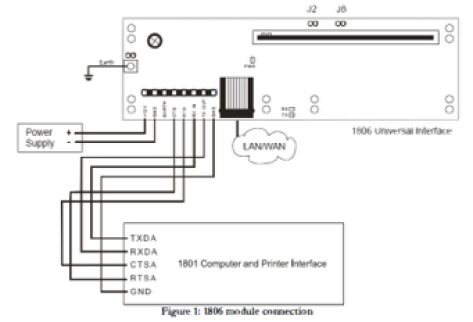
| Element | Operation | Meaning |
|---|---|---|
| Cell 1 | Cell 2 | Cell 3 |
| Cell 1 | Cell 2 | Cell 3 |
How to Connect Device to C4
You can use more than four time restrictions now. All time restrictions are sorted by date and time of upload. Time frames with the same value as the upload date are sorted according to the upload time. C4 only uploads first four time frames and rest of them is postponed. The following four time frames will be submitted after the last time frame has expired. In the case of connection failure or power failure, the timer of time restrictions upload is scheduled again after the driver is started. If the action should be triggered by past (when the driver was offline), the driver has started uploading the time restrictions and chooses time frames by time now.
Holidays: If you do not have holidays set in C4 , the holiday time frame will skip. When you set your holidays in C4 the time restrictions will be recounted .
| Property | Range | Default |
|---|---|---|
| Network Monitoring Enabled | YES/NO | YES |
| Determines, whether the network monitoring is enabled | ||
| Timeout For Response From The Device | 00:00:10 |
| Property | Range | Default |
|---|---|---|
| Network Monitoring Enabled | YES/NO | YES |
| Determines, whether the network monitoring is enabled | ||
| Timeout For Response From The Device | 00:00:10 |
| Property | Range | Default |
|---|---|---|
| Network Monitoring Enabled | YES/NO | YES |
| Determines, whether the network monitoring is enabled | ||
| Timeout For Response From The Device | 00:00:10 |
| Property | Range | Default |
|---|---|---|
| Network Monitoring Enabled | YES/NO | YES |
| Determines, whether the network monitoring is enabled | ||
| Timeout For Response From The Device | 00:00:10 |
| Property | Range | Default |
|---|---|---|
| Network Monitoring Enabled | YES/NO | YES |
| Determines, whether the network monitoring is enabled | ||
| Timeout For Response From The Device | 00:00:10 |
| Property | Range | Default |
|---|---|---|
| Network Monitoring Enabled | YES/NO | YES |
| Determines, whether the network monitoring is enabled | ||
| Timeout For Response From The Device | 00:00:10 |
| Property | Range | Default |
|---|---|---|
| Network Monitoring Enabled | YES/NO | YES |
| Determines, whether the network monitoring is enabled | ||
| Timeout For Response From The Device | 00:00:10 |
| Property | Range | Default |
|---|---|---|
| Network Monitoring Enabled | YES/NO | YES |
| Determines, whether the network monitoring is enabled | ||
| Timeout For Response From The Device | 00:00:10 |
| Property | Range | Default |
|---|---|---|
| Network Monitoring Enabled | YES/NO | YES |
| Determines, whether the network monitoring is enabled | ||
| Timeout For Response From The Device | 00:00:10 |
| Property | Range | Default |
|---|---|---|
| Network Monitoring Enabled | YES/NO | YES |
| Determines, whether the network monitoring is enabled | ||
| Timeout For Response From The Device | 00:00:10 |
| Property | Range | Default |
|---|---|---|
| Network Monitoring Enabled | YES/NO | YES |
| Determines, whether the network monitoring is enabled | ||
| Timeout For Response From The Device | 00:00:10 |
| Property | Range | Default |
|---|---|---|
| Network Monitoring Enabled | YES/NO | YES |
| Determines, whether the network monitoring is enabled | ||
| Timeout For Response From The Device | 00:00:10 |
| Property | Range | Default |
|---|---|---|
| Network Monitoring Enabled | YES/NO | YES |
| Determines, whether the network monitoring is enabled | ||
| Timeout For Response From The Device | 00:00:10 |
| Property | Range | Default |
|---|---|---|
| Network Monitoring Enabled | YES/NO | YES |
| Determines, whether the network monitoring is enabled | ||
| Timeout For Response From The Device | 00:00:10 |
| Property | Range | Default |
|---|---|---|
| Network Monitoring Enabled | YES/NO | YES |
| Determines, whether the network monitoring is enabled | ||
| Timeout For Response From The Device | 00:00:10 |
Integration Tests
You can use more than four time restrictions now. All time restrictions are sorted by date and time of upload. Time frames with the same value as the upload date are sorted according to the upload time. C4 only uploads first four time frames and rest of them is postponed. The following four time frames will be submitted after the last time frame has expired. In the case of connection failure or power failure, the timer of time restrictions upload is scheduled again after the driver is started. If the action should be triggered by past (when the driver was offline), the driver has started uploading the time restrictions and chooses time frames by time now.
Holidays: If you do not have holidays set in C4 , the holiday time frame will skip. When you set your holidays in C4 the time restrictions will be recounted .
| Test | Name | Result |
|---|---|---|
| Supported Functionality - Device Auto Import | ||
 T0FAFL T0FAFL |
Supported Functionality - Device Auto Import | Supported, cannot verify |
| Supported Functionality - Time synchronization | ||
| T0FAFL |
Unified Time Management -Time Synchronization when changes on device | Passed |
| T0FAFL |
Unified Time Management -Time Synchronization when changes on device | Passed |
| T0FAFL |
Unified Time Management -Time Synchronization when changes on device | Passed |
| T0FAFL |
Unified Time Management -Time Synchronization when changes on device | Passed |
| Supported Functionality - Time synchronization | ||
| T0FAFL |
Unified Time Management -Time Synchronization when changes on device | Passed |
| Device Category -DVR | ||
| T0FAFL |
Unified Time Management -Time Synchronization when changes on device | Not supported |
| T0FAFL |
Unified Time Management -Time Synchronization when changes on device | Not supported |
| T0FAFL |
Unified Time Management -Time Synchronization when changes on device | Not supported |
| T0FAFL |
Device tree configuration validation | Passed |
Test used also for driver certificationUpdates
10 June 2020version: 5.4.1
- Lorem ipsum dolor sit amet consectetur.
- Velit tristique amet egestas a.
- Hac pulvinar aliquet gravida urna interdum tincidunt porttitor feugiat mollis. Bibendum nisl penatibus purus risus.
- Purus non ac sed velit aenean enim volutpat risus.
10 June 2020version: 5.4.1
- Lorem ipsum dolor sit amet consectetur.
- Velit tristique amet egestas a.
- Hac pulvinar aliquet gravida urna interdum tincidunt porttitor feugiat mollis. Bibendum nisl penatibus purus risus.
- Purus non ac sed velit aenean enim volutpat risus.
10 June 2020version: 5.4.1
- Lorem ipsum dolor sit amet consectetur.
- Velit tristique amet egestas a.
- Hac pulvinar aliquet gravida urna interdum tincidunt porttitor feugiat mollis. Bibendum nisl penatibus purus risus.
- Purus non ac sed velit aenean enim volutpat risus.
10 June 2020version: 5.4.1
- Lorem ipsum dolor sit amet consectetur.
- Velit tristique amet egestas a.
- Hac pulvinar aliquet gravida urna interdum tincidunt porttitor feugiat mollis. Bibendum nisl penatibus purus risus.
- Purus non ac sed velit aenean enim volutpat risus.
Business Partners

- Training valid from:12 June 2021
- Training valid until:12 June 2022

- Training valid from:12 June 2021
- Training valid until:12 June 2022

- Training valid from:12 June 2021
- Training valid until:12 June 2022

- Training valid from:12 June 2021
- Training valid until:12 June 2022

- Training valid from:12 June 2021
- Training valid until:12 June 2022
Reviews
(108)Version: 1.0.13
18. November 2022
Lorem ipsum dolor sit amet consectetur. Nec faucibus est lectus faucibus. Tincidunt blandit adipiscing non in nisl massa felis dictum. Dictum sollicitudin risus vel sed tortor. Tincidunt dis ipsum sed adipiscing euismod. At viverra donec est donec. Arcu ornare vestibulum sed lacinia hendrerit urna malesuada. Vulputate dignissim mi et sollicitudin enim non neque gravida nunc.

Version: 1.0.13
18. November 2022
Lorem ipsum dolor sit amet consectetur. Sem congue tincidunt massa tellus ut sit. Fames sem sit odio in eu. Semper faucibus quis egestas eu arcu vitae luctus. Tristique faucibus fermentum est tempor sed est ornare sit.
Reviews
Be first to leave a review for the plugin
Older versions
| Supported firmware | Supported models | ||
|---|---|---|---|
| ATS1809 v00.06.12 AL-1809 v00.06.12 |
|
| Supported firmware | Supported models | ||
|---|---|---|---|
| ATS1809 v00.06.12 AL-1809 v00.06.12 |
|
| Supported firmware | Supported models | ||
|---|---|---|---|
| ATS1809 v00.06.12 AL-1809 v00.06.12 |
|
| Supported firmware | Supported models | ||
|---|---|---|---|
| ATS1809 v00.06.12 AL-1809 v00.06.12 |
|
| Supported firmware | Supported models | ||
|---|---|---|---|
| ATS1809 v00.06.12 AL-1809 v00.06.12 |
|
| Supported firmware | Supported models | ||
|---|---|---|---|
| ATS1809 v00.06.12 AL-1809 v00.06.12 |
|